4. Storing Files Using the Scanner
Function
Using the scanner function, you can store scan files in the machine and then send the stored files by e-
mail or Scan to Folder.
Before Storing Files
This section outlines file storage under the scanner function and provides related cautions.
Overview of File Storage under the Scanner Function
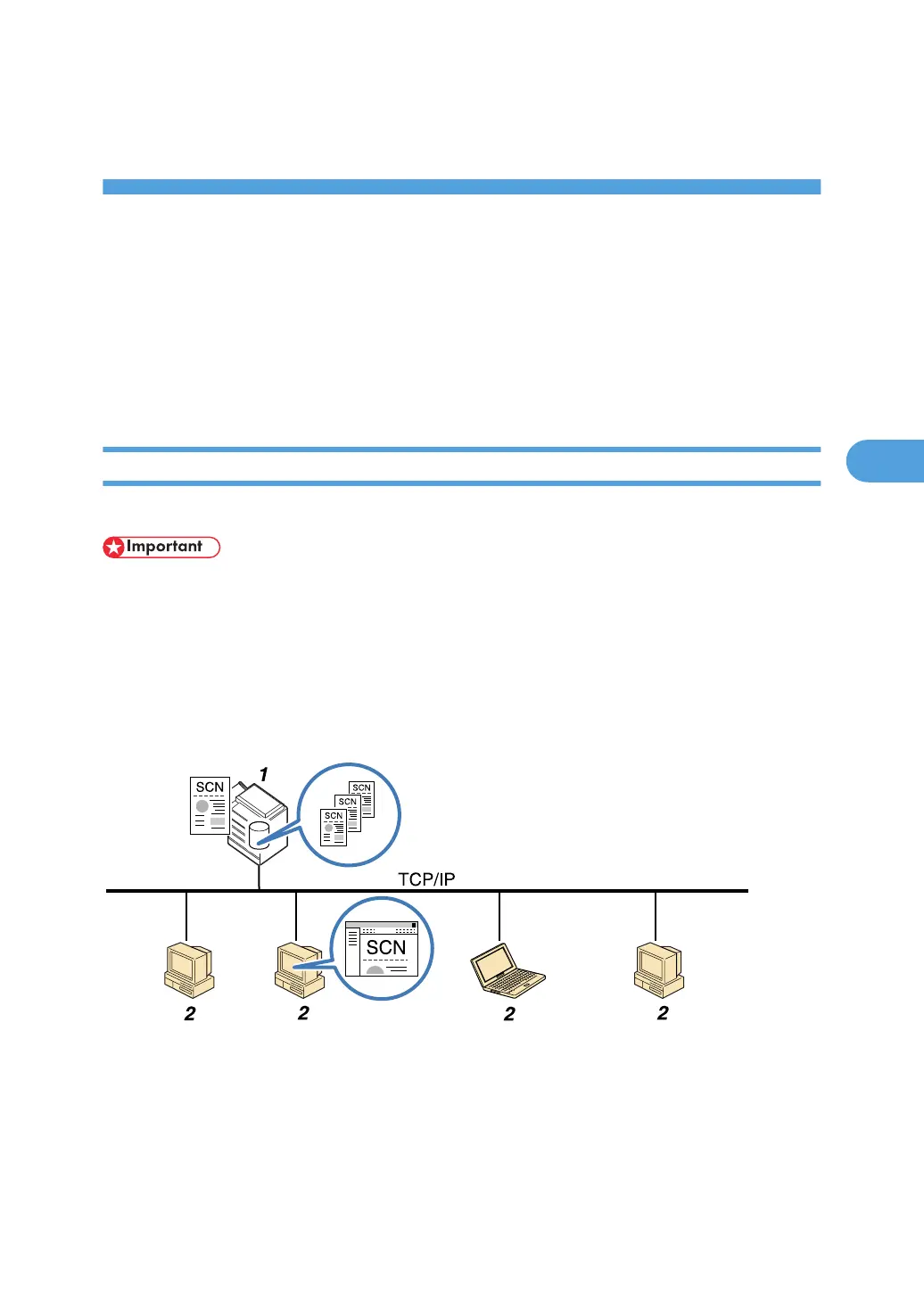
This section describes the process of storing files under the scanner function.
• You can specify a password for each stored file. Files that are not password-protected can be
accessed by other users on the same local area network using DeskTopBinder. We recommend
that you protect stored files from unauthorized access by specifying passwords.
• Scan file stored in the machine may be lost if some kind of failure occurs. We advise against using
the hard disk to store important files. The supplier shall not be responsible for any damage that may
result from the loss of files. For long-term storage of files, we recommend the use of DeskTopBinder.
For details, contact your local dealer, or see the documentation for DeskTopBinder.
1. This Machine
You can store scan files on the machine's hard disk. The stored files can be sent by e-mail, Scan to Folder, or
the network delivery scanner.
2. Client Computer
Using DeskTopBinder, you can, over the network, view, copy, or delete files stored in the machine. Using
Web Image Monitor, you can, over the network, view, download, send, or delete files stored in the machine.
107



 To Next Page