Staple
With an optional finisher installed, this machine can staple individual sets when printing multiple sets.
• Make option settings for the machine using the printer driver when bidirectional communication is
disabled.
•
Be sure to set the paper size and paper orientation in the printer driver when using this function.
• The staple function cannot be used if the following paper types are used.
• Thick (106 to 157 g/m2), Transparency, Labels, Envelope.
• This function is also available using the PostScript 3 printer driver. For details, see PostScript 3
Supplement.
•
Depending on the application, print settings may not be enabled and printed output may not be as
expected.
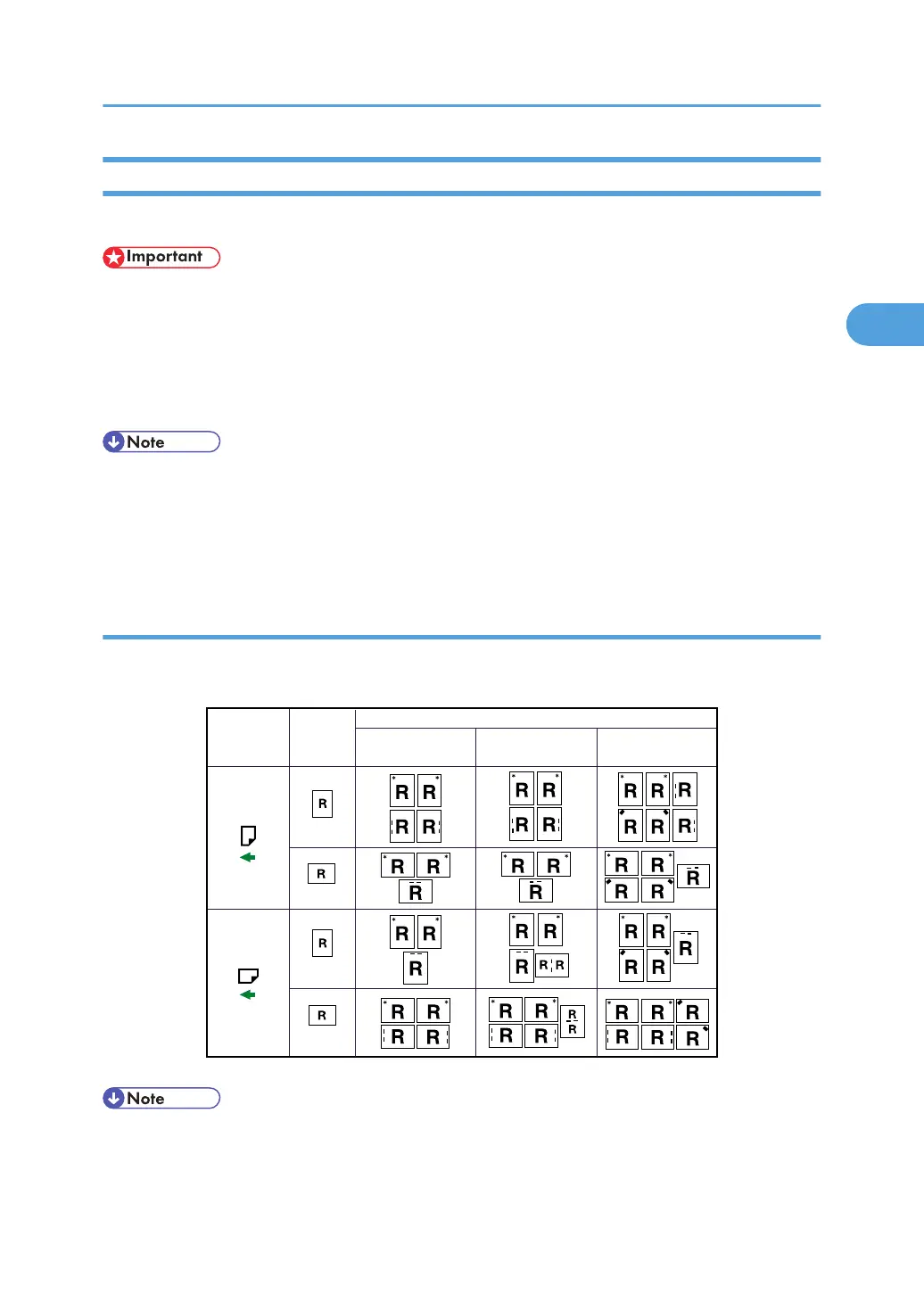
Staple position
The specified staple position varies depending on paper size, type, quantity and feed orientation. The
following table shows staple positions:
Print Data
Direction
Staple Position
CHN011
Paper
Orientation on
the Machine
Portrait
Portrait
Landscape
Landscape
Booklet finisher 500-sheet finisher
1000-sheet finisher/
Internal finisher
• Stapling might not be in the specified position if combine (layout) and duplex printing are both
selected. After setting the staple position, use the printer driver's preview icon to check the position
before printing.
Advanced Printing
79



 To Next Page