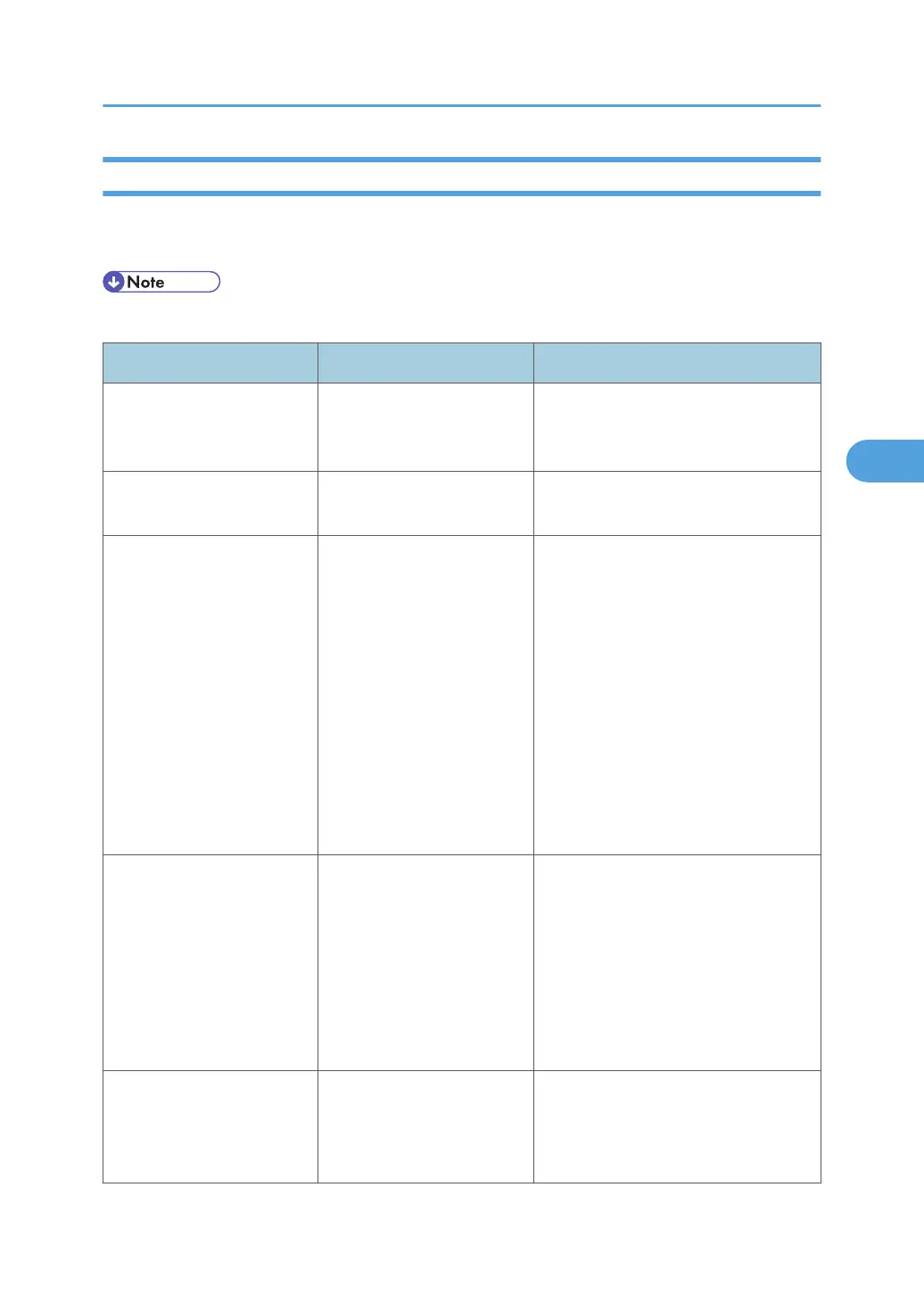
Messages Displayed on the Control Panel When Using the Printer Function
This section describes likely causes of and possible solutions for the error messages that appear on the
control panel.
• Before turning the main power switch off, see "Turning On/Off the Power", About This Machine.
Message Causes Solutions
"Authentication has failed." The entered login user name
or login password is not
correct.
Ask the user administrator for the
correct login user name and login
password.
"Authentication has failed." The machine cannot perform
authentication.
Contact your administrator.
"Cannot connect with the
wireless card. Turn the main
power switch off, then check
the card."
(A "wireless LAN board" or
"Bluetooth interface unit" is
referred to as a "wireless
card".)
• The wireless LAN
board was not installed
while the machine was
turned on.
•
The wireless LAN
board was removed
after the machine was
turned on.
• The settings have not
been updated,
however the unit can
be detected.
Turn off the main power switch, and
then check that the wireless LAN board
is installed correctly. And then, turn on
the main power switch again. If the
message appears again, contact your
service representative.
"Cannot connect with the
Bluetooth interface. Check
the Bluetooth interface."
• The Bluetooth interface
unit was installed while
the machine was turned
on.
•
The Bluetooth interface
unit was removed while
the machine was turned
on.
Turn off the main power switch, and
then check that the Bluetooth interface
unit was installed correctly. And then,
turn on the main power switch again. If
the message appears again, contact
your service representative.
"Hardware Problem:
Ethernet"
An error has occurred in the
Ethernet interface.
Turn off the main power switch, and
then back on again. If the message
appears again, contact your service
representative.
Messages Displayed When Using the Printer Function
73



 To Next Page