• The settings you must configure in [System Settings] vary depending on your network environment.
For details about network settings, see "Connecting the Machine", Network and System Settings
Reference.
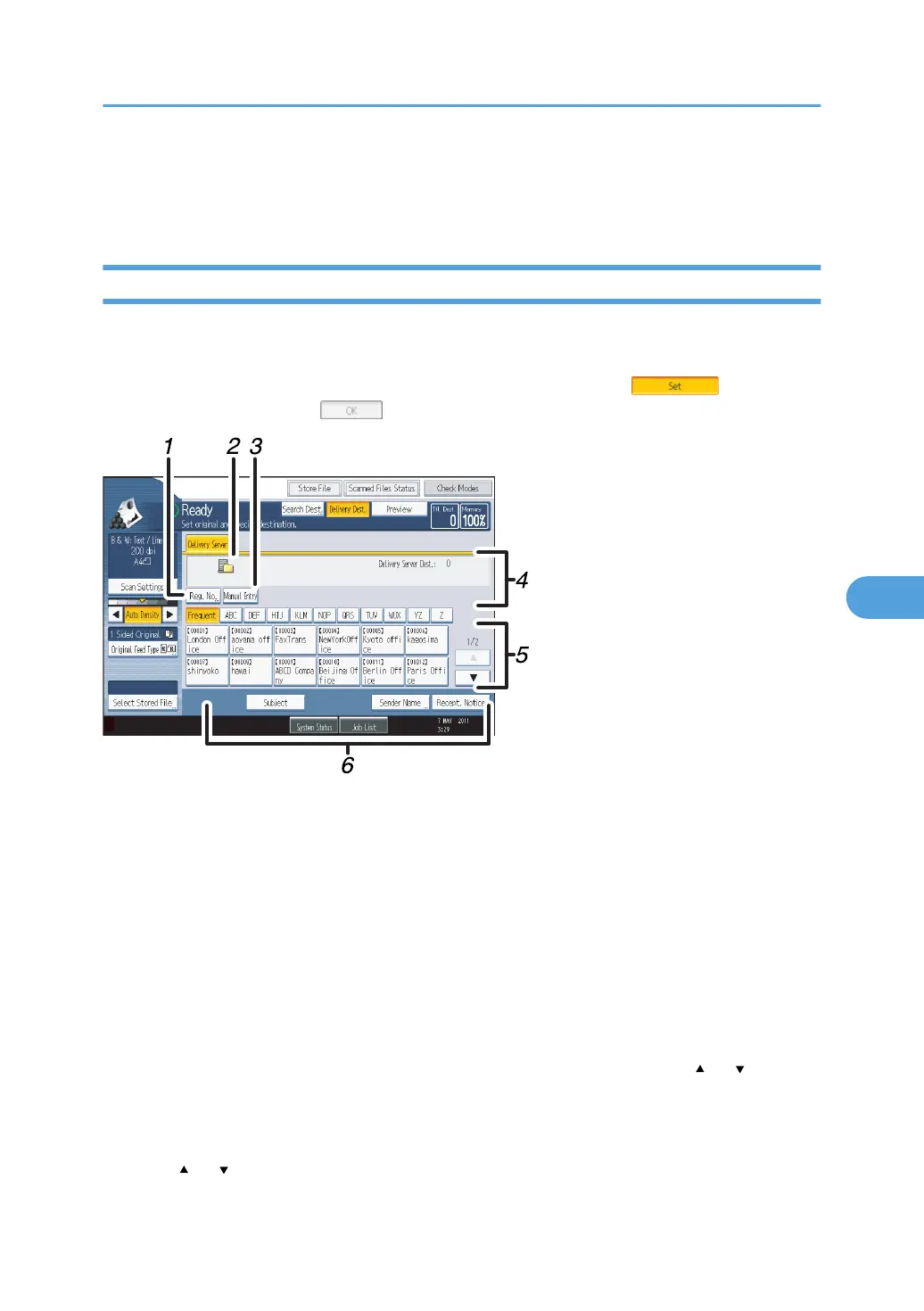
Network Delivery Scanner Screen
This section describes the screen layout when using the network delivery scanner.
The function items displayed serve as selector keys. You can select or specify an item by pressing it.
When you select or specify an item on the display panel, it is highlighted like . Keys that
cannot be selected appear like .
1. [Reg. No.]
Press this key to specify the destination using a 5-digit registration number.
2.
Network delivery scanner icon
Indicates that the network delivery scanner screen is displayed.
3. [Manual Entry]
To send a file by e-mail via the delivery server to a destination not registered in the delivery server's
Destination List, press this key to display the soft keyboard. Then use the soft keyboard to enter the e-mail
address. For details about how to send a file by e-mail via the delivery server, see ScanRouter delivery
software manual.
4. Destination Field
The specified destination appears. If more than one destination has been specified, press [
] or [ ] to scroll
through the destinations.
5.
Destination List
The list of destinations registered in the delivery server appears. If all of the destinations cannot be displayed,
press [
] or [ ] to switch the screen.
Before Delivering Files
137



 To Next Page