4. Press [OK].
The selected original orientation appears in “Original Feed Type”.
5. Specify a destination, and then press the [Start] key.
Scanning Two-Sided Originals
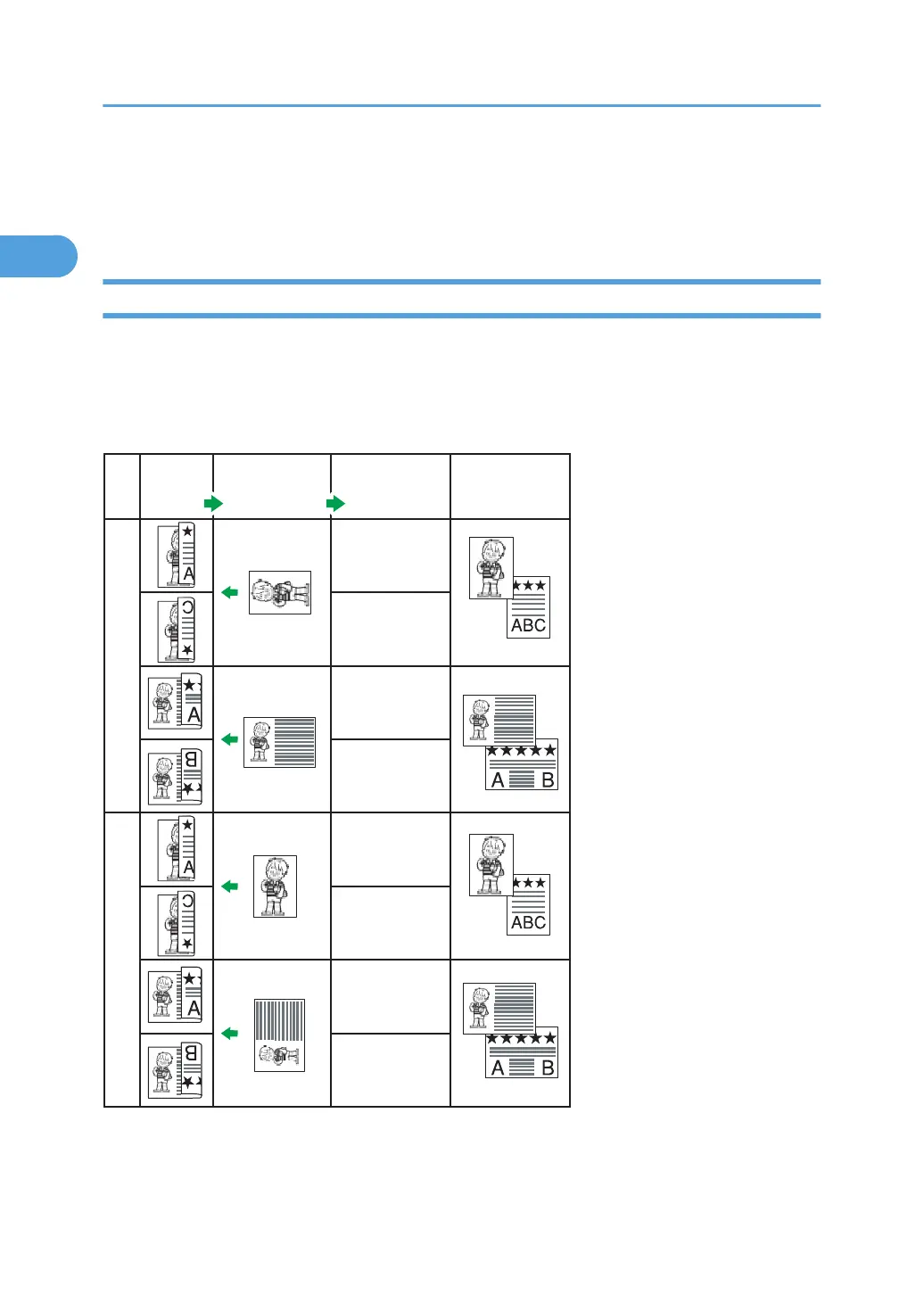
Use this function to send two-sided originals.
The front and back of the scanned original will be printed in order on separate sheets at the other end.
The orientation of alternate sheets may be reversed at the other end. If you want to print the original with
the same orientation at the other end, specify the “Original position” and “Page opening orientation”.
CHH009
B5 JIS, A5, 5
1
/
2
x8
1
/
2
A3, B4 JIS, A4, 11x17, 8
1
/
2
x14, 8
1
/
2
x11
Original Original position
Page opening
orientation
Top to Top
Top to Bottom
Top to Top
Top to Bottom
Top to Top
Top to Bottom
Top to Top
Top to Bottom
Output at
the other end
1. Transmission
56



 To Next Page