Control Panel
This section introduces the names and functions of the components on the control panel.
• Do not turn off the main power switch while the operation switch indicator is lit or blinking. Doing so
may damage the hard disk.
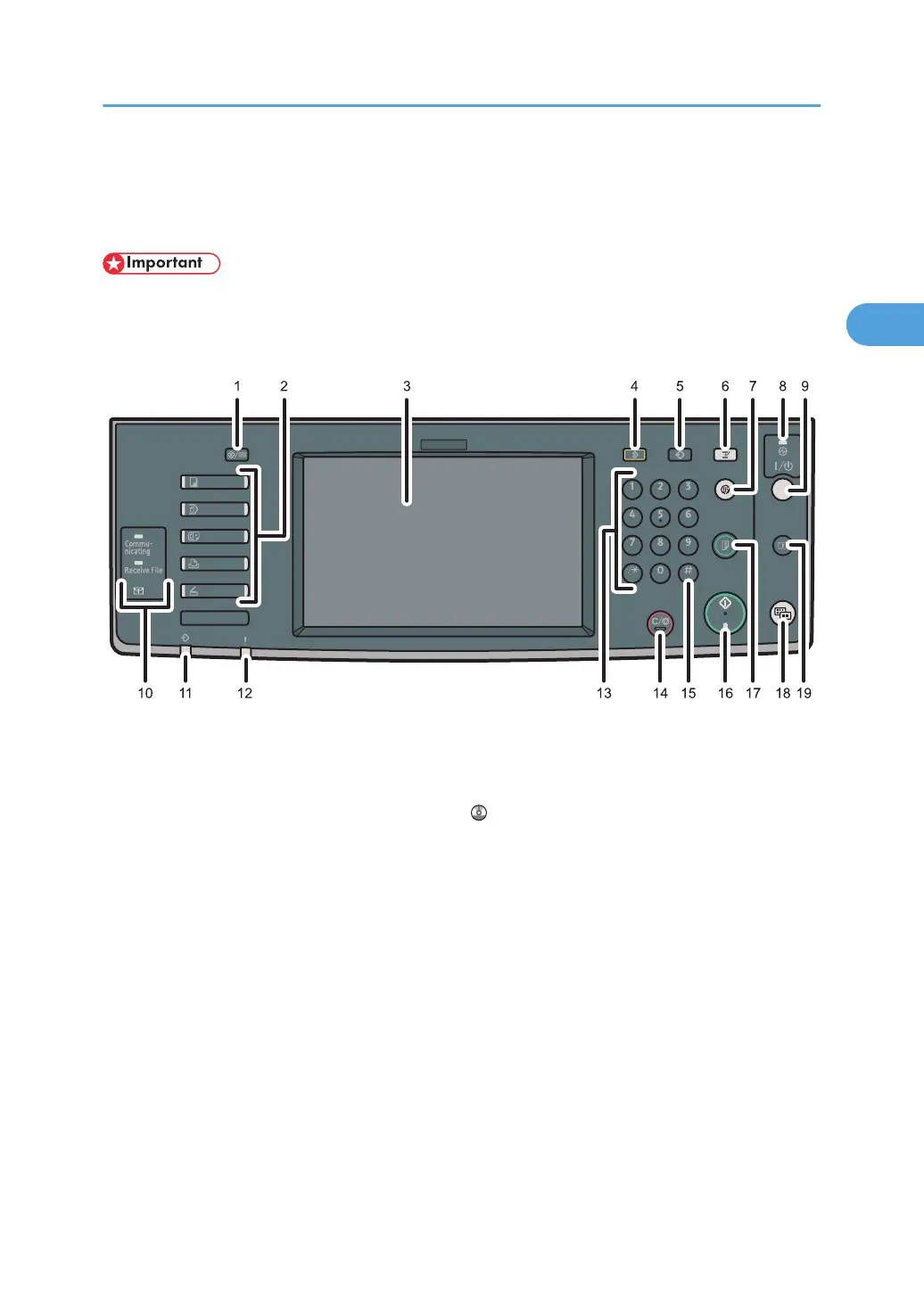
This illustration shows the control panel of the machine with options fully installed.
1. [User Tools/Counter] key
•
User Tools
Press to change the default settings and conditions to meet your requirements. See “Accessing User
Tools”, Network and System Settings Reference
.
•
Counter
Press to check or print the counter value. See “Counter”.
• Enquiry
Press to find out where to order expendable supplies and where to call when a malfunction occurs. You
can also print these details. See “Enquiry”.
2. Function keys
Press to display the operation screen of one of the following functions: copy, Document Server, facsimile,
printer, or scanner.
The indicator of the selected function goes on. See “Changing Modes”.
3. Display panel
Displays keys for each function, operation status, or messages. See “Display Panel”.
4. [Clear Modes] key
Press to clear the current settings.
Control Panel
37



 To Next Page