Printing on Orientation-Fixed or Two-Sided
Paper
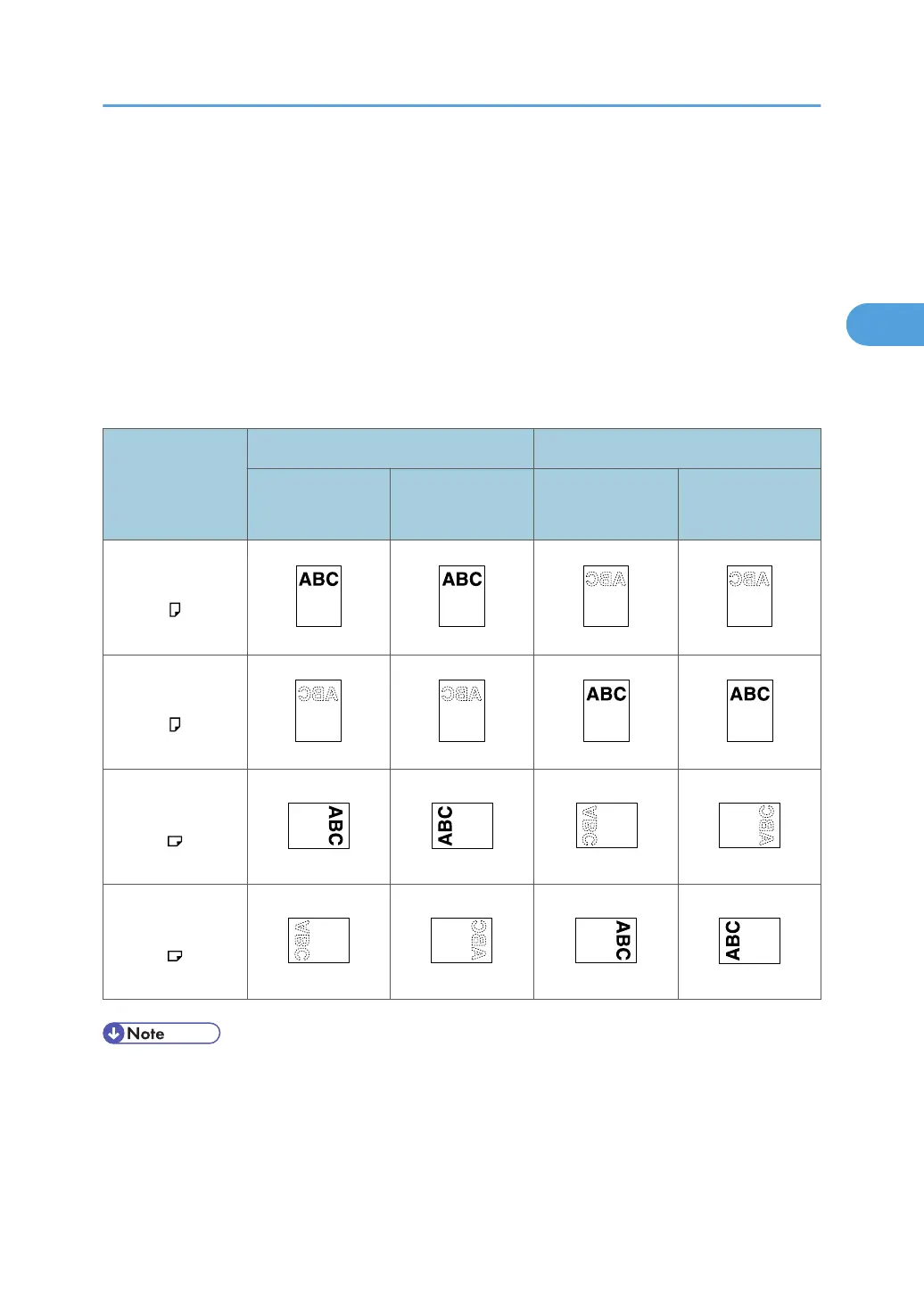
This section explains how to print on paper whose orientation and printing side are unchangeable
(letterhead paper, for example).
Use the settings and paper orientations shown below to ensure the machine prints onto orientation-fixed
paper (such as letterhead or continuous stationery) correctly. Specify [Auto Detect] or [On (Always)] for
[Letterhead Setting] under [Printer Features], and then place the paper as shown below. For details
about the letterhead settings, see "System".
Paper Orientation
Paper Trays 1 to 4 Bypass tray
Letterhead Setting
[On (Always)]
Letterhead Setting
[Off]
Letterhead Setting
[On (Always)]
Letterhead Setting
[Off]
1-sided print
2-sided print
1-sided print
2-sided print
• To print on letterhead paper when [Letterhead Setting] is set to [Auto Detect], you must specify
[Letterhead] as the paper type in the printer driver's settings.
•
If a print job is changed partway through printing from 1-sided to 2-sided printing, 1-sided output
after the first copy may print facing a different direction. To ensure all paper is output facing the
Printing on Orientation-Fixed or Two-Sided Paper
65



 To Next Page