• For details about acceptable original size and paper thickness for two-sided scanning with the
ADF, see “Acceptable Original Sizes”.
•
You can set the original feed types that are selected right after the power is turned on or whenever
the [Clear Modes] key is pressed. See “Changing the Default Functions of the Fax's Initial Display”.
• p.59 "Acceptable Original Sizes"
•
p.63 "Stamp"
• p.171 "Changing the Default Functions of the Fax's Initial Display"
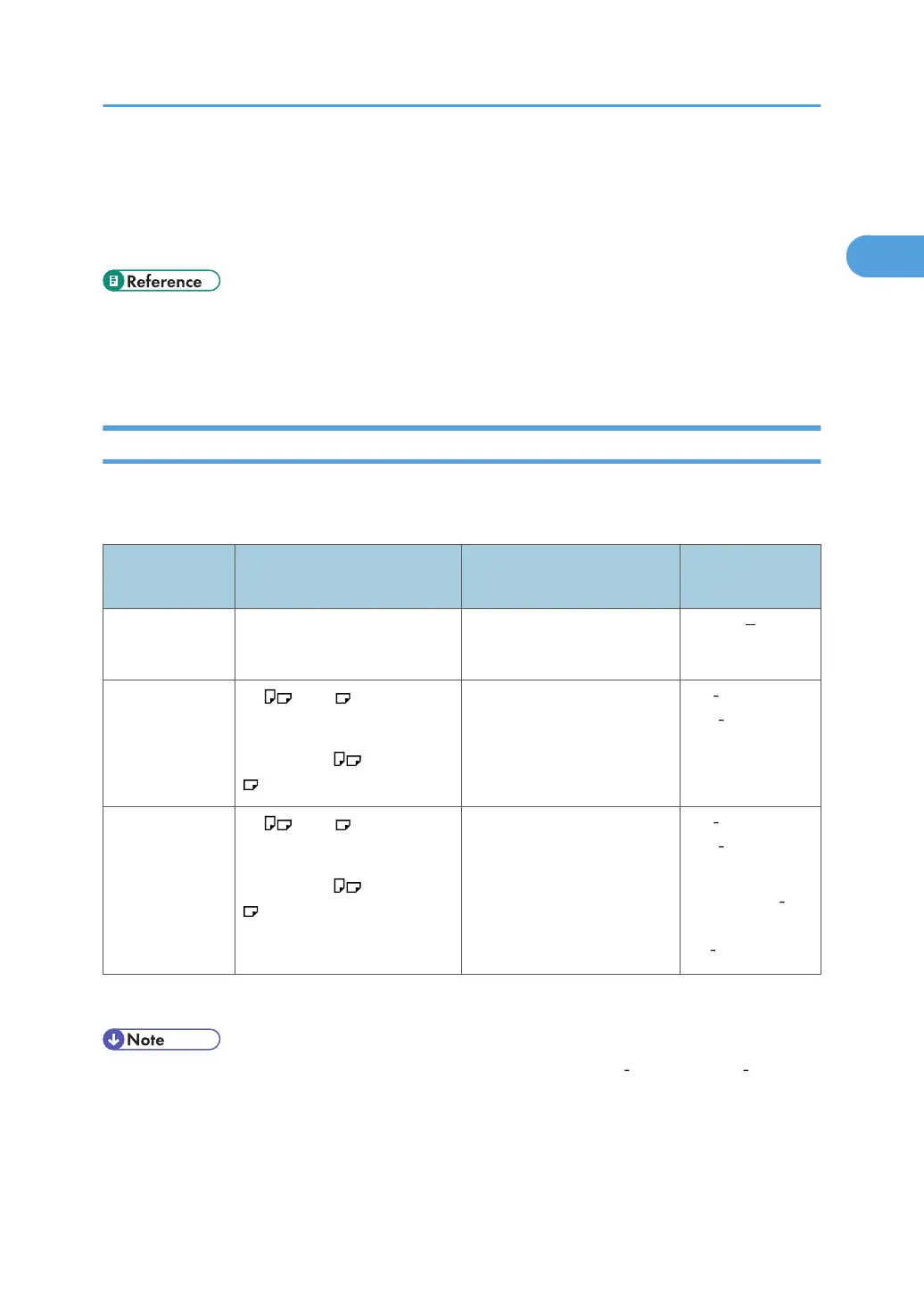
Acceptable Original Sizes
This section describes the size and thickness limitations that apply to originals placed on the exposure
glass or the ADF.
Where original
is set
Acceptable original size Maximum number of sheets Paper thickness
Exposure glass Up to A3 (297 × 420 mm),
11 × 17 (279 × 432 mm)
1 sheet
ADF, one-sided
original
A5 to A3
(up to 1,200 mm long)
5
1
/
2
× 8
1
/
2
to 11 × 17
50 sheets: Less than 81.4 g/
m
2
(22 lb. Bond)
*1
40 128 g/m
2
(11 34 lb.
Bond)
ADF, two-sided
original
A5
to A3
(up to 432 mm long)
5
1
/
2
× 8
1
/
2
to 11 × 17
50 sheets: Less than 81.4 g/
m
2
(22 lb. Bond)
*1
52 105 g/m
2
(14 28 lb.
Bond)
11 × 17: 64
105 g/m
2
(17
lb. 28 lb. Bond)
*1
Above specification depends on the paper type and condition
• The weight range for originals in the Mixed Original Sizes mode is 52 105 g/m
2
(14 28 lb.
Bond).
Placing Originals
59



 To Next Page