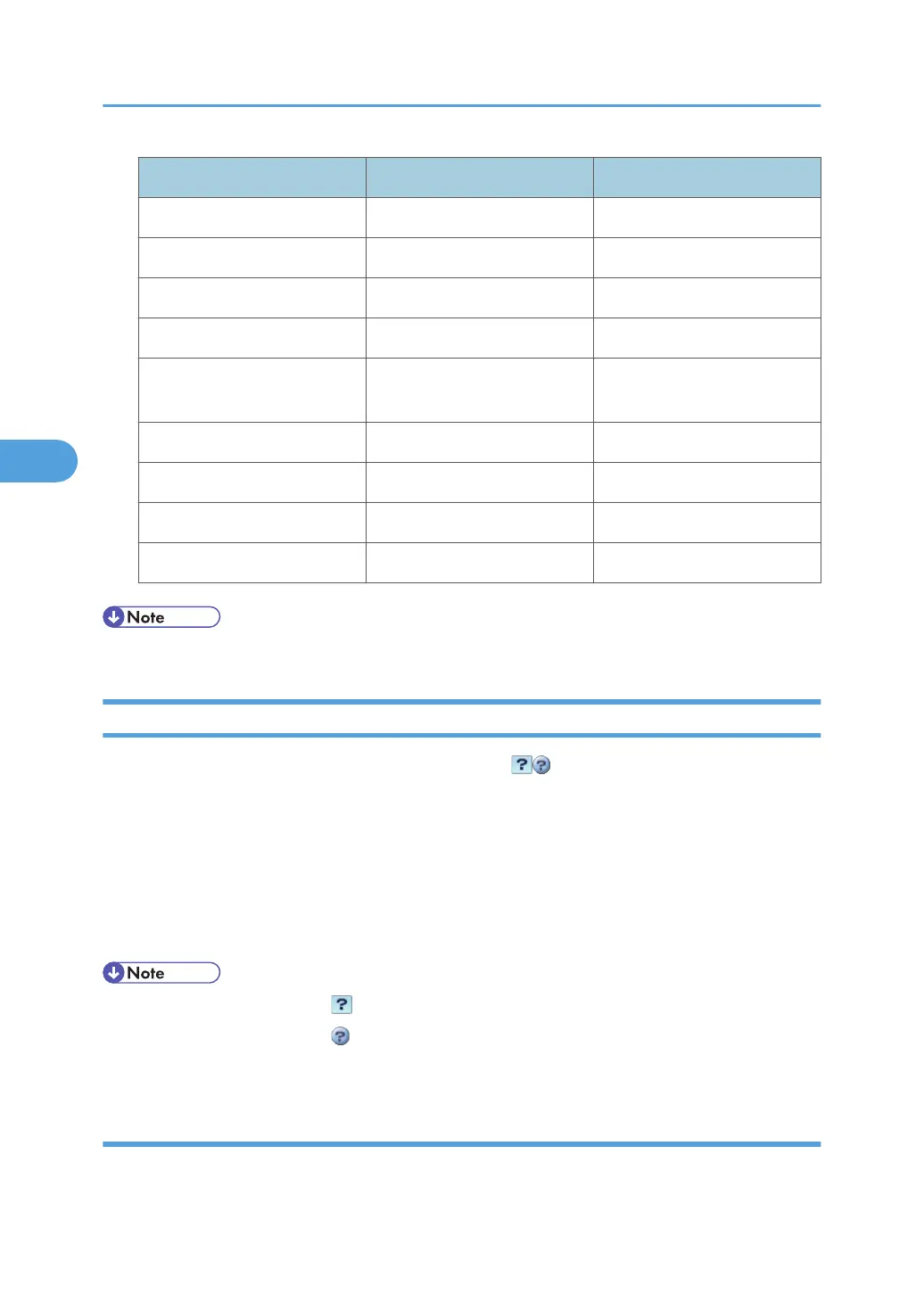
Menu Guest mode Administrator mode
Install None Read/Modify
Uninstall None Read/Modify
Change Allocation None Read/Modify
Administrator Tools None Read/Modify
Additional Program Startup
Setting
None Read/Modify
Install Additional Program None Read/Modify
Uninstall Additional Program None Read/Modify
Copy Extended Features None Read/Modify
Copy Card Save Data None Read/Modify
• Some items are not displayed depending on the security settings.
Displaying Web Image Monitor Help
When using Help for the first time, clicking the Help button ( ) makes the following screen appear,
in which you can view Help in two different ways, as shown below:
Viewing Help on our Web site
You can view the latest Help information.
Downloading and Checking Help
You can download Help to your computer. As the Help URL, you can specify the path to the local
file to view the Help without connecting to the Internet.
• By clicking the Help button ( ) in the header area, the contents of Help appear.
• By clicking the Help button ( ) in the work area, Help for the setting items in the work area
appears.
Downloading Help
1. In the [OS] list, select the operating system.
4. Monitoring and Configuring the Machine
144



 To Next Page