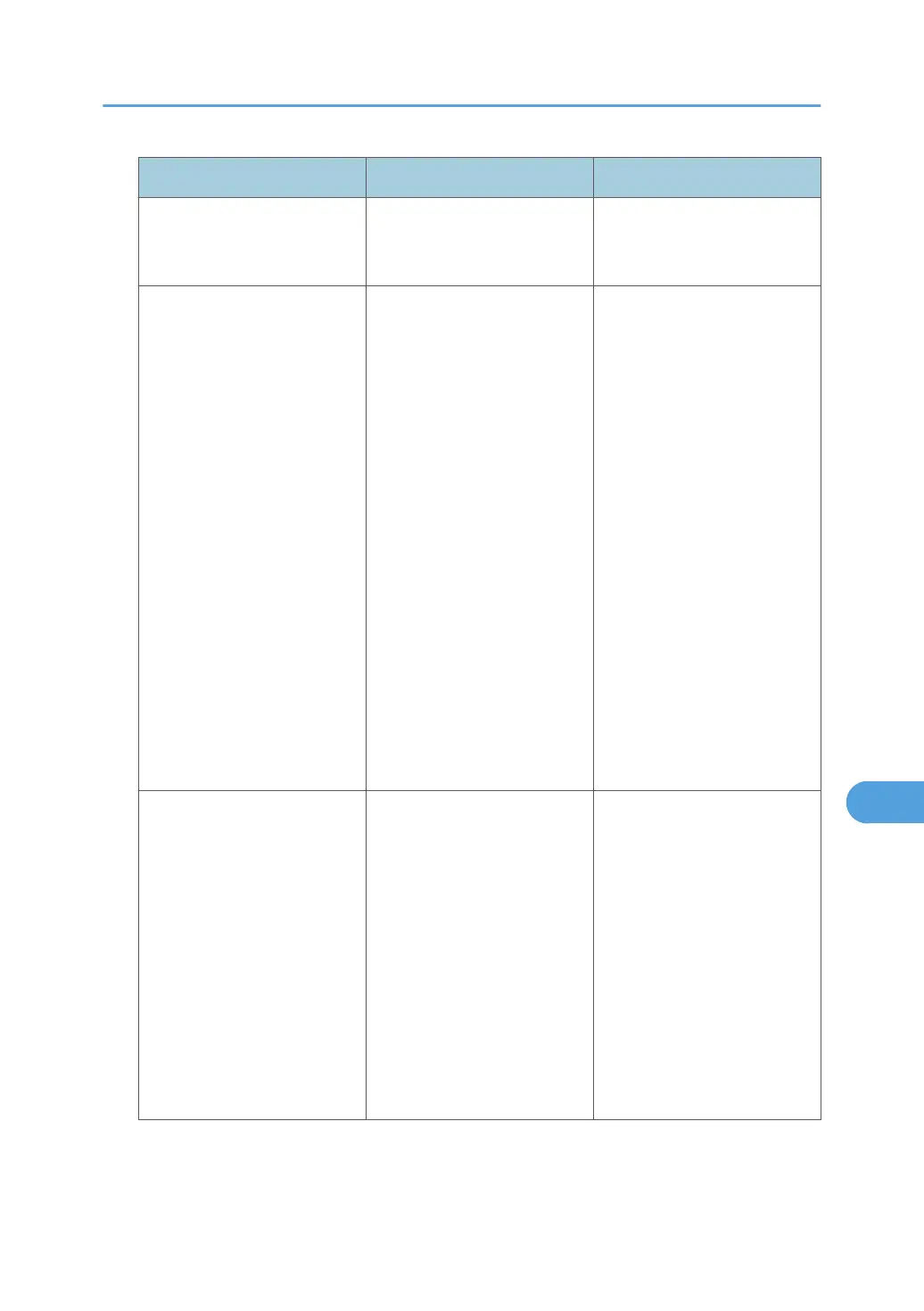
Error Code Cause Solution
L0406-201
Authentication is disabled in
the LDAP server settings.
Change the LDAP server
settings in administrator tools,
in "System Settings".
L0406-202
L0406-203
1. There is an error in the
LDAP authentication settings,
LDAP server, or network
configuration.
1. Make sure that a
connection test is successful
with the current LDAP server
configuration.
If connection is not successful,
there might be an error in the
network settings.
Check the domain name or
DNS settings in "Interface
Settings".
2. Make sure the LDAP server
is specified correctly in the
LDAP authentication settings.
3. Make sure the login name
attribute is entered correctly in
the LDAP authentication
settings.
4. Make sure the SSL settings
are supported by the LDAP
server.
L0406-202
L0406-203
2. A login user name or
password error occurred.
1. Make sure the login user
name and password are
entered correctly.
2. Make sure a usable login
name is registered on the
machine.
Authentication will fail in the
following cases:
If the login user name contains
a space, colon (:), or
quotation mark (").
If the login user name exceeds
128 bytes.
If Authentication Fails
291



 To Next Page