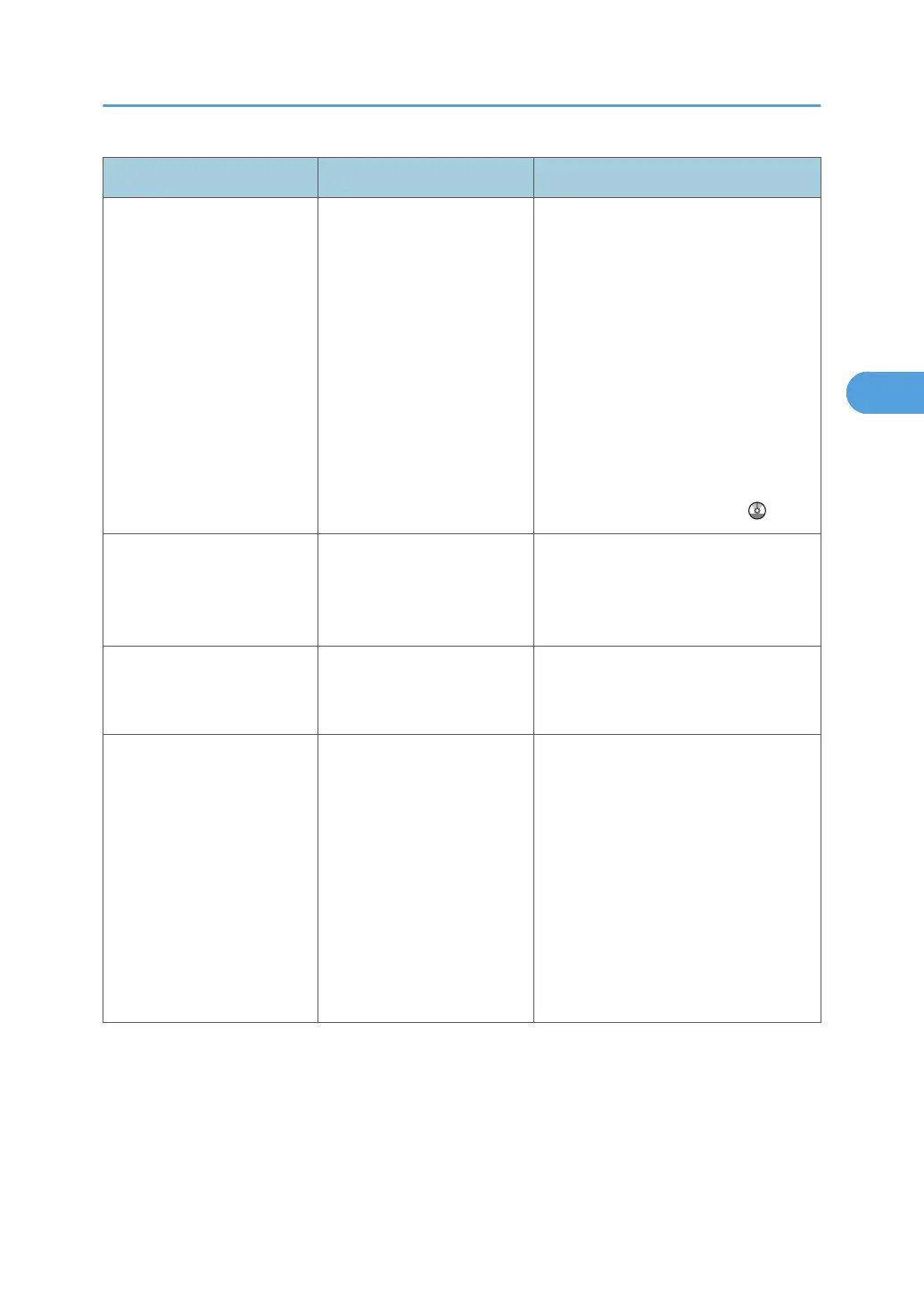
Problem Causes Solutions
When using On Hook Dial
or Manual Dial, "Receivg."
appears and transmission is
not allowed.
If the machine fails to detect
the size of the original when
the [Start] key is pressed, it
performs a receiving
operation.
Press [Scan Size] in [Scan Settings],
select the scan area, and then resend
the document.
If you use On Hook Dial or Manual
Dial frequently, it is recommended that
you set "Receive documents by
pressing the [Start] key when originals
are not set." to "Off" in User
Parameters. If this is set to "Off", when
using Manual Dial you cannot receive
by pressing the [Start] key. For details
about how to do this, see "Parameter
Settings", Facsimile Reference .
LAN-Fax Driver does not
work.
The entered login user
name, login password, or
driver encryption key is
incorrect.
Check your login user name, login
password, or driver encryption key,
and then enter them correctly. Contact
your administrator.
LAN-Fax Driver does not
work.
A high security level is set by
the extended security
function.
Contact your administrator.
Although a group
specification was set for the
following, reception was not
possible.
Receiving Station of
Information Box,
Forwarding, Forwarding of
Special Sender, Reception
Report e-mail, E-mail TX
Results, routing e-mail
received via SMTP.
The number of specified
destinations exceeds the
maximum number that can
be specified as a group.
A maximum of 500 parties can be
specified for a group. Check if there
are more than the specified numbers
registered in the Address Book. If a
group was registered in another group
or specified as Receiving Stations 1 to
5 for the Transfer Box, transmission is
canceled but an error message does
not appear.
When You Cannot Send or Receive Fax Messages As Wanted
55



 To Next Page