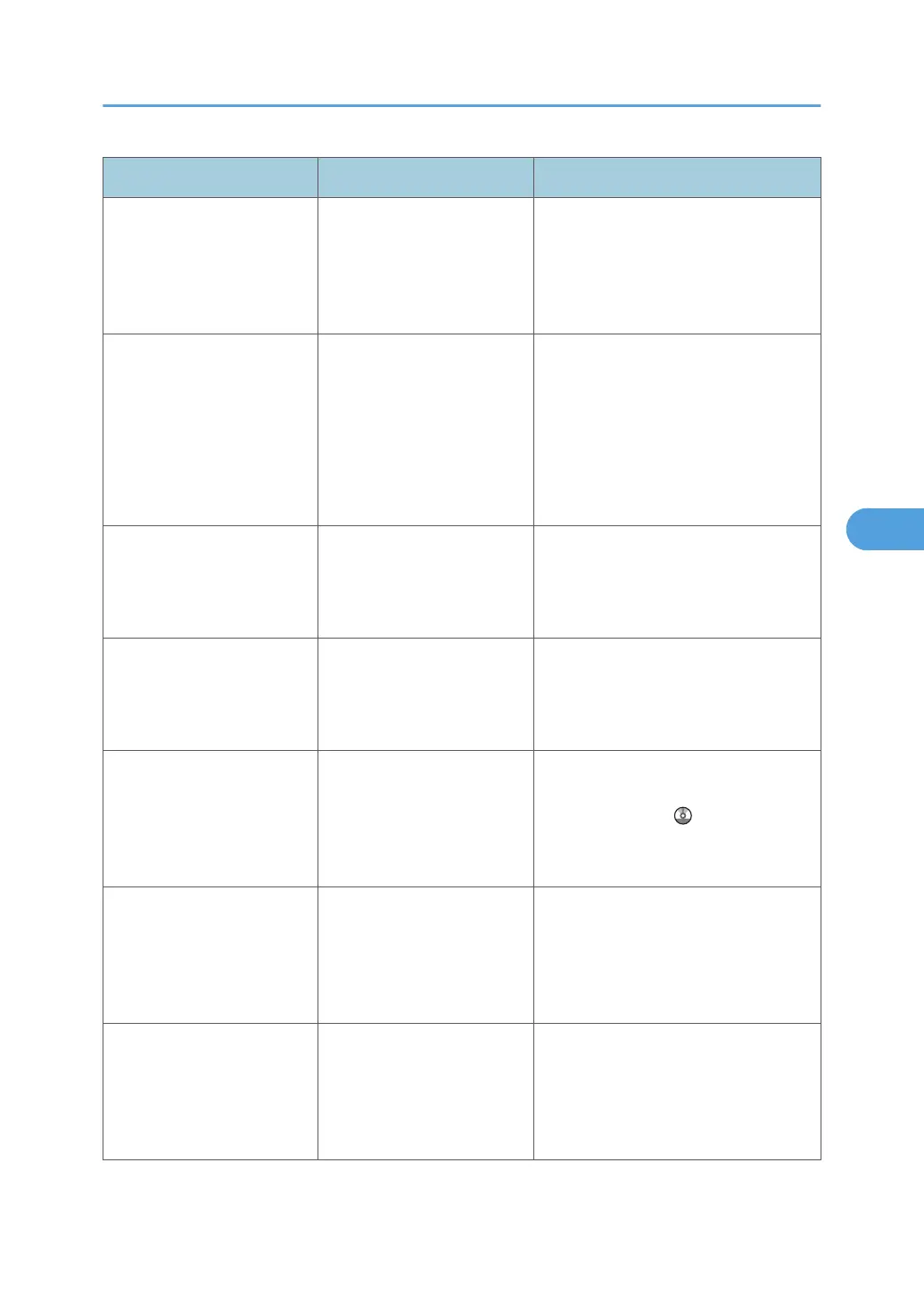
Message Causes Solutions
"Only one memory storage
device can be used in one
time. Please remove all other
memory storage devices to
resume writing."
Only one memory device
can be connected at a time.
Insert one memory device only in the
media slot.
"Original is being scanned
by another function. Switch
to the following function,
then press the Stop key to
cancel scanning or press the
Start key to continue."
A function of the machine
other than the Scanner
function is being used such
as the Copier function.
Cancel the job in progress.
For example, press [Exit], and then
press the [Copy] key. Next, press the
[Clear/Stop] key. When the message
"The Clear / Stop key was pressed.
Are you sure you want to stop
scanning?" appears, press [Stop].
"Output buffer is full.
Sending the data has been
cancelled. Please try again
later."
Too many jobs are in
standby state, and sending
was canceled.
Retry sending after sending jobs in
standby state completes.
"SMTP authentication E-mail
address and Administrator
E-mail address mismatch."
The SMTP authentication e-
mail address and the
administrator's e-mail
address do not match.
Contact your administrator.
"Scanner journal is full.
Please check Scanner
Features."
"Print & Delete Scanner
Journal" in [Scanner
Features] is set to [Do not
Print: Disable Send], and
Scanner Journal is full.
Print or delete Scanner Journal. For
details, see "General Settings",
Scanner Reference
.
"Selected file is currently in
use. File name cannot be
changed."
You cannot change the
name of a file whose status
is "Waiting..." or that is
being edited with
DeskTopBinder.
Cancel transmission ("Waiting..." status
cleared) or the DeskTopBinder setting,
and then change the file name.
"Selected file is currently in
use. Password cannot be
changed."
You cannot change the
password of a file whose
status is "Waiting..." or that is
being edited with
DeskTopBinder.
Cancel transmission ("Waiting..." status
cleared) or the DeskTopBinder setting,
and then change the password.
Messages Displayed When Using the Scanner Function
107



 To Next Page