• For details about how to place originals, see "Setting of Original Feed Type".
• p.169 "Scanning part of a custom size original"
•
p.173 "Setting of Original Feed Type"
Scanning part of a custom size original
If you want to scan only a part of a custom size original, select [Custom Size] as the scan size.
To display the custom size setting screen, on the initial scanner screen, press [Scan Settings] > [Scan
Size] > [Custom Size].
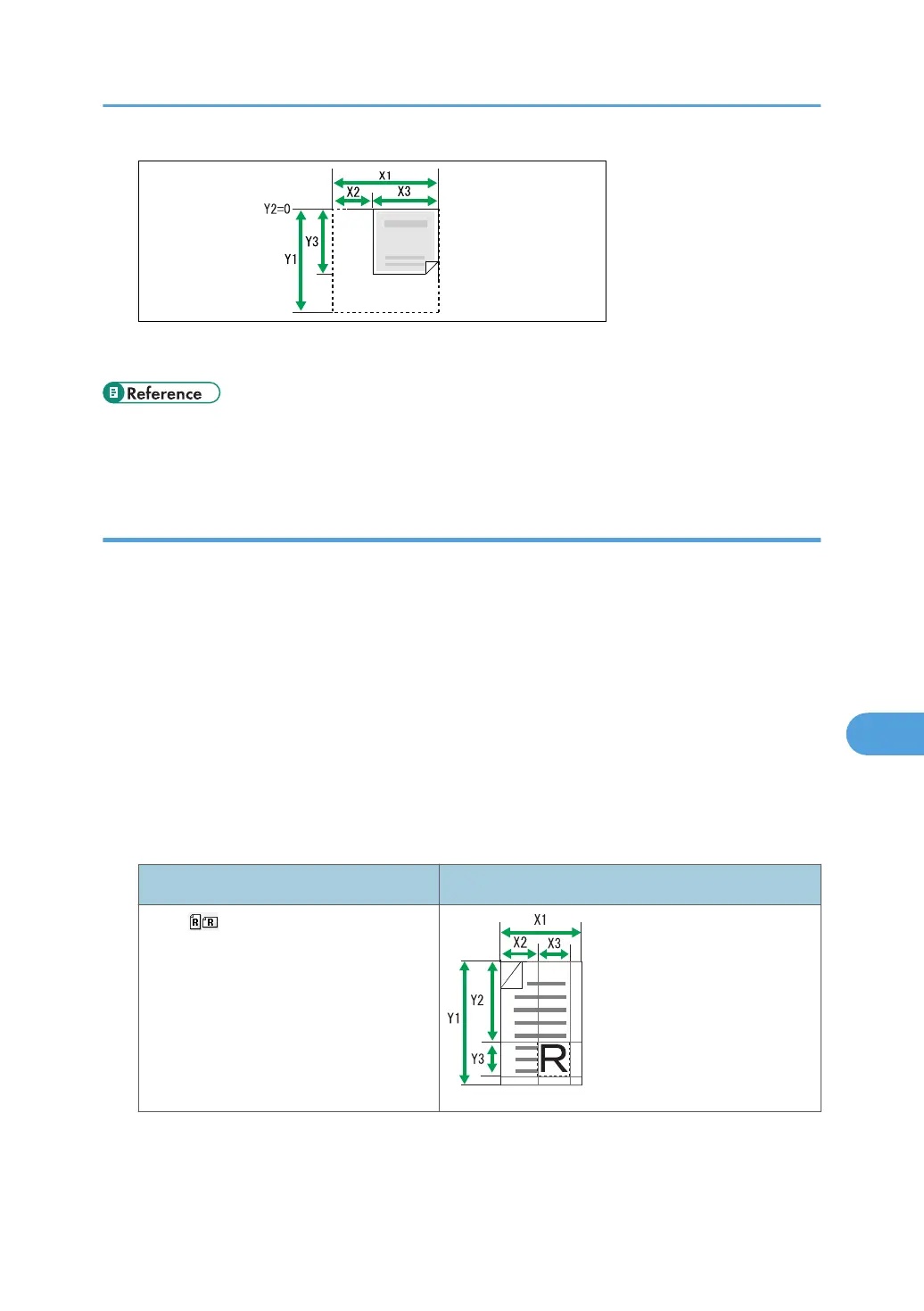
To scan part of an original, measure Original Size (X1 and Y1), Start Position (X2 and Y2), and Scan
Area (X3 and Y3) on the surface of the original, and then enter those values in the same order on the
custom size setting screen.
Measuring methods differ depending on where the original is placed and the orientation it is placed in.
For details about how to measure Original Size (X1 and Y1), Start Position (X2 and Y2), and Scan Area
(X3 and Y3) correctly, see "How to measure sizes".
Enter the sizes while referring to "Scan settings on the custom size setting screen".
How to measure sizes
Orientation and placement of original Measuring method for scanning the "R" section
In the orientation on the exposure
glass or in the ADF.
Scan Settings
169



 To Next Page