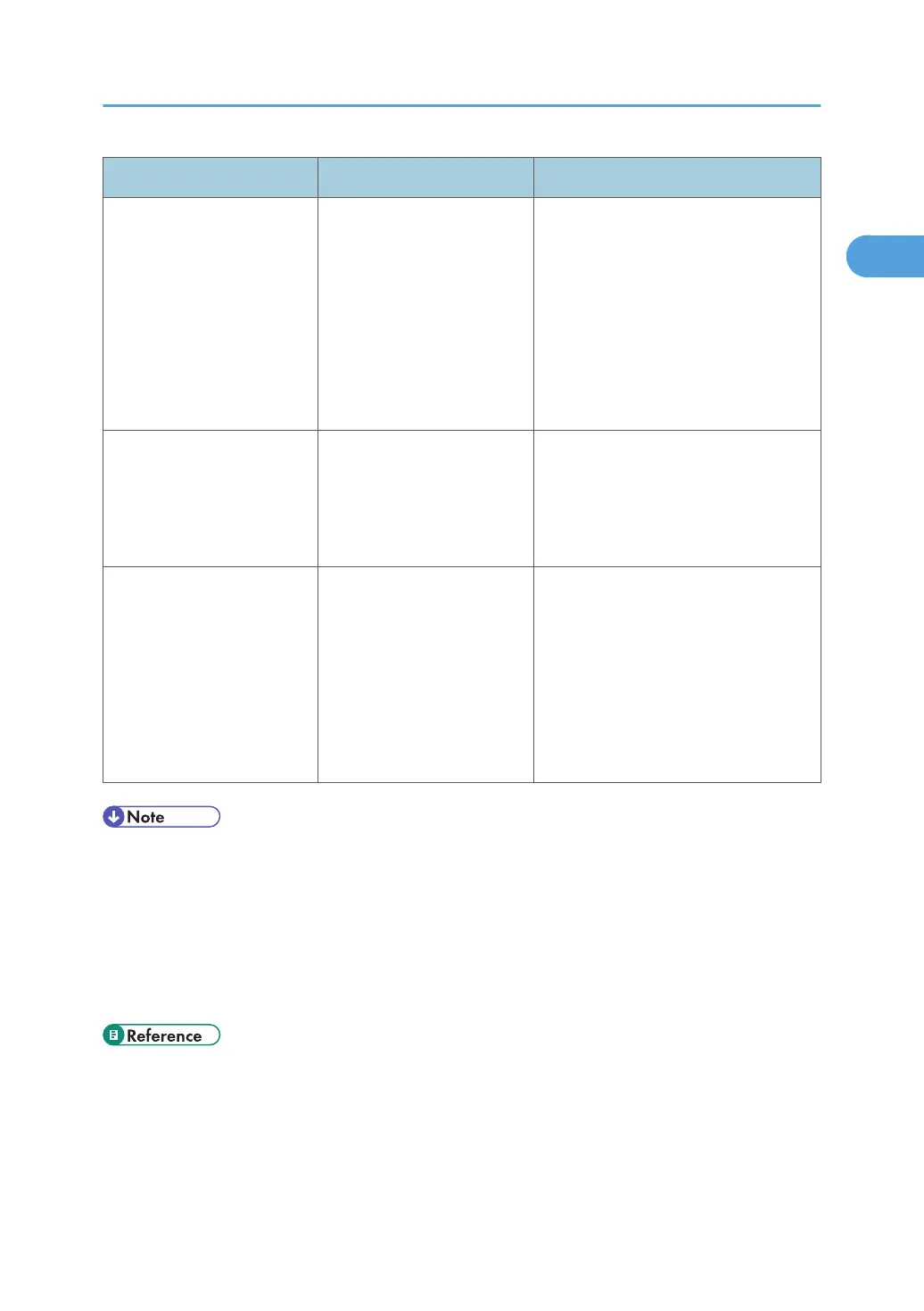
Problem Causes Solutions
"Shutting down... Please
wait. Main power will be
turned off automatically."
appears.
The shut down procedure
has begun because the main
power switch was turned off
while the machine was in
standby mode or performing
an operation.
Follow the message that appears and
wait until the machine has shut down.
Do not turn on the main power switch
while this message is displayed. If the
main power switch has been turned on,
follow the message that appears. For
details about turning the main power
switch on and off, see "Turning On/Off
the Power", About This Machine.
An error has occurred when
the Address Book is
changed from the display
panel or Web Image
Monitor.
The Address Book cannot be
changed while deleting the
multiple stored documents.
Wait a while, and then retry the
operation.
Cannot use Web Image
Monitor to print documents
stored in Document Server.
When print volume limits are
specified, users cannot print
beyond their print volume
limit. Print jobs selected by
users who have reached
their print volume limits will
be canceled.
• For details about specifying print
volume limits, contact your
administrator.
•
To view the status of a print job,
see [Print Job History]. In Web
Image Monitor, [Print Job History]
is under [Document Server] in
[Job].
• If you cannot make copies as you want because of paper type, paper size, or paper capacity
problems, use the recommended paper. See "Recommended Paper Sizes and Types", About This
Machine.
•
Using curled paper often causes misfeeds, soiled paper edges, or slipped positions while
performing staple or stack printing. When using curled paper, take the stiffness out of the paper
with your hands to straighten out the curl, or load the paper up side down. Also, lay paper on a flat
surface to prevent paper from curling, and do not lean it against the wall.
• p.121 "Removing Jammed Paper"
When You Have Problems Operating the Machine
21



 To Next Page