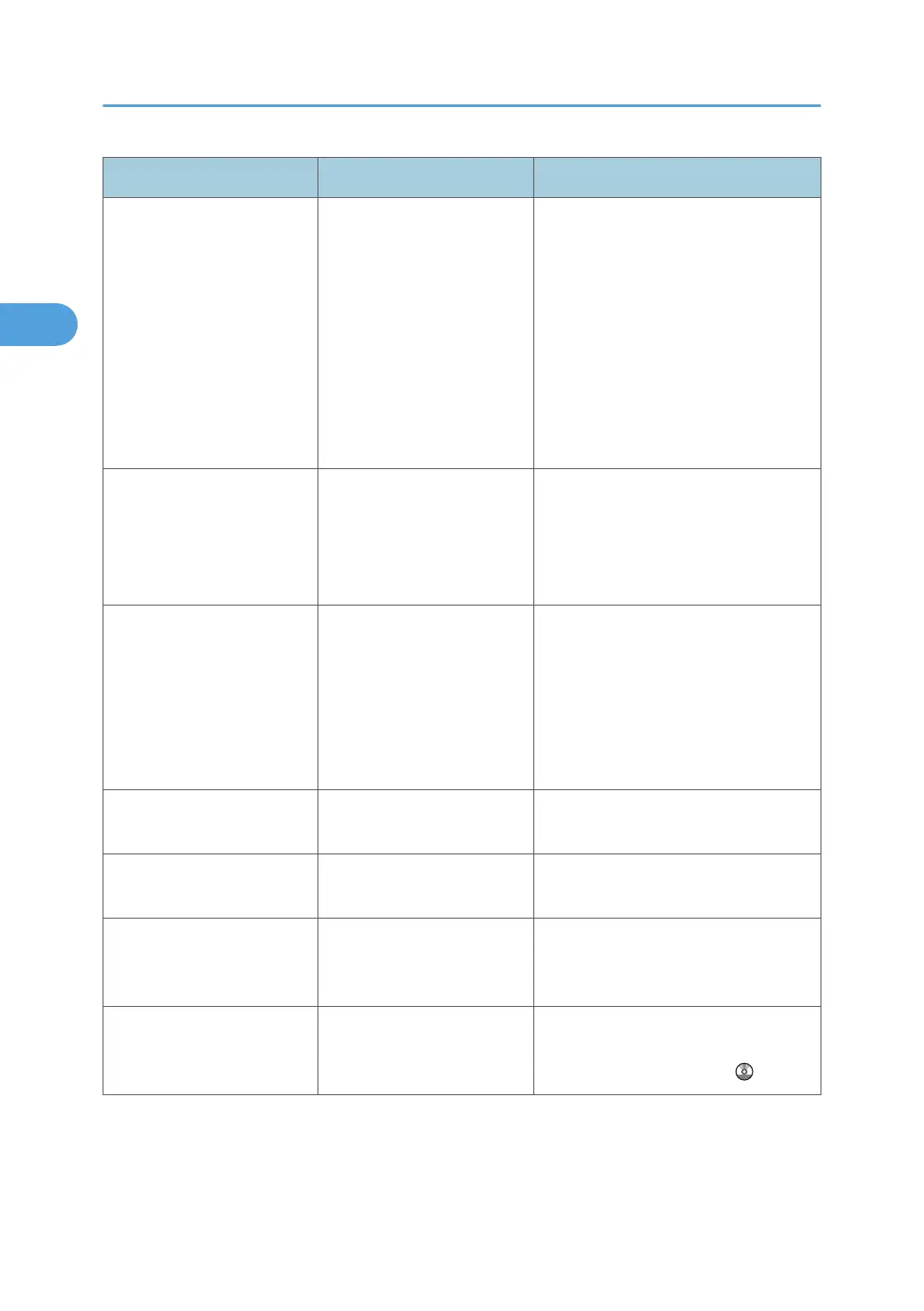
Message Causes Solutions
"Cannot detect original
size."
Original is not placed, or the
original placed on the
exposure glass is a non-
standard size.
• Place the original correctly.
•
Specify the paper size.
• When placing an original directly
on the exposure glass, the lifting/
lowering action of the exposure
glass cover or ADF triggers the
automatic original size detection
process. Lift the exposure glass
cover or ADF by 30 degrees or
more.
"Cannot punch this paper
size."
The Punch function cannot
be used with paper size
selected.
Select a proper paper size. See
"Specifications for Punch Unit (Internal
Finisher) (Optional)" or "Specifications
for Punch Unit (Booklet Finisher)
(Optional)", About This Machine.
"Cannot staple paper of this
size."
The Staple function cannot
be used with paper size
selected.
Select a proper paper size. See
"Specifications for 500-Sheet Finisher
(Optional)", "Specifications for Internal
Finisher (Optional)", "Specifications for
1000-Sheet Finisher (Optional)", or
"Specifications for Booklet Finisher
(Optional)", About This Machine.
"Check original orientation." Original is not placed in a
proper orientation.
Change the orientation of the original.
"Check paper size." An irregular paper size is
set.
If you press the [Start] key, the copy
will start using the selected paper.
"Clean the scanning glass.
(Located next to the
exposure glass.)"
The scanning glass or guide
plate of the ADF is dirty.
Clean them. See "Maintaining Your
Machine", About This Machine.
"Duplex is not available with
this paper size."
A paper size not available in
Duplex mode has been
selected.
Select a proper paper size. See
"Duplex Copying", Copy and
Document Server Reference
.
2. Troubleshooting When Using the Copy/Document Server Function
26



 To Next Page