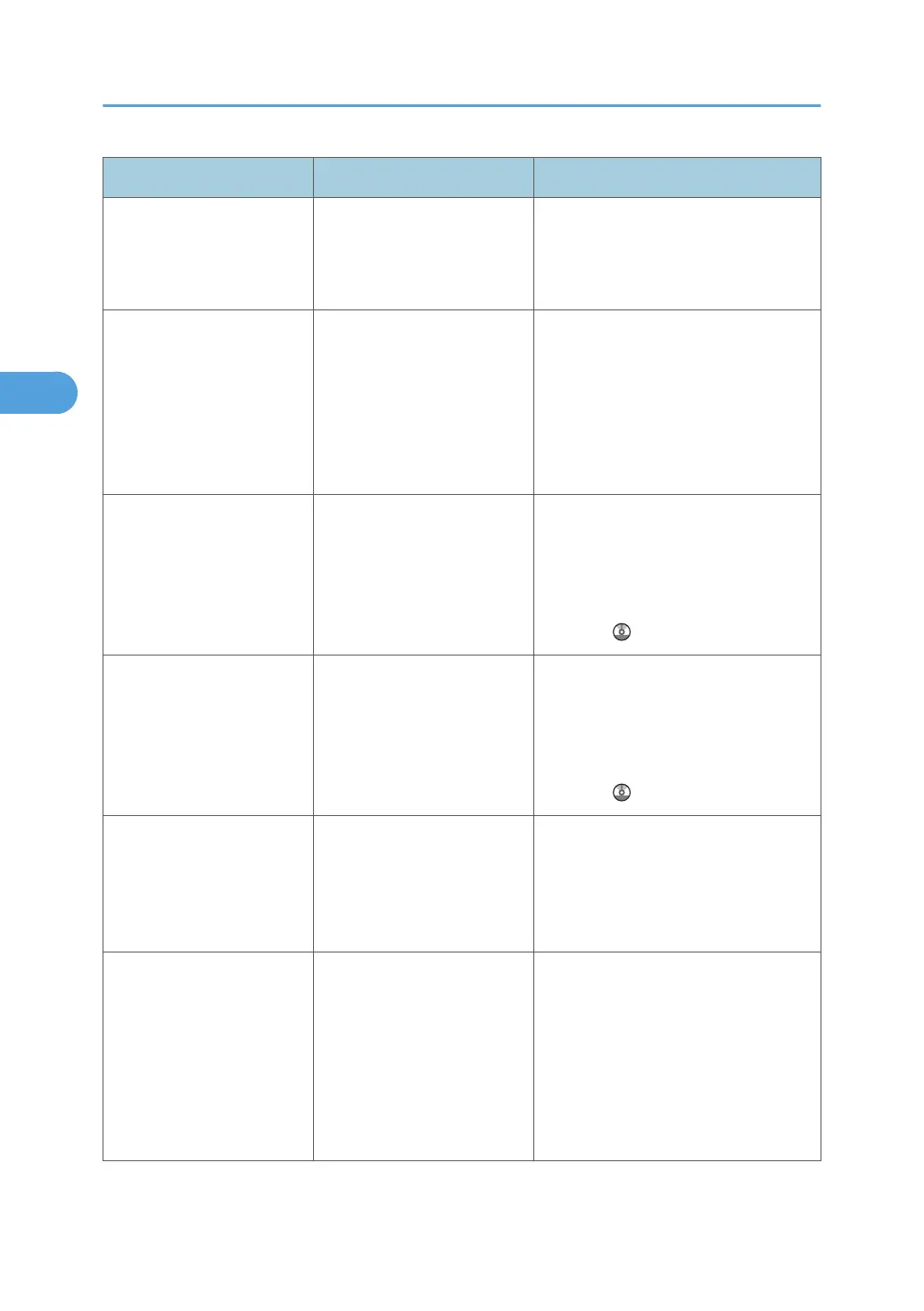
Message Causes Solutions
"Remove the paper from
Internal Tray 1."
Internal Tray 1 is full. Remove the paper. If the other tray is
also full, the tray name shown on the
screen changes. Remove paper from
the tray indicated on the display.
"Some invalid destination(s)
contained. Do you want to
select only valid
destination(s)?"
The specified group contains
fax destinations, e-mail
destinations, and/or folder
destinations, either of which
are incompatible with the
specified transmission
method.
In the message that appears at each
transmission, press [Select].
"Some page(s) are near
blank. To cancel, press the
Stop key."
The first page of the
document is almost blank.
The original's blank side might have
been scanned. Be sure to place your
originals correctly. For details about
determining the cause of blank pages,
see "Detecting Blank Sheet", Facsimile
Reference
.
"Some page(s) are near
blank."
The first page of the
document is almost blank.
The original's blank side might have
been scanned. Be sure to place your
originals correctly. For details about
determining the cause of blank pages,
see "Detecting Blank Sheet", Facsimile
Reference .
"The selected file(s)
contained file(s) without
access privileges. Only
file(s) with access privileges
will be deleted."
You tried to delete a
document for which you do
not have permission to
delete.
Only the administrator can delete this
document. Contact your administrator
if you want to delete a document for
which you do not have permission to
delete.
"Updating the destination
list... Please wait. Specified
destination(s) or sender's
name has been cleared."
The destination list is being
updated from the network
using Web Image Monitor.
Wait until the message disappears. Do
not switch off the power while this
message is displayed. Depending on
the number of destinations to be
updated, there may be some delay
before you can resume operation.
Operation is not possible while this
message is displayed.
3. Troubleshooting When Using the Facsimile Function
52



 To Next Page