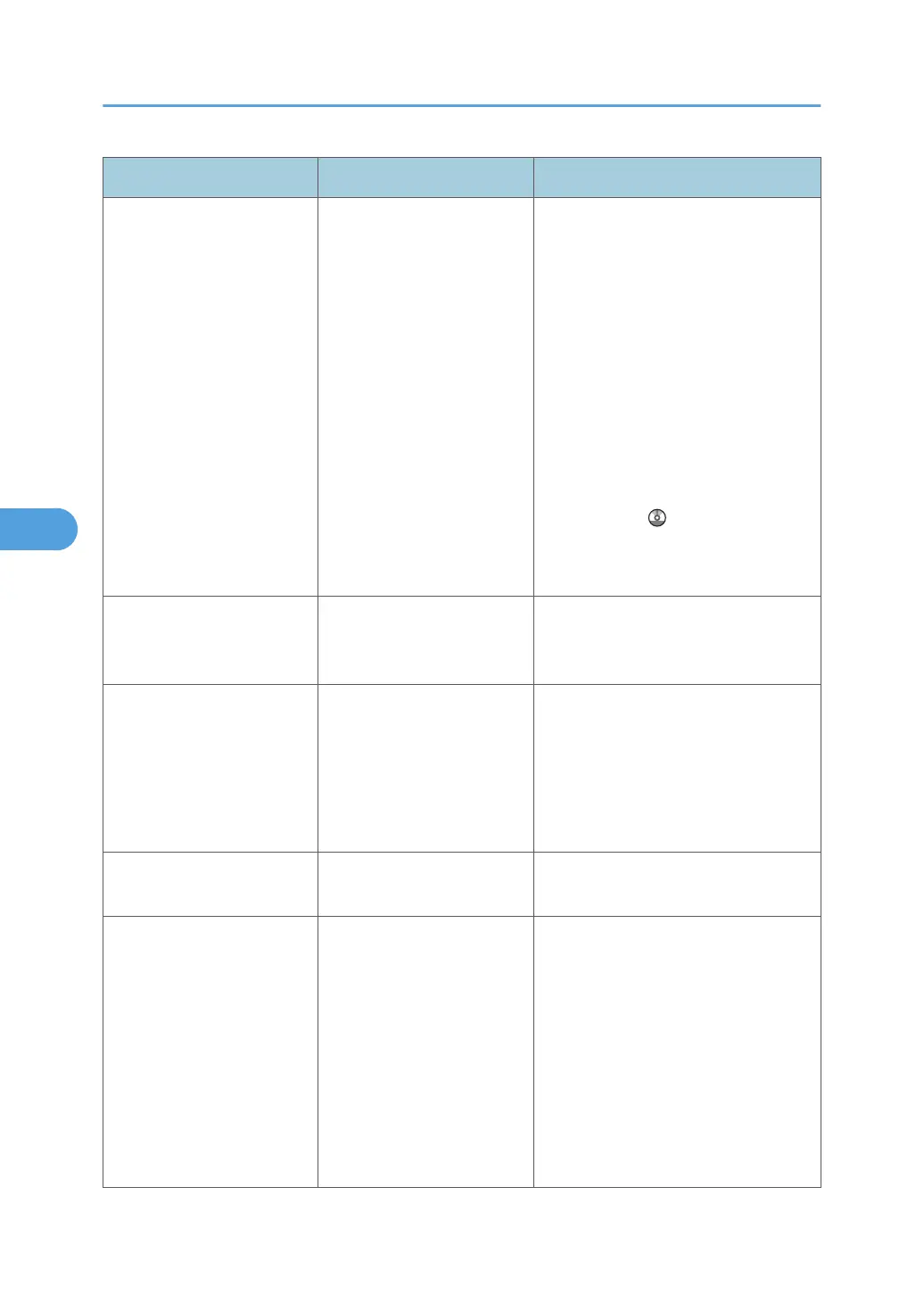
Message Causes Solutions
"Cannot find "XXX" scanner
used for the previous scan.
"YYY" will be used instead."
("XXX" and "YYY" indicate
scanner names.)
The machine is not
connected to the network
correctly.
• Check that the previously used
scanner is connected to the
network correctly.
•
Cancel the Personal Firewall of
the client computer. For details,
see Windows Help.
• Use an application such as telnet
to make sure SNMPv1 or
SNMPv2 is set as the machine's
protocol. See "Remote
Maintenance Using telnet",
Network and System Settings
Reference
.
•
Select the scanner used for the
previous scan.
"Cannot specify any more
scanning area."
The maximum number of
registerable scan areas has
been exceeded.
The maximum number of scanning
areas that can be stored is 100. Delete
unneeded scanning areas.
"Clear Misfeed(s) in ADF." A paper misfeed has
occurred inside the ADF.
Remove jammed originals, and then
insert them again. For details, see p.
121 "Removing Jammed Paper".
•
Check whether the originals are
suitable to be scanned by the
machine.
"Communication error has
occurred on the network."
A communication error has
occurred on the network.
Check whether the client computer can
use the TCP/IP protocol.
"Error has occurred in the
scanner driver."
An error has occurred in the
driver.
• Check whether the network cable
is connected correctly to the client
computer.
•
Check whether the Ethernet board
of the client computer is
recognized correctly by
Windows.
• Check whether the client
computer can use the TCP/IP
protocol.
5. Troubleshooting When Using the Scanner Function
112



 To Next Page