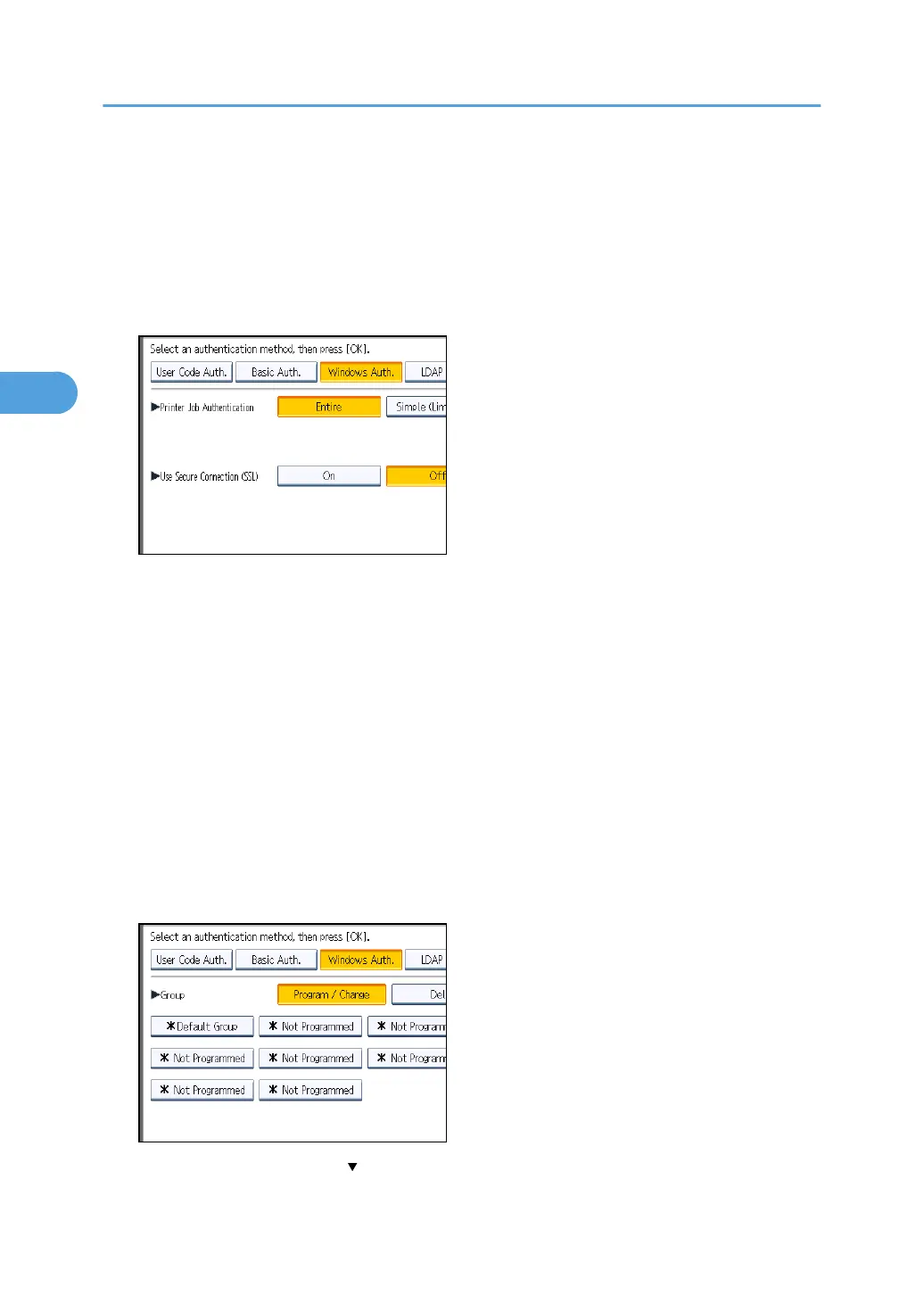
If you select [Simple (All)], you can print even with unauthenticated printer drivers or devices. Specify
this setting if you want to print with a printer driver or device that cannot be identified by the machine or
if you do not require authentication for printing. However, note that, because the machine does not
require authentication in this case, it may be used by unauthorized users.
1. Press [Entire] or [Simple (All)].
2. Press [On] for "Use Secure Connection (SSL)".
If you are not using secure sockets layer (SSL) for authentication, press [Off].
If global groups have been registered under Windows server, you can limit the use of functions for
each global group.
You need to create global groups in the Windows server in advance and register in each group the
users to be authenticated. You also need to register in the machine the functions available to the
global group members. Create global groups in the machine by entering the names of the global
groups registered in the Windows Server. (Keep in mind that group names are case sensitive.) Then
specify the machine functions available to each group.
If global groups are not specified, users can use the available functions specified in [*Default
Group]. If global groups are specified, users not registered in global groups can use the available
functions specified in [*Default Group]. By default, all functions are available to *Default Group
members. Specify the limitation on available functions according to user needs.
3. Under "Group", press [Program / Change], and then press [* Not Programmed].
If this item is not visible, press [ Next] to display more settings.
3. Configuring User Authentication
58



 To Next Page