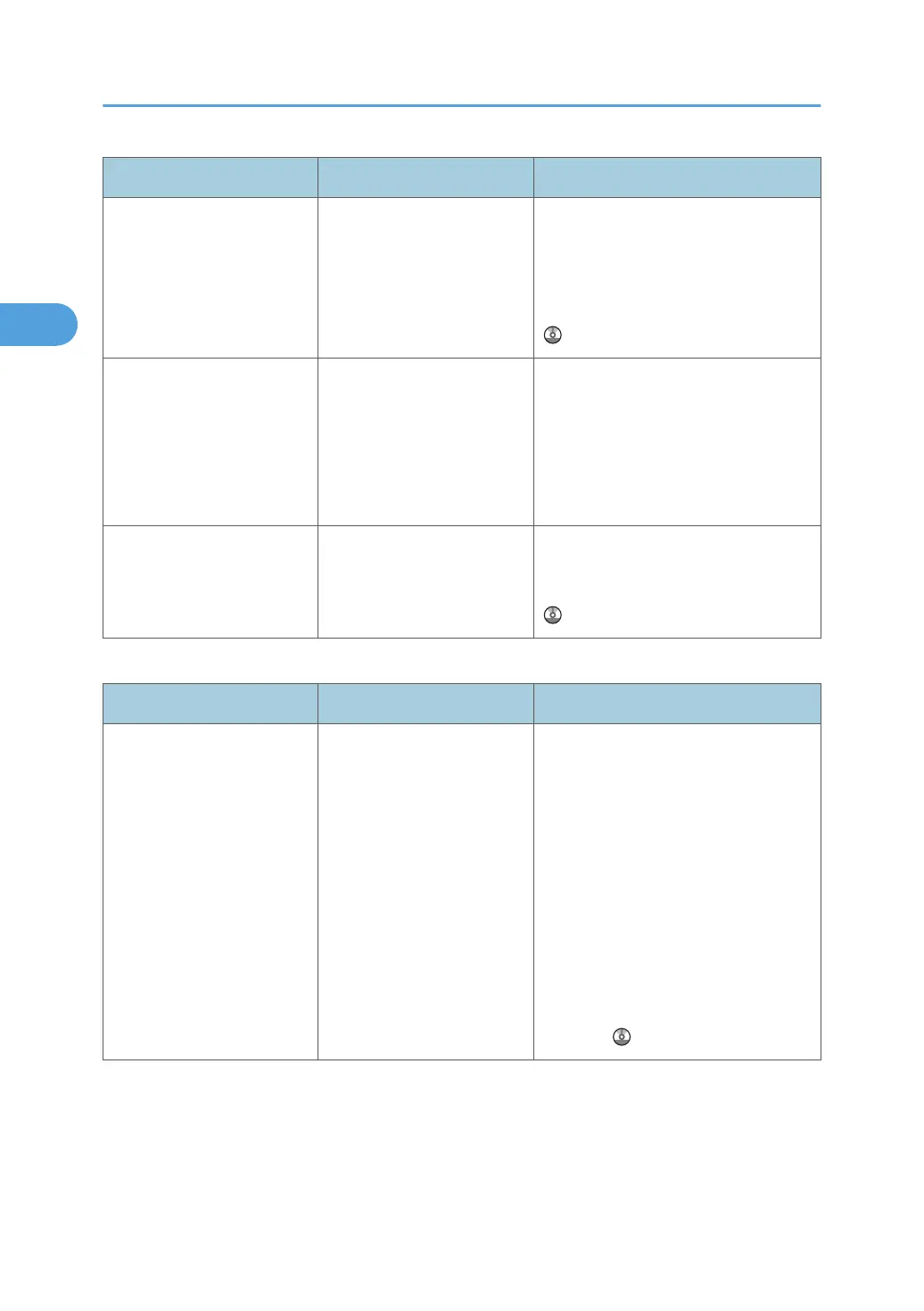
Problem Causes Solutions
Cannot print in duplex
mode.
You have selected a paper
type that cannot be used for
duplex copying.
In [Tray Paper Settings], select a paper
type that can be used for duplex print.
For details about the paper types that
can be used, see "Duplex Copying",
Copy and Document Server Reference
.
Copies are not in correct
order.
You placed the originals in
the incorrect order.
When inserting a stack of originals into
the ADF, the last page should be on
the bottom.
If you place an original on the
exposure glass, start with the first page
to be copied.
When using "Duplex", copy
is made top to bottom even
though [Top to Top] is
selected.
You placed the originals in
the wrong orientation.
Place the original in the correct
orientation. See "Duplex Copying",
Copy and Document Server Reference
.
Document Server
Problem Causes Solutions
Cannot access file. The file is password
protected.
Contact your administrator.
To delete the files stored in the
Document Server, select [Delete All
Files in Document Server] under
[Administrator Tools] in [System
Settings]. As this will permanently
delete every single file, make sure the
Document Server does not contain any
files you want to keep. For details
about Delete All Files in Document
Server, see "Administrator Tools",
Network and System Settings
Reference .
2. Troubleshooting When Using the Copy/Document Server Function
38



 To Next Page