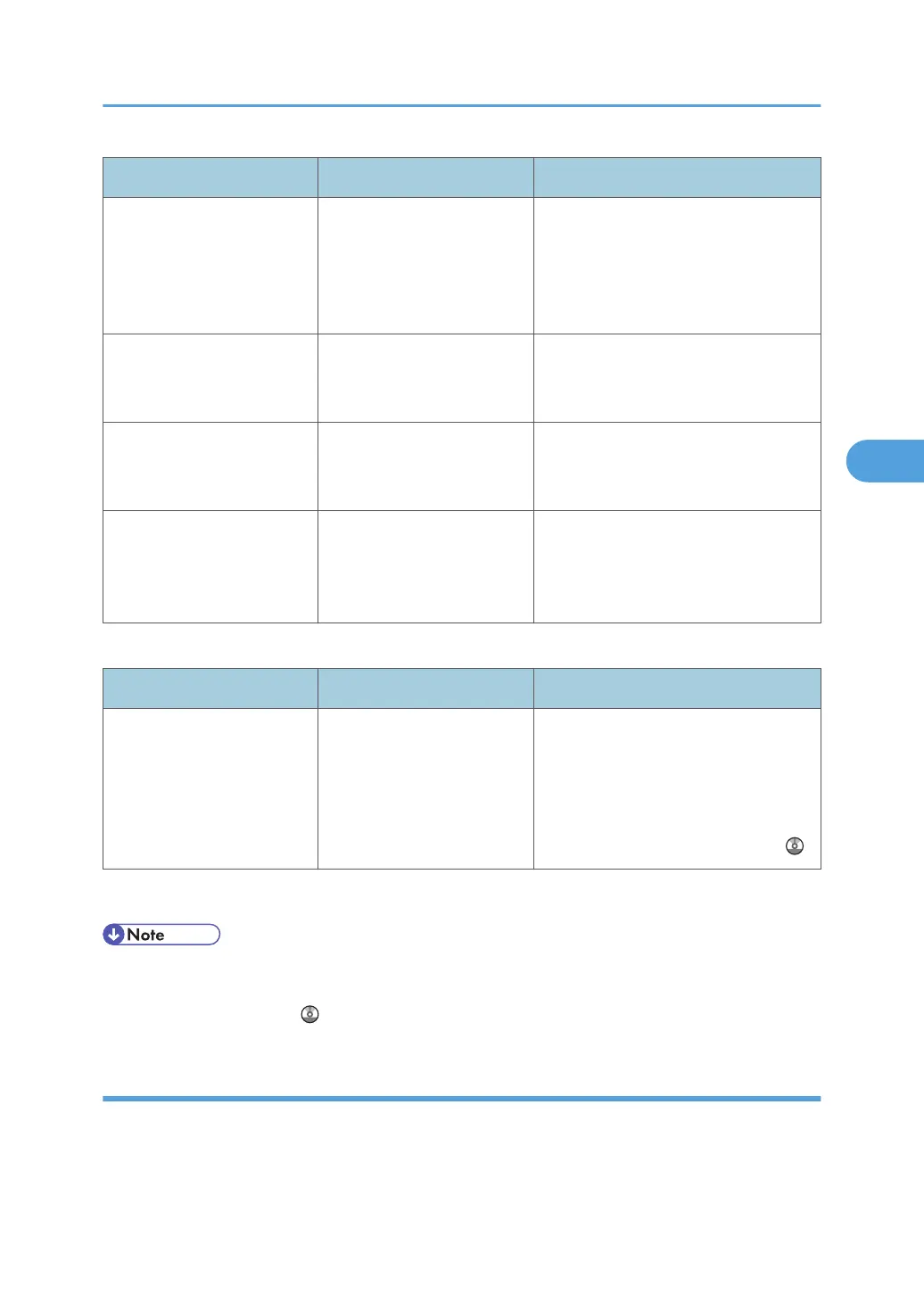
Message Causes Solutions
"The print job has been
cancelled because capture
file(s) could not be stored:
Exceeded max. number of
pages per file."
The maximum page
capacity of the Document
Server was exceeded.
Delete some of the files stored in the
Document Server or reduce the number
of pages that you want to send.
"You do not have a privilege
to use this function. This job
has been cancelled."
The entered login user name
or login password is not
correct.
Check that the user name and
password are correct.
"You do not have a privilege
to use this function. This job
has been cancelled."
The logged in user is not
allowed to use the selected
function.
Contact your administrator.
"You do not have a privilege
to use this function. This
operation has been
cancelled."
The logged in user does not
have the privileges to
register programs or change
the paper tray settings.
Contact your administrator.
Messages during Direct print from a removable memory device
Message Causes Solutions
"99: Error" This data cannot be printed.
The specified data is either
corrupt or not supported by
the Direct printing function
from removable memory
devices.
Check that the data is valid. For details
about the kinds of data supported by
the Direct printing function from
removable memory devices, see
"Direct Printing from a Removable
Memory Device", Printer Reference .
If printing does not start, contact your service representative.
• The contents of errors may be printed on the Configuration Page. Check the Configuration Page in
conjunction with the error log. For details about how to print the Configuration Page, see "List / Test
Print", Printer Reference .
Checking the Error Log
If files could not be stored due to printing errors, identify the cause of the errors by checking the error log
on the control panel.
Messages Displayed When Using the Printer Function
83



 To Next Page