Page 7-32
Troubleshooting
INTER-TEL
®
AXXESS
®
MANUAL VERSION 11.0 – May 2008
CO Trunk Issues
B. CO TRUNK ISSUES
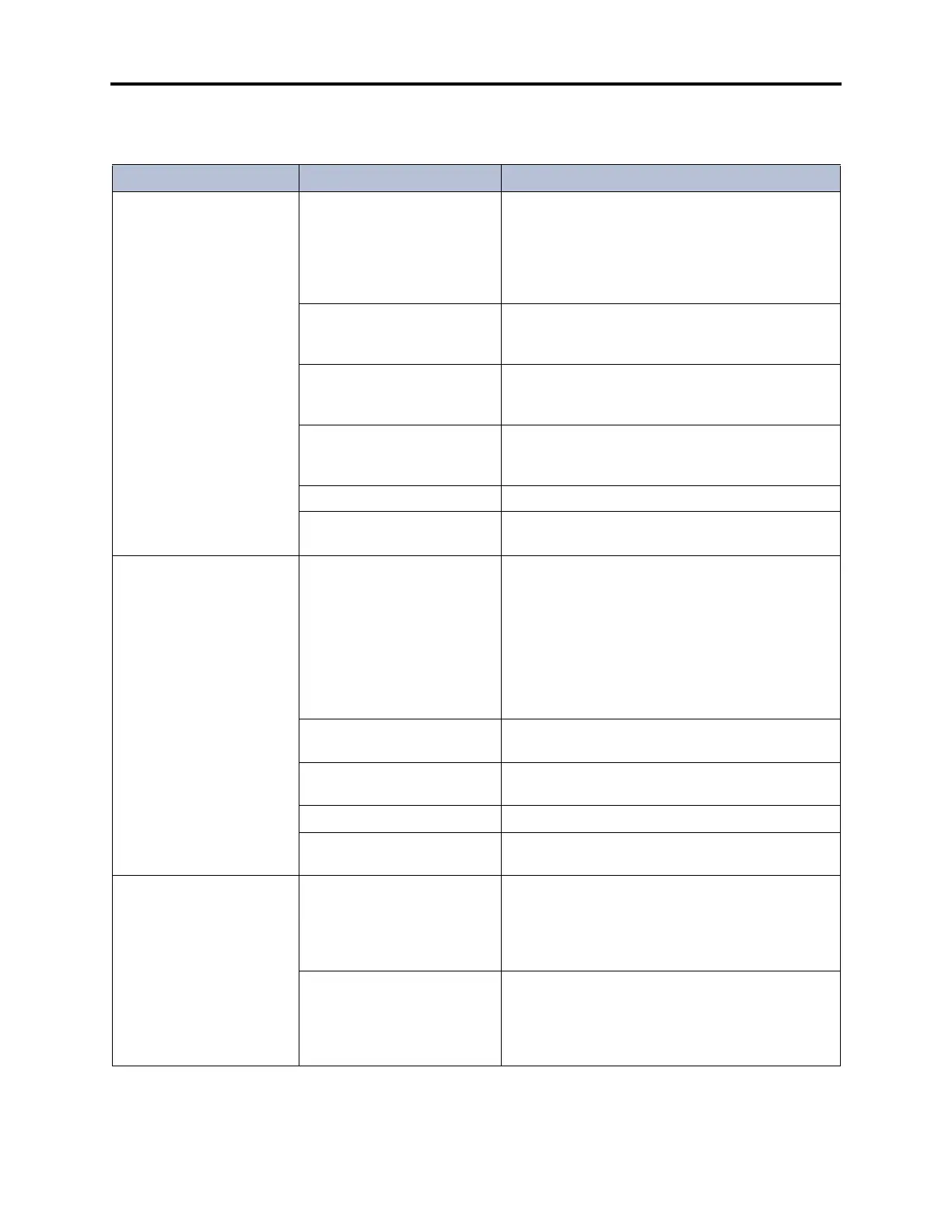
Table 7-7. CO Trunk Troubleshooting Chart
Symptom Possible Cause Corrective Action
CO trunk inoperative
throughout the system
Defective CO trunk from cen-
tral office
At the associated CO block, remove the bridging
clips for the trunk. On the telco side of the block,
use a test set to verify the CO trunk connection.
Also, move the CO trunk to a known good CO cir-
cuit. If the problem follows the trunk, contact the
telephone company.
Trunk is dedicated to a sec-
ondary carrier requiring an
access code
Verify the type of CO trunk. Instruct users to dial
access code if required.
Defective cabling or mis-wired
amphenol connector on the
trunk card
Using a test set, ensure presence and correct loca-
tion of the CO trunk at the associated CO block.
Programming error Ensure that the trunk is assigned to the correct
trunk group and stations have been given access to
it. See page 6-244 in PROGRAMMING.
Defective trunk card Replace the associated trunk card.
Defective CPC or CPU Card See page 7-3 for LED and system voltage informa-
tion. Replace the card if faulty.
Cannot obtain CO dial tone If reorder tone is heard, pro-
gramming error
Ensure that phone has outgoing access. See
page 6-198 in PROGRAMMING.
Also, check to see if the phone is programmed for
ARS only. If so, check ARS programming, see
page 6-291 in PROGRAMMING.
Ensure trunk is assigned to the correct trunk group.
See page 6-244 in PROGRAMMING.
If progress tone is heard, user
error
System is programmed to expect a forced account
code. See PROGRAMMING, page 6-301.
Selected trunk is designated
as incoming-only
Cannot dial out on an incoming-only trunk.
Defective trunk card Replace the associated trunk card.
Defective CPC or CPU Card See page 7-3 for LED and system voltage informa-
tion. Replace the card if faulty.
Low volume on all CO
trunks; cannot break CO
dial tone
Defective trunk card Measure the system voltages. If not within toler-
ance, remove all trunk cards and check voltages
again. If the voltages return to normal, replace the
cards one at a time until the defective card is iso-
lated and replaced.
Defective CO trunk from cen-
tral office
At the CO block, remove the bridging clips for the
trunk. On the telco side of the block, use a test set
to verify the CO trunk connection. Also, move the
CO trunk to a known good CO circuit. If the problem
follows the trunk, contact the telephone company.



 To Next Page