Page D-20
Appendix D — CPC64/CPU64 Configuration
INTER-TEL
®
AXXESS
®
MANUAL VERSION 11.0 – May 2008
Hardware Installation
C. HARDWARE INSTALLATION
4.16 To install the EVMC, see Figure D-3 on page D-22 and do the following:
1. Make sure the proper security PAL is installed in socket U23. (The PAL determines the
number of available mailboxes.)
NOTE: Currently, the 4-port EVMC is shipped with the 32-mailbox PAL.
2.
If installing a second DSPM Card, attach the DSPM card in the lower socket, below the
existing DSPM card. Make sure that the connectors and the standoffs are properly
aligned and seated.
3. Insert the EVMC into slot 7 of the equipment chassis.
4. Observe the LEDs on the front of the EVMC. The LED indications are as follows. (The
left LED is marked “CARD ON-LINE” and the right LED is marked “OK TO
REMOVE CARD.”)
CAUTION
When handling the EVMC be very careful not to damage the hard drive. It is sensitive to
vibration, pressure, and shock.
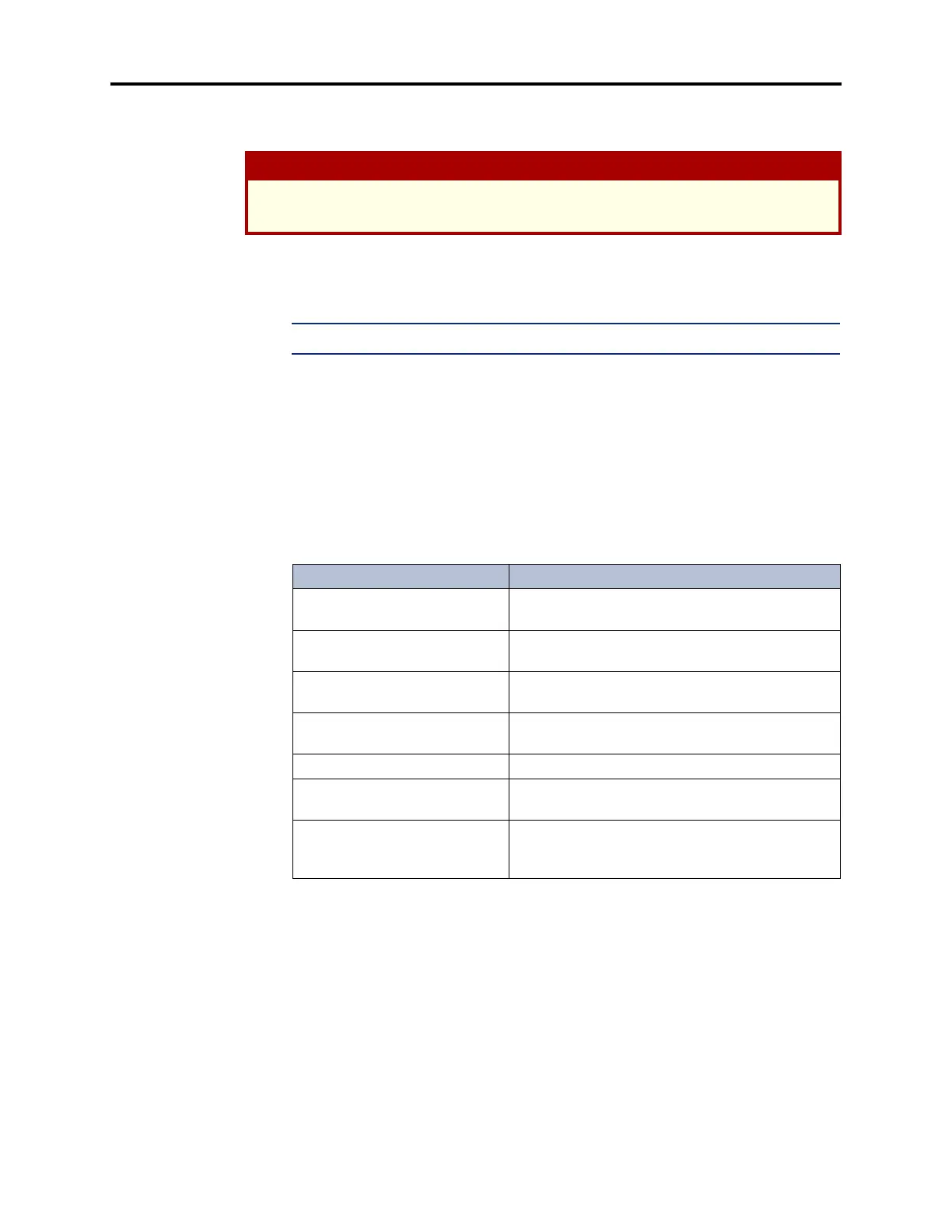
Table D-11. EVMC LED Indications
LED Indication Meaning
Both LEDs off If the system chassis is powered up, the OS/2
operating system is starting.
Left LED blinking slowly Voice Processing Unit is attempting to connect to
the CPC or CPU.
Left LED blinking rapidly The OS/2 operating system and the Voice Process-
ing Unit driver have started.
Left LED lit solid Voice Processing Unit is initialized and connected
to the CPC or CPU.
Right LED blinking rapidly Voice Processing Unit is shutting down.
Right LED blinking slowly Voice Processing Unit is shut down and the OS/2
operating system is shutting down.
Right LED lit solid Voice Processing Unit and OS/2 are shut down. It
is now safe to turn off power and remove the
EVMC from the chassis.



 To Next Page