Page 7-33
Troubleshooting
INTER-TEL
®
AXXESS
®
MANUAL VERSION 11.0 – May 2008
CO Trunk Issues
7
TROUBLE-
SHOOTING
(Continued) Low volume on
all CO trunks; cannot break
CO dial tone
Open or loose connection in
the cable between the power
supply and the backplane
If, with all trunk cards removed, the system volt
ages are still not within tolerance, turn off the sys-
tem and check the cable and connector with an
ohmmeter. Replace or repair the faulty cable.
Defective power supply With all trunk cards removed, measure the system
voltages. If not within tolerance, replace the power
supply.
Hybrid balance mismatch Select the balance network – normal or short – that
best matches the trunk's impedance. See PRO-
GRAMMING, page 6-244.
NOTE: See also phone problems on page 7-43.
Cannot break CO dial tone CO circuit is programmed for
wrong signaling type
Ensure that CO trunk and CO circuit use same type
signaling (DTMF or dial pulse). See PROGRAM-
MING, page 6-244.
Defective CO trunk from cen-
tral office
At the CO block, remove the bridging clips for the
trunk. On the telco side of the block, use a test set
to verify the CO trunk connection. Also, move the
CO trunk to a known good CO circuit. If the problem
follows the trunk, contact the telephone company.
Timer error If trunk is DTMF, the DTMF Digit Duration/ Pause
timer setting may not be compatible with the trunk.
See PROGRAMMING, page 6-329.
Defective trunk card Replace the associated trunk card.
Defective CPC or CPU Card See page 7-3 for LED and system voltage informa-
tion. Replace the card if faulty.
NOTE: See also phone problems on page 7-43.
Cannot place an outgoing
call; CO dial tone is
present; intercom works
Programming error Check station class of service (COS). See PRO-
GRAMMING, page 6-198. Check that equal access
and absorbed digit programming for the trunk group
are correct. See PROGRAMMING, page 6-244. If
using ARS, check ARS programming on page 6-291
in PROGRAMMING.
Defective CO trunk from cen-
tral office
At the CO block, remove the bridging clips for the
trunk. On the telco side of the block, use a test set
to verify the CO trunk connection. Also, move the
CO trunk to a known good CO circuit. If the problem
follows the trunk, contact the telephone company.
Defective station instrument Replace the station instrument and/or perform the
keyset self-test as outlined in INSTALLATION,
page 3-182.
Selected trunk is designated
as incoming-only
Cannot dial out on an incoming-only trunk.
Defective trunk card Replace the associated trunk card.
Defective CPC or CPU Card See page 7-3 for LED and system voltage informa-
tion. Replace the card if faulty.
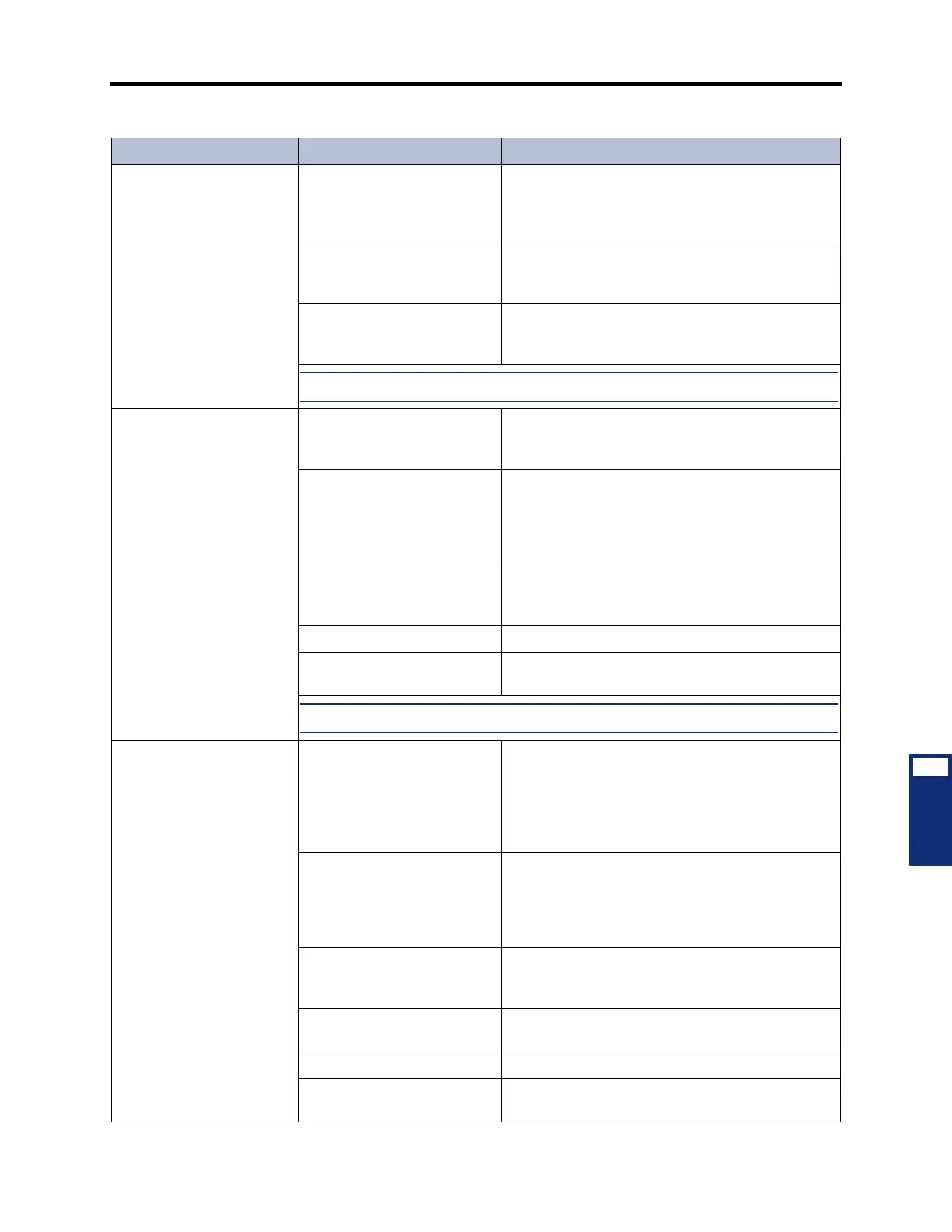
Table 7-7. CO Trunk Troubleshooting Chart (Continued)
Symptom Possible Cause Corrective Action



 To Next Page