Page 7-53
Troubleshooting
INTER-TEL
®
AXXESS
®
MANUAL VERSION 11.0 – May 2008
Voice Processing Issues
7
TROUBLE-
SHOOTING
K. VOICE PROCESSING ISSUES
NOTE: If a Voice Processing applications problem cannot be resolved, Technical Support may instruct the installer
on how to use the diagnostics software. Also, for additional troubleshooting procedures and important diagnostic
information, refer to the new voice processing system diagnostics manual, which will be published at a later date.
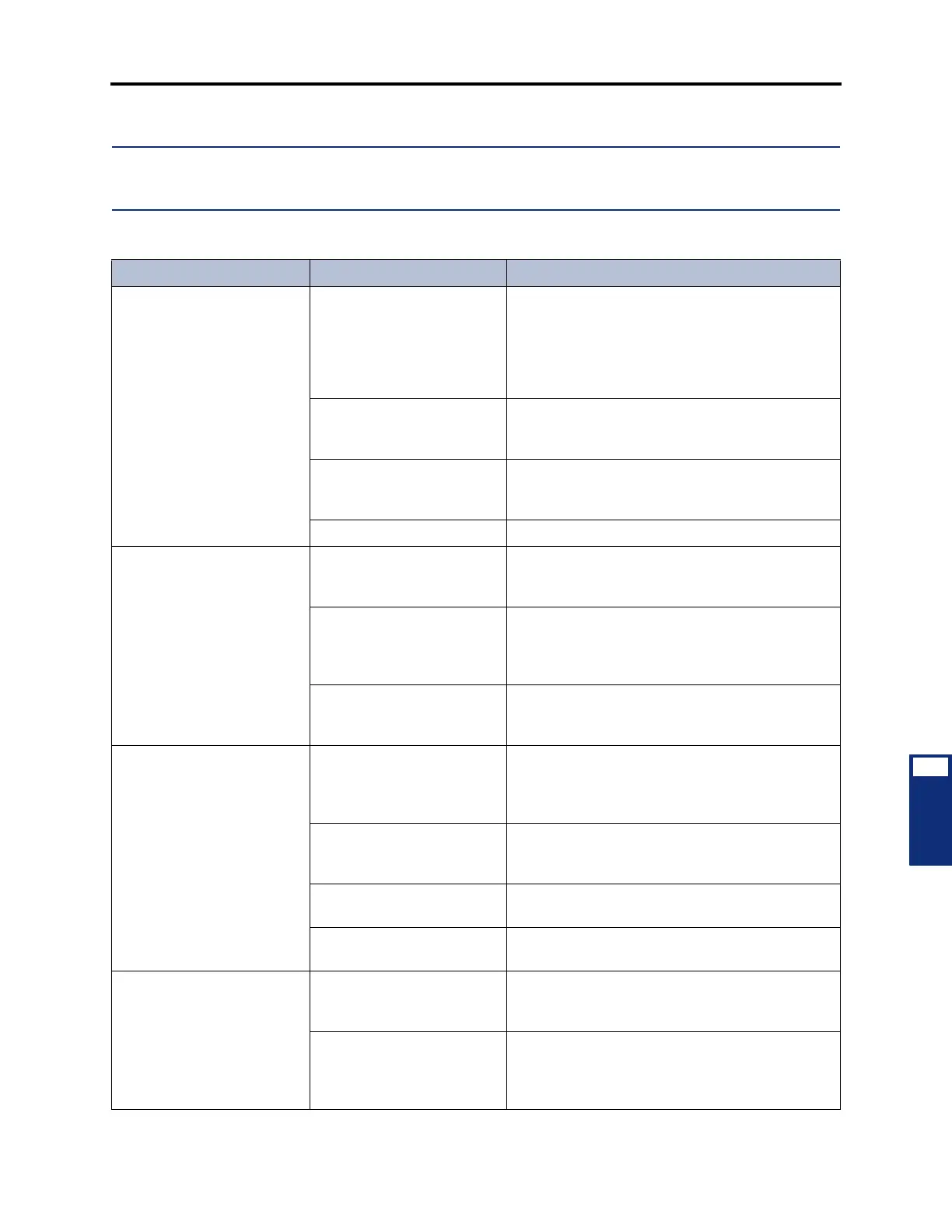
Table 7-16. Voice Processing Troubleshooting Chart
Symptom Possible Cause Corrective Action
Phone system unable to
communicate over voice
channels with Voice Process-
ing PC
Programming error Make sure the appropriate time slot group (no. of
Voice Processing voice channels) is assigned to
each Voice Processing application. Voice channels
are used for processing calls between the phone
system and the Voice Processing PC. See PRO-
GRAMMING, page 6-354.
Loose or defective cabling
between the phone system
and the Voice Processing PC
Check the cabling connecting the system to the
PC. The CPC or CPU connection controls ports 1-
8; the OPC connection controls ports 9-40.
Incorrect strap settings on
the AIC or one or more of the
VPCs
Ensure that the AIC and all VPCs have their
jumper straps set in the proper positions. See
page 3-213 in INSTALLATION.
Defective AIC or VPC Replace the defective card.
System programming PC
unable to communicate with
Voice Processing PC (the
monitor may display a mes-
sage about being unable to
communicate with or losing
its connection with the Voice
Processing PC)
Programming error Voice Processing programming cannot be
accessed until a Voice Processing communications
port has been established.
Loose or defective RS232
cabling between the phone
system and the Voice Pro-
cessing PC
Check the RS232 cabling connecting the system to
COM1 on the PC.
Defective CPC, CPU, MEM,
or Disk Controller Combina-
tion Card
Replace the defective card.
Monitor and keyboard un
able to communicate with
Voice Processing PC
Loose or defective cabling
between the Voice Process-
ing PC and the monitor or
keyboard
Check the cabling connecting the PC to the moni-
tor or keyboard.
Monitor is wrong type for the
Video Card installed in the
PC
Make sure the monitor is the proper type (generally
VGA) for the Video Card installed in the PC.
Defective monitor or key-
board
Replace the defective monitor or keyboard.
Defective Video Card or PC
Motherboard
Replace the defective card.
Automated attendant not
responding properly
User error The caller must use a DTMF phone to enter digits.
See VOICE PROCESSING FEATURES, page 4-
16.
DTMF tones not being inter-
preted correctly (see NOTE
below)
If numbers appear to be misdialed frequently, due
to trunk noise or other problems, use the digit
translation feature as described on page 6-371 in
PROGRAMMING.



 To Next Page