Page 7-61
Troubleshooting
INTER-TEL
®
AXXESS
®
MANUAL VERSION 11.0 – May 2008
IP Devices Issues
7
TROUBLE-
SHOOTING
M. IP DEVICES ISSUES
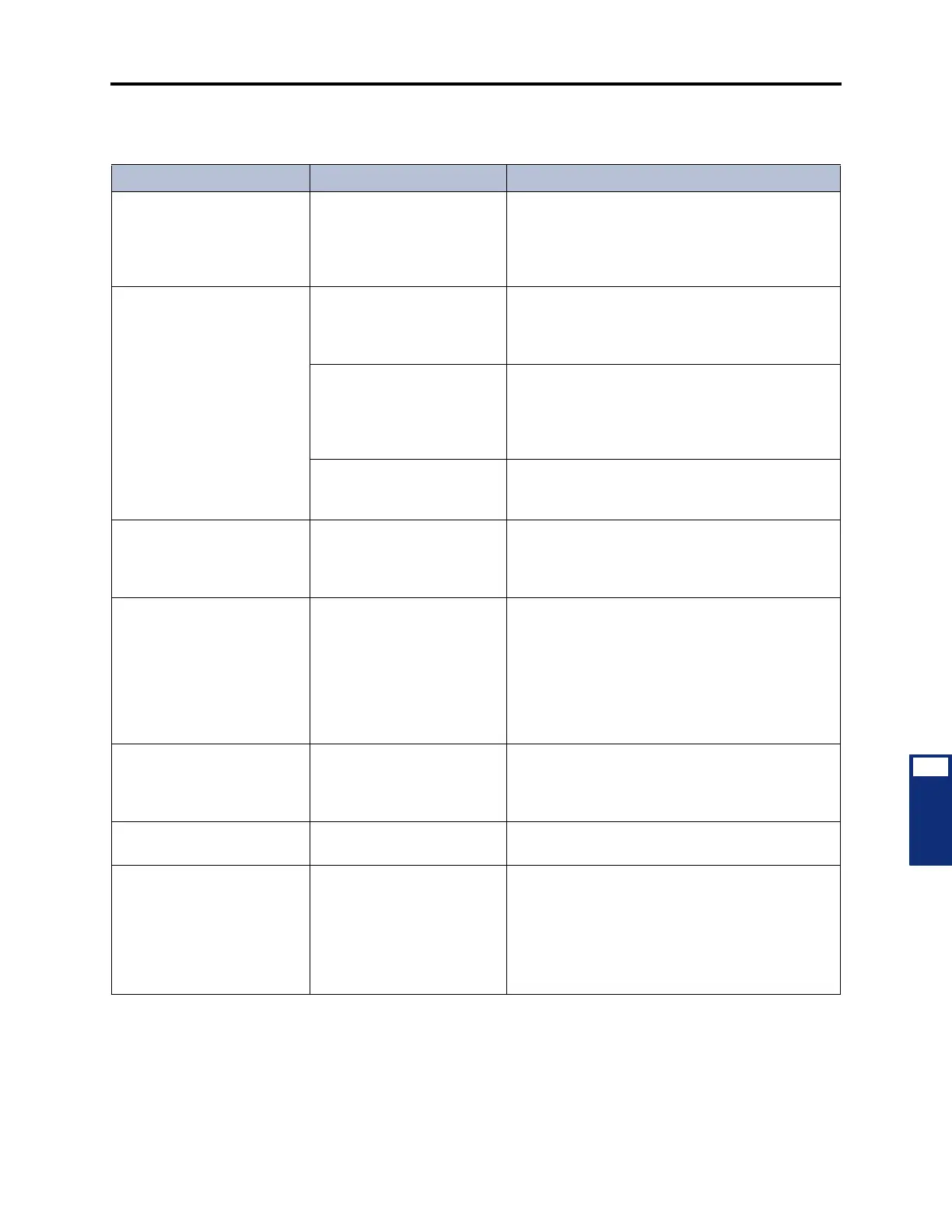
Table 7-18. IP Devices Troubleshooting Chart
Symptom Possible Cause Corrective Action
IP Phone displays VOIP
RESOURCE IS
UNAVAILABLE.
The number of programmed
IP devices exceeds the num-
ber of available voice chan-
nels, and all programmed
voice channels are in use.
Make sure the voice channels are set to IP End-
point (see page 6-146). If necessary, consider add-
ing another IPRC or a daughter card.
A call was established
between two IP phones, but
there is no audio.
The IP phones are pro-
grammed for P2P audio, but
they do not support the same
vocoder.
Remove the IP devices from the Network Group.
Consider adding them to a Network Group that
contains IP devices that support the vocoder.
The IP phones are pro-
grammed for P2P audio, but
they do not support the same
number of audio frames per
IP packet.
Remove the IP devices from the Network Group.
Consider adding them to a Network Group that
contains IP devices that support the same number
of audio frames per IP packet.
There is a firewall or NAT
between the two devices.
Place the devices into different Network Groups or
disable the Use Peer-To-Peer Audio flag for the
group.
A call was established, but
the device cannot send
DTMF digits.
The IP phones are pro-
grammed for P2P audio, but
they do not support the same
DTMF encoding setting.
Remove the IP devices from the Network Group.
Consider adding them to a Network Group that
contains IP devices that support the same DTMF
encoding setting.
The Upload Utility is not con-
necting to the IP devices.
The IP devices have version
1.x firmware, and the IPRC
has v8.1 firmware. Because
the IP devices cannot con-
nect to the card, they are
constantly retrying the con-
nection and blocking the
Upload Utility.
In general, you should upgrade the IP devices
before you upgrade the IPRC (see page 3-156 for
details). If, however, you have already upgraded
the IPRC, you must manually place the devices in
the download state before you upload the firmware.
The network is experiencing
audio and/or connection
problems.
There is a port conflict or the
firewall, NAT, or router is
blocking the port.
Try changing the ports associated with IP call con-
trol and/or audio. Make sure none of them conflict
with ports that other protocols use (e.g., SIP uses
5060).
The Upload Utility is not
working.
You have not entered a pass-
word for the connection.
Make sure the Password field is complete before
you click Start. See page 3-178 for details.
Accessing the Record-A-Call
or Agent Help feature while
using an IP SLA results in the
call ringing and then discon-
necting as soon as the agent
helper or voice mail applica-
tion answers.
The IP SLA is currently on a
peer-to-peer (P2P) call with
another IP device. Record-A-
Call and Agent Help features
are not available on P2P
calls.
Remove the IP SLA from a Network Group that
supports P2P.



 To Next Page