Page 6-49
Programming
INTER-TEL
®
AXXESS
®
MANUAL VERSION 11.0 – May 2008
DB Programming Window
PROGRAMMING
6
10. DB PROGRAMMING WINDOW
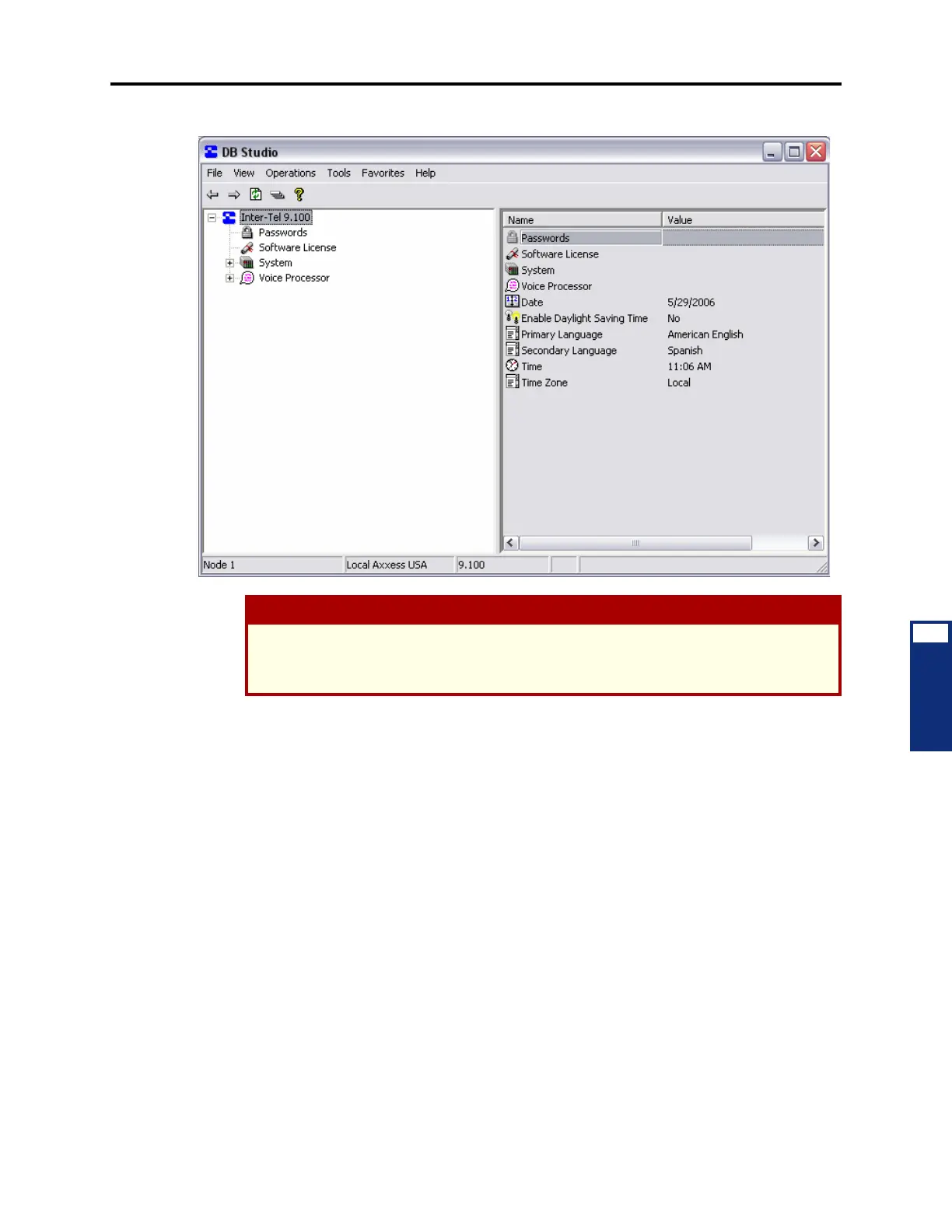
10.1 All programming is done through the programming window shown above or one of its
dialog boxes. The DB Programming interface, called DB Programming Studio, makes it easier
to move between programming areas when creating the customer’s database. It functions very
much like Windows Explorer and follows many of the same conventions.
10.2 The status bar at the bottom of the window shows the description and number of the
Node being programmed, the type of programming session, and the name assigned to the pro-
gramming session in Session Manager. It also displays status and error messages when applica-
ble.
10.3 The window provides access to all of the programming areas. In the window, you can
see both the hierarchy of the database and all the items in each programming area. When you
click on an element in the left side of the window, the contents of that programming area will
appear on the right side of the window.
10.4 Some tips for using the DB Programming Studio interface include:
• While programming, it is best to display the information in Details view so that the
input fields are visible.
CAUTION
If the DB Programming session is slow to respond, shut down any other programs, including
anti-virus programs, that may be running. If this does not help, make sure the PC meets the
minimum requirements (see page 2-99).



 To Next Page