Page 6-28
Programming
INTER-TEL
®
AXXESS
®
MANUAL VERSION 11.0 – May 2008
Merge Utility Operation
B. MERGE UTILITY OPERATION
5.10 To start the DB Merge Utility application, select Start - Programs - Inter-Tel DB Pro-
gramming -
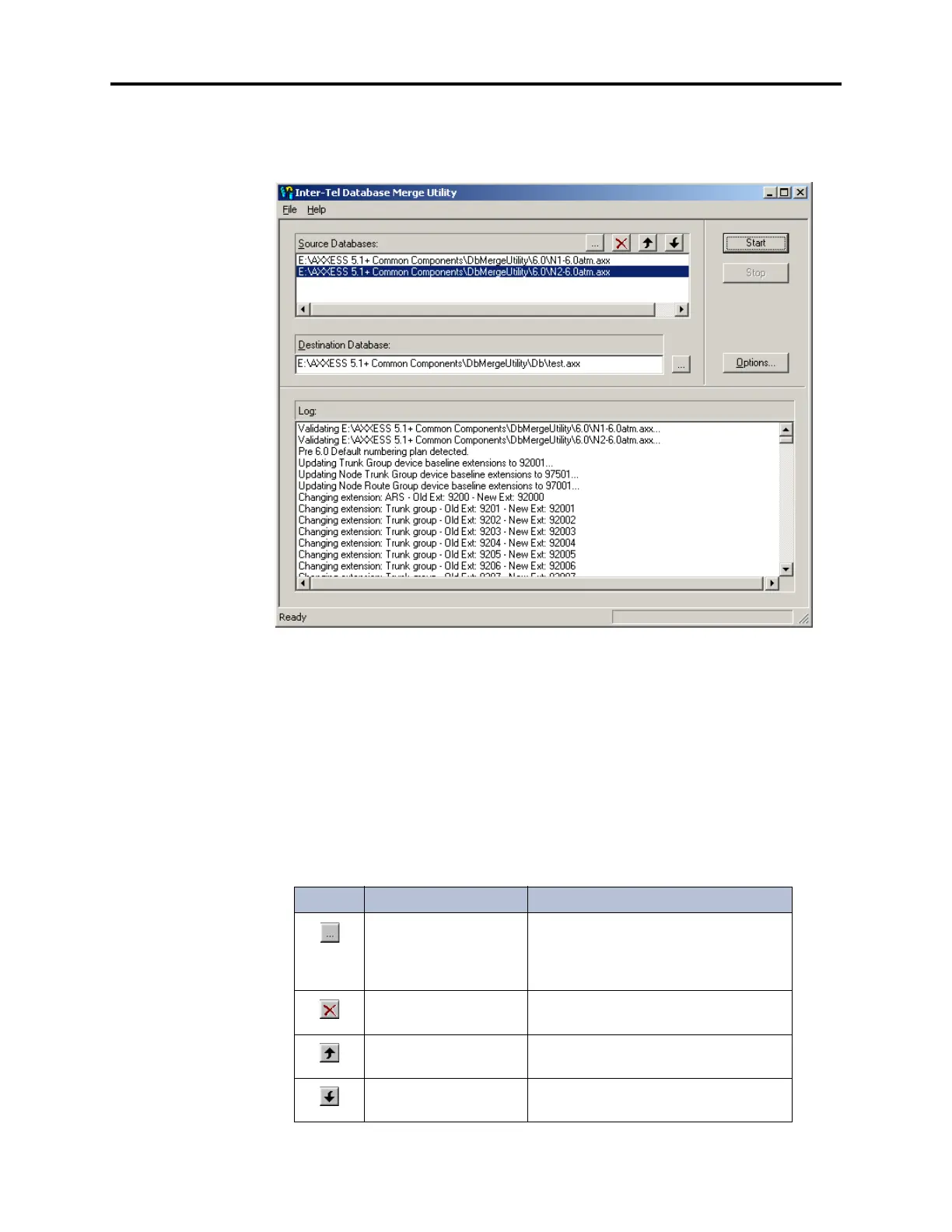
DB Merge. The main screen appears, as shown below.
5.11 This screen consists of the following elements:
• Source Databases: Contains the names and locations of the databases to be merged.
The master database is always listed first. Additional databases will be merged in the
order in which they are displayed.
• Destination Database: Displays the path and file name of the final database. This file
is created when the merge operation is complete.
• Log: Lists the details of the database merge. The text displayed in this window is auto-
matically saved to a .txt file with the same name as the destination database.
• Command Buttons: Perform various actions, as described in the following table.
Table 6-1: Merge Utility Command Buttons
Button Keystrokes Function
CTRL + B Invokes a browse window that allows
you to search for databases to be
merged (or for the destination data-
base).
DELETE Deletes the selected database from the
Source Databases list.
CTRL + Up Arrow Moves the selected database up in the
Source Databases list.
CTRL + Down Arrow Moves the selected database down in
the Source Databases list.



 To Next Page