Page 7-94
Troubleshooting
INTER-TEL
®
AXXESS
®
MANUAL VERSION 11.0 – May 2008
Navigating the Web Site
Navigating the Web Site
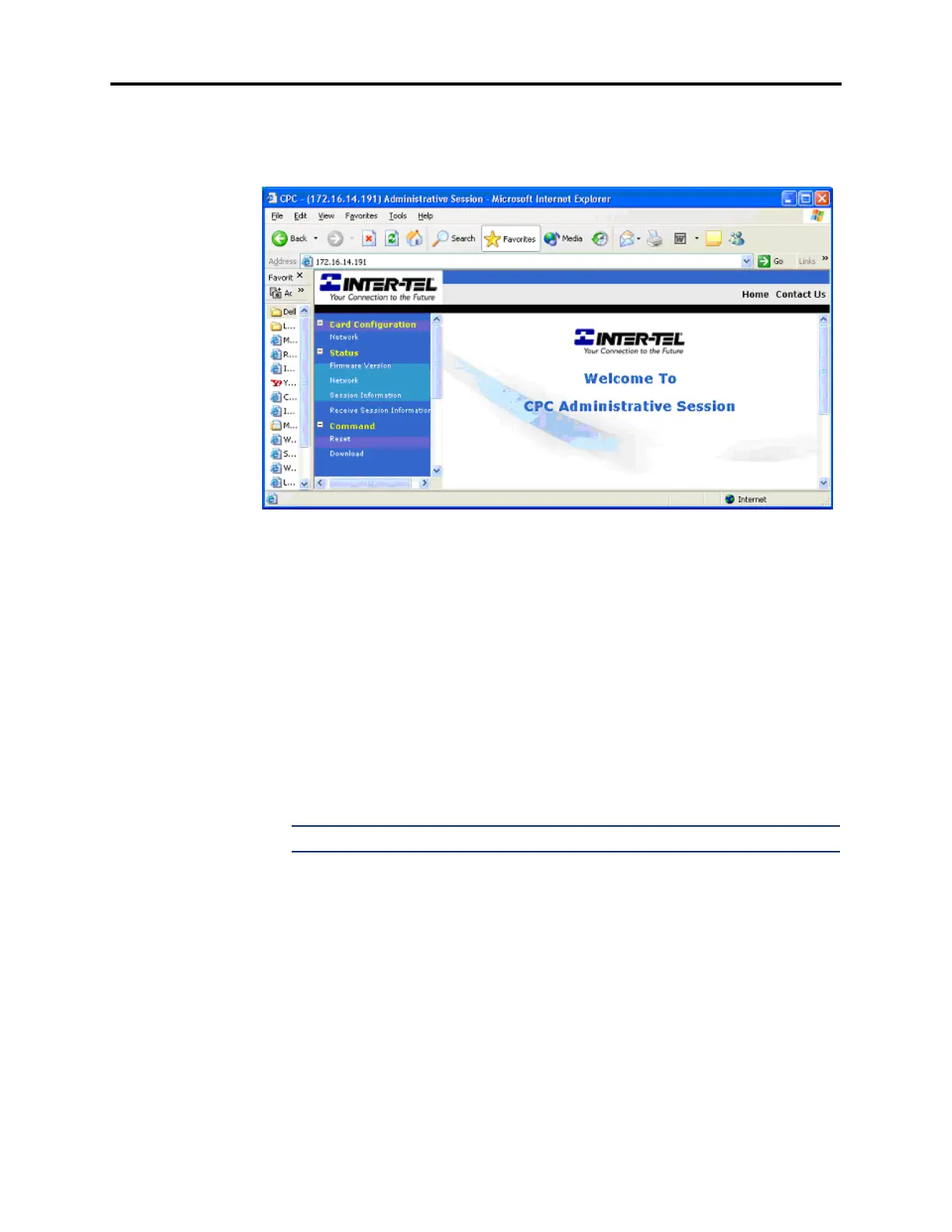
8.45 After you have successfully accessed the CPC, the Welcome page appears, as shown
below.
8.46 The left side of the Web page lists the main menu items, each of which expands to dis-
play different options. The available main menu items are:
• Card Configuration: Includes the Network page, which allows you to program the fol-
lowing IP port parameters:
— Static IP Address
— Static Subnet Mask
— Static Gateway Address
— WINS Server
— Hostname
— IP Address Assignment (Enable or Disable BOOTP or DHCP)
— Web and Telnet Server (Enable or Disable)
NOTE: For details about these fields, see page 6-178.
• Status: Includes the following options:
— Firmware Version: Displays the boot code and application code version uploaded
onto the CPC.
— Network: Displays the current network settings for the CPC.
— Session Information and Receive Session Information: Not available.
• Command: Allows you to reset the card or place it into the download state. If you reset
the card from the Web site, your connection is eventually terminated.



 To Next Page