Page 7-65
Troubleshooting
INTER-TEL
®
AXXESS
®
MANUAL VERSION 11.0 – May 2008
IP Networking Issues
7
TROUBLE-
SHOOTING
P. IP NETWORKING ISSUES
CAUTION
Security is the responsibility of the customer’s network administrator. Inter-Tel is not responsible for network prob-
lems due to security violations involving the IP address exposure of the IPRC. This includes, but is not limited to,
toll fraud and interrupted network service. Place the IPRC in a private IP network such as point-to-point or frame
relay; however, the IPRCs do not work behind firewalls and NATs. It is recommend that you place v1.x firmware
device IPRCs in DMZ areas or behind firewalls with appropriate port access. Firewalls are still recommended
where technically feasible to prevent unauthorized access from areas such as the public Internet, wireless IP, or
other media.
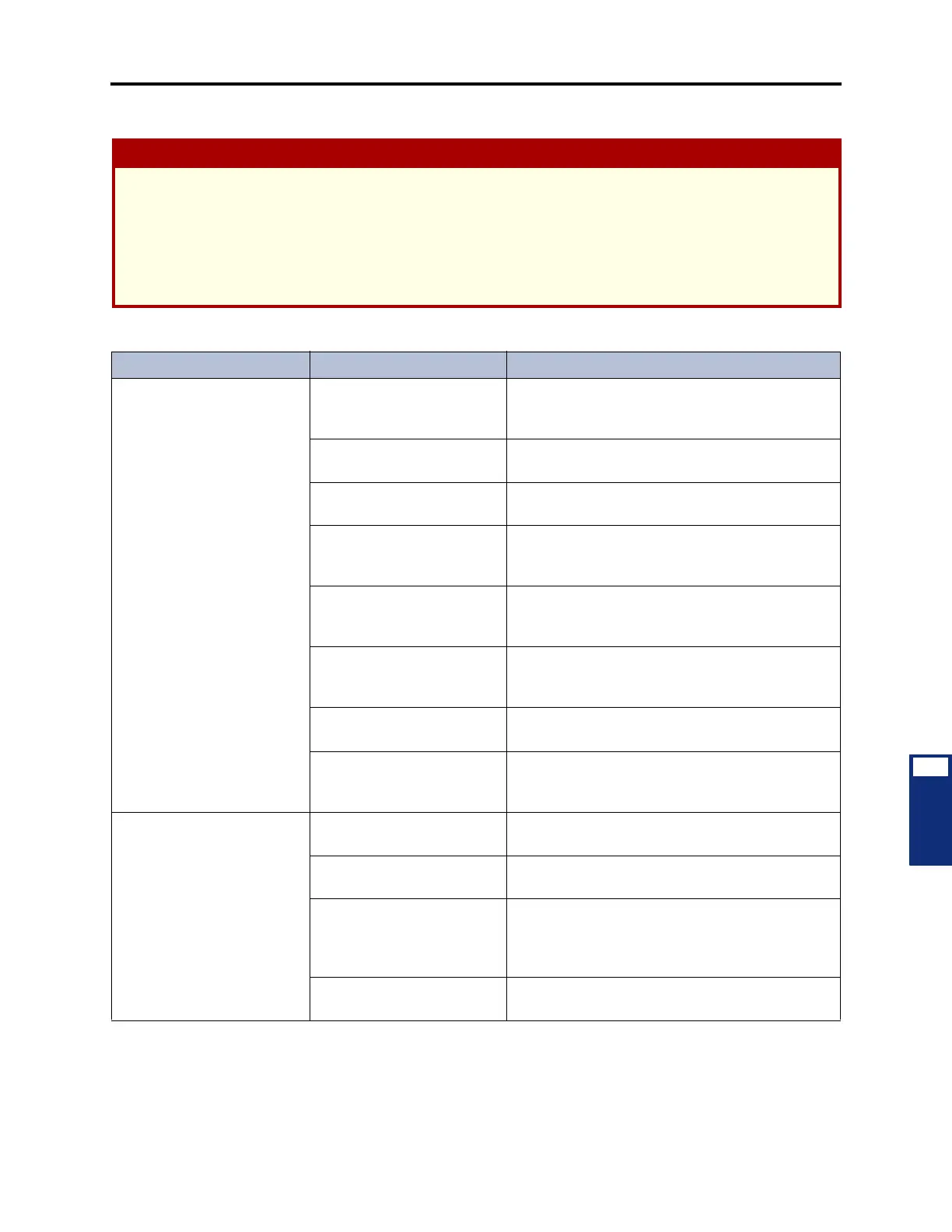
Table 7-21. IP Networking Troubleshooting Chart
Symptom Possible Cause Corrective Action
Cannot establish an IP con-
nection
The Ethernet cable is not
plugged into the IPRC and/or
data network (i.e., hub).
Plug the Ethernet cable into the IPRC and/or data
network.
The IPRC has the incorrect
boot code.
Upload the correct version of the IPRC code
(iprc_ipnc.hex). See page 3-178 for details.
The IPRC is not seated prop-
erly in the chassis.
Make sure the IPRC is properly seated.
NATs/firewalls are present. Remove the NATs/firewalls. The IPRC cannot work
behind firewalls or use NATs. See page 2-94 for
details.
The IP connection extension
for the node is not unique.
Make sure the IP connection extensions (P6XXY)
are unique. See page A-13 for a networking exam-
ple.
There is no Node IP Connec-
tion Group programmed for
the node.
Program a “P8XXX” Node IP Connection Group for
the networked nodes. See page 6-191 for details.
The IPRC does not have a
valid networking PAL.
Make sure the IPRC has the correct networking
PAL. See page 8-7 for a list of the available PALs.
The IP address and subnet
mask information for each
IPRC is not valid.
Make sure each IPRC has the correct IP address
and subnet mask programmed (see page 6-174).
Cannot make calls across
IPRCs
The IPRC does not have a
valid PAL.
Make sure the IPRC has the correct networking
PAL. See page 8-7 for a list of the available PALs.
No VoIP channels are avail-
able.
Make sure the IPRC has the correct networking
PAL. See page 8-7 for a list of the available PALs.
The remote IP address is
programmed incorrectly.
Make sure the off-node IP connections have the
correct Remote IP Address programmed (see
page 6-177). This address must match the IP
address programmed locally on that node.
The node cannot find the IP
connection.
Make sure the correct Node IP Connection Group
is added to the appropriate node (see page 6-191).



 To Next Page