Page 6-324
Programming
INTER-TEL
®
AXXESS
®
MANUAL VERSION 11.0 – May 2008
Music-On-Hold Profiles
B. MUSIC-ON-HOLD PROFILES
11.17 This section provides the instructions for creating a Music-On-Hold Profile for a Call
Routing Table (CRT). For complete information about this feature, see “Music-On-Hold for
Call-Routing Tables” on page 5-98.
Programming the Music-On-Hold Profiles
11.18 To program the Music-On-Hold Profiles for trunk groups:
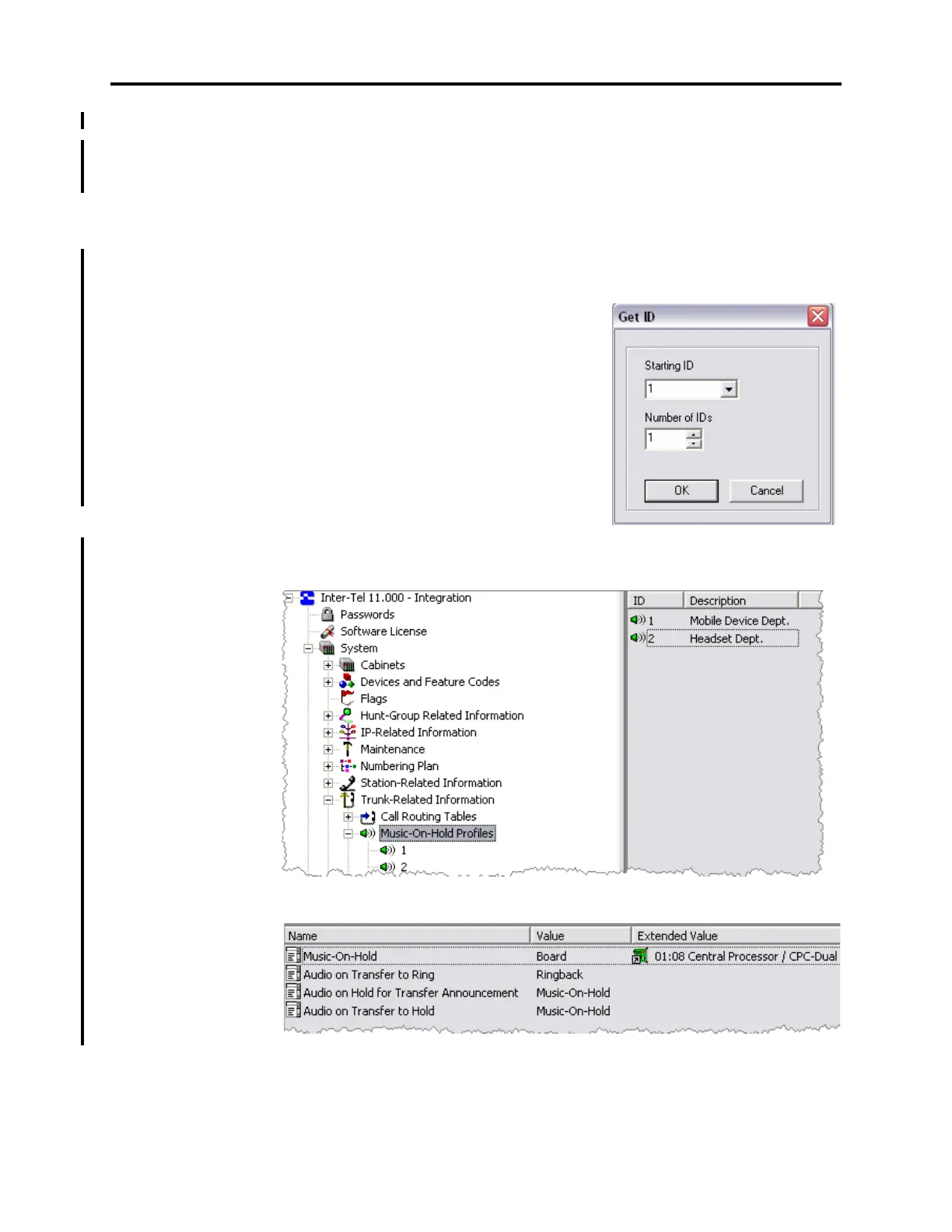
1. Go to System – Trunk-Related Information – Music-On-Hold Profiles.
2. Right-click Add to Music-On-Hold Profiles
List
in the right pane. The Get ID dialog box
appears.
3. Select the starting ID and the number of IDs (up
to 25) to create. For example, to create IDs 1–9,
select
1 as the “Starting ID” and 9 as the “Num-
ber of IDs.”
4. Click OK. The items are added to the list with
default values.
5. Click the desired Description field, and then
type the profile description.
6. Double-click one of the Music-On-Hold Profiles. The following screen appears.



 To Next Page