Page 7-43
Troubleshooting
INTER-TEL
®
AXXESS
®
MANUAL VERSION 11.0 – May 2008
Phone Issues
7
TROUBLE-
SHOOTING
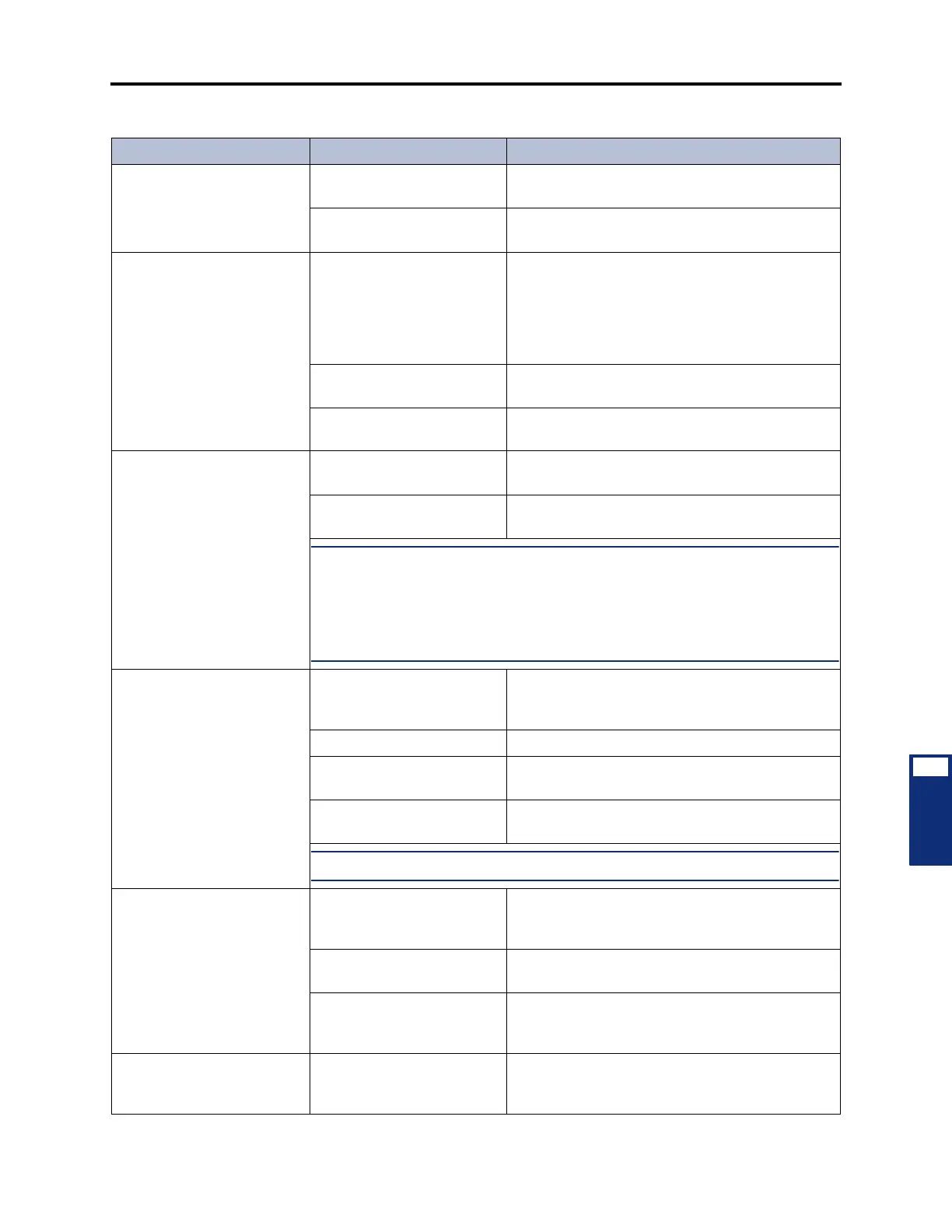
(Continued) Erratic phone
operation (lamp status incor-
rect)
Defective DKSC, EKSC, or
AKSC
Replace the associated DKSC, EKSC, or AKSC.
Defective CPC or CPU Card See page 7-3 for LED and system voltage informa-
tion. Replace the card if faulty.
A group of 8 or 16 phones
inoperative; no LED indica-
tion when a trunk button is
held down; all affected
phones are located on one
DKSC, EKSC, or AKSC
Defective station amphenol
connector or cable attached
to the associated DKSC,
EKSC, or AKSC
Remove the cable from the card. Using an ohm
meter, verify the pinout of the cable. (See the infor-
mation on page 3-44 to 3-59 in INSTALLATION.)
Ensure that 24VDC is present at the modular jack
and polarity is correct. Check for loose or open
connections in the station cabling and the line cord.
Defective cabling or DKSC,
EKSC, or AKSC
Replace the associated cabling or card.
Defective receptacle on the
chassis backplane
Replace the chassis backplane.
Phone squeals on outside
calls or when receiving a
handsfree intercom call from
a single-line station (feed-
back)
Speaker volume is too loud Reduce feedback by lowering speaker volume
using phone volume controls.
Poor acoustics Poor acoustics can cause poor quality on hands-
free calls. Try placing a private call.
NOTE: A two- to four-wire converter is used during communication between
phones and single-line stations. Reflection is a normal characteristic of these con-
verters. Feedback on intercom calls is eliminated when the single-line station user
places a private intercom call by pressing the pound [hash] (#) button before dialing
the intercom number or by entering the ring intercom always feature code – 377 (pro-
vided the phone user does not press the SPKR button to respond).
Cannot break CO dial tone Defective phone Perform the keyset self-test as described in
INSTALLATION, page 3-182, and replace the
phone if faulty.
Defective trunk card Replace defective trunk card.
Defective DKSC, EKSC, or
AKSC
Replace the associated DKSC, EKSC, or AKSC.
Defective CPC or CPU Card See page 7-3 for LED and system voltage informa-
tion. Replace the card if faulty.
NOTE: See also CO trunk problems on page 7-33.
Cannot obtain intercom dial
tone; no tone heard; CO
trunk works
Defective phone Perform the keyset self-test as described in
INSTALLATION, page 3-182, and replace the
phone if faulty.
Defective DKSC, EKSC, or
AKSC
Replace the associated DKSC, EKSC, or AKSC.
Defective CPC or CPU Card See page 7-3 for LED and system voltage informa-
tion. Replace the card if faulty.
Cannot obtain intercom dial
tone; no tone heard; CO
trunk works
Defective phone Perform the keyset self-test as described in
INSTALLATION, page 3-182, and replace the
phone if faulty.
Table 7-12. Phone Troubleshooting Chart (Continued)
Symptom Possible Cause Corrective Action



 To Next Page