Page 7-29
Troubleshooting
INTER-TEL
®
AXXESS
®
MANUAL VERSION 11.0 – May 2008
System Issues
7
TROUBLE-
SHOOTING
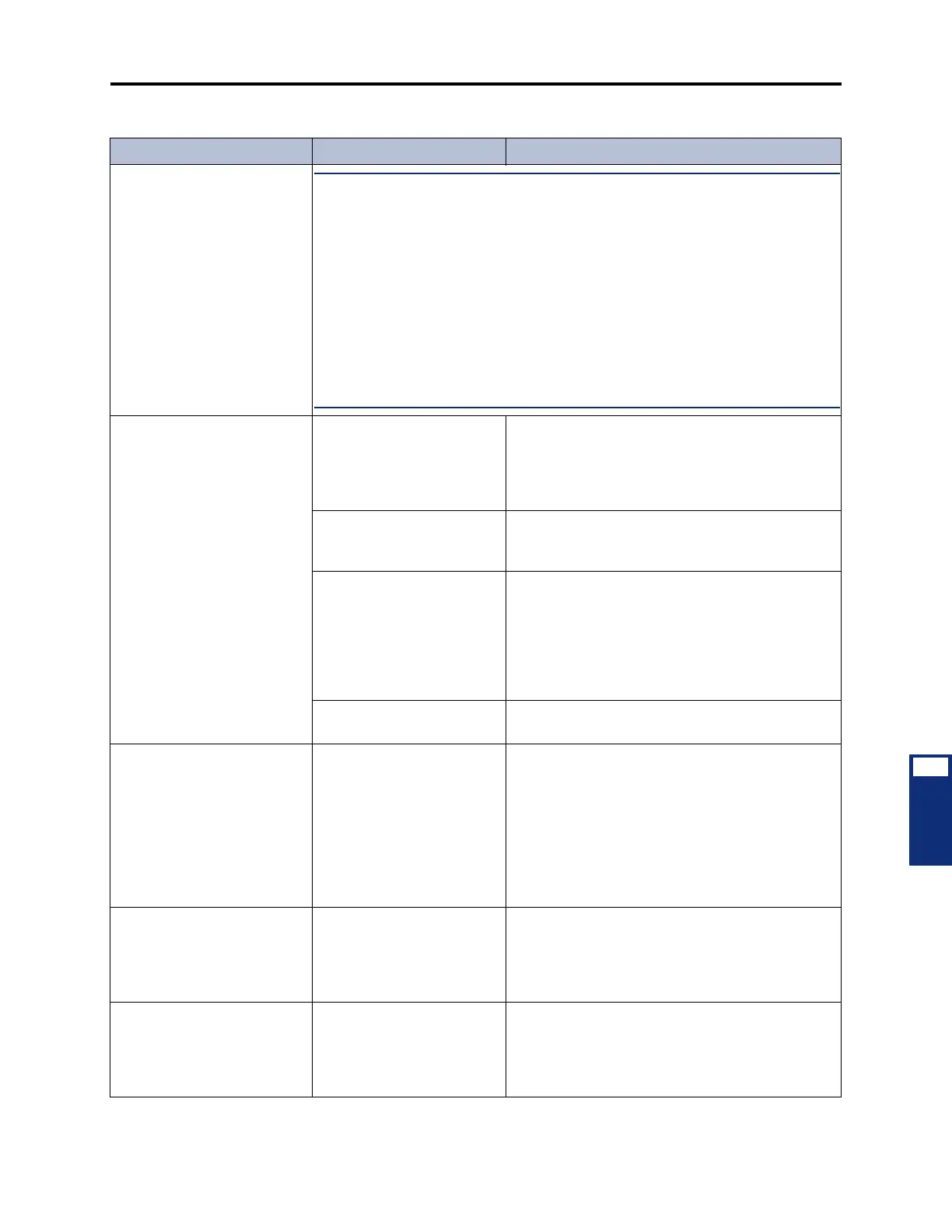
(Continued) RFI/EMI present
over conversations
NOTE: For further RFI/EMI troubleshooting assistance while on site, certified tech-
nicians should contact Technical Support with the following information:
1. Modulation (AM, FM, or other) and frequency of the interfering station (in Hz)
2. Broadcast power and distance between equipment chassis and broadcast
antenna
3. Who hears RFI:
– Outside call - inside party only?
– Outside call - outside party only?
– Outside call - both parties?
– Intercom call - one or both parties?
4. Type of instrument(s) on which RFI is heard (e.g., Basic Digital Phone, Stan-
dard Display Phone, etc.)
Faulty DID numbers displayed
at attendant stations
User error (after dialing the
correct 3- or 4-digit “base”
number, the user entered in
correct or incomplete “start”
digits)
Only valid DID “start” digits can be properly pro-
cessed by the system.
Programming error Ensure that all valid DID numbers have been pro-
grammed to ring in to the appropriate locations.
(See page 6-244 in PROGRAMMING.)
Defective DID trunk from
central office (the system is
receiving incomplete or muti-
lated DID “start” digits)
At the DKSC block, remove the bridging clips for
the trunk. On the system side of the block, use a
test set to verify the DID trunk connection and the
system's ability to accept and process valid digits.
Also, move the trunk to a known good DKSC cir-
cuit. If the problem follows the trunk, contact the
telephone company.
Defective SLA, DKSC, or
T1C
Replace the associated SLA, DKSC, or T1C.
Out of memory error while
loading DB Programming soft-
ware on the programming PC
Memory conflict with the
PC's autoexec.bat and/or
config.sys files
Rename autoexec.bat file to autoexec.sav (or
something similar) and rename config.sys file to
config.sav (or something similar). Then create a
basic config.sys file with:
files=51
device=c:osimem.sys
buffers=30
Reboot the PC without an autoexec.bat file and
then re-install the software.
DID numbers routed before all
digits are dialed
Non-programmable system
timer expiring before CO
completes digit transmission
The phone system allows seven seconds for DID
input. After seven seconds, the system routes the
call based on information received to that point.
The Central Office must complete DID digit trans-
mission within seven seconds.
The RXn LED on the ASX-
200BX ATM switch is lit red
The connection to the chas-
sis or CPS is down
Verify that the cables are connected properly. If
using a fiber connection, switch the RX/TX connec-
tors. If necessary, test the connection with a known,
good cable. Replace the defective cable, if neces-
sary.
Table 7-6. System Troubleshooting Chart (Continued)
Symptom Possible Cause Corrective Action



 To Next Page