Page 7-67
Troubleshooting
INTER-TEL
®
AXXESS
®
MANUAL VERSION 11.0 – May 2008
IP Networking Issues
7
TROUBLE-
SHOOTING
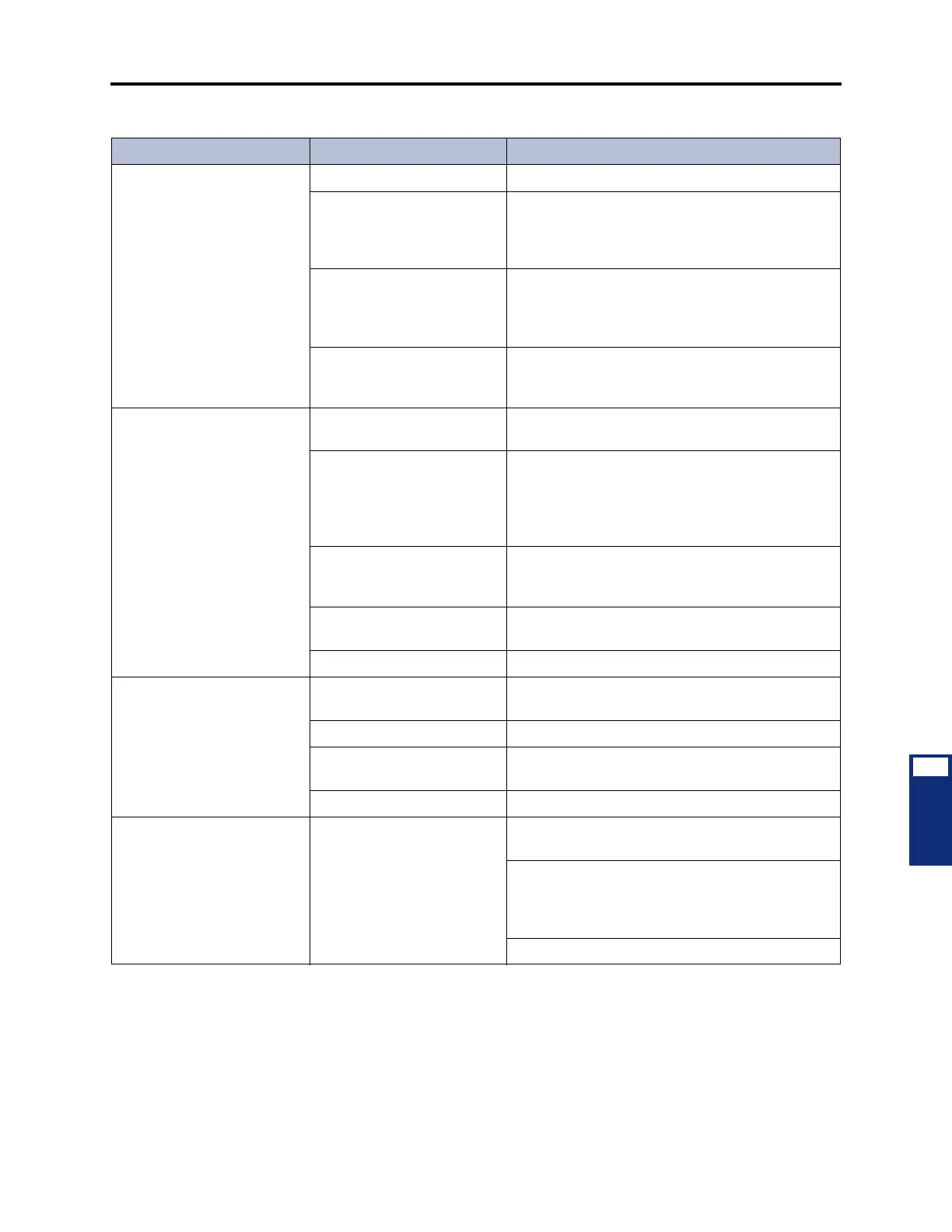
Echo is heard (half-duplex) Noise levels are too high. Talk at a lower volume while on a call.
Callers are talking at the
same time (doubletalk).
When simultaneous and similar audio on both
sides of the call is detected, the card may try to
cancel this perceived “echo,” causing audio and
echo problems. Try to avoid doubletalk.
The data network does not
meet the minimum specifica-
tions required for IP network-
ing.
Run the Network Qualifier to assess your data net-
work. Then verify that your data network meets the
minimum specifications (see page 2-94 for more
information).
The backplane configuration
settings (echo settings in par-
ticular) are not optimized.
Change the backplane configuration settings. See
page 6-173 for more information.
Cannot call devices on other
nodes after using the IPRC
Networking Wizard.
Wrong Off-Node IP Connec-
tion IP Address.
Check IP Connection IP Addresses on the local
and the remote nodes.
Missing IP Connection Group
or Off-Node IP Connection.
Verify that there's a Node IP Connection Group in
the target node's Node Trunk/IP Connection
Groups folder. Make sure there's an Off-Node IP
Connection in that NIPCG, and verify the IP
Address.
Missing IP Networking Port
License(s) or IP Networking
software License.
Check the License and premium features for Net-
working.
Wrong version of IPRC Firm-
ware installed.
Check your internet connection, and Upgrade IPRC
Firmware to version 8.1.2 or higher.
Internet connection is down. Check your Internet connection.
Cannot call devices on other
nodes after using the T1/E1
Networking Wizard.
No B-Channels. Make sure the PRI Card is online, and enough B-
Channels are equipped.
No Reference Clock. Check reference clock list on this and other nodes.
Bad License, no premium
features.
Make sure license and premium features are valid
for networking.
Old firmware. Make sure firmware is up-to-date.
Cannot import/export to/from
new target node after using
the Networking Wizard.
Networking is not pro-
grammed correctly.
Verify that there's a Node Trunk/IP Connection
Group to the remote node.
Verify that the Node Trunk/IP Connection Group
includes the Node Trunk Group or Off-Node IP
Connection to the remote node Depending on the
type of programming.
Refer to the Help file for each programming area.
Table 7-21. IP Networking Troubleshooting Chart (Continued)
Symptom Possible Cause Corrective Action



 To Next Page