Page F-15
Appendix F – Network Topology
INTER-TEL
®
AXXESS
®
MANUAL VERSION 11.0 – May 2008
Endpoint Configurations for Native, NAT, and Auto NAT Types
APPENDICES
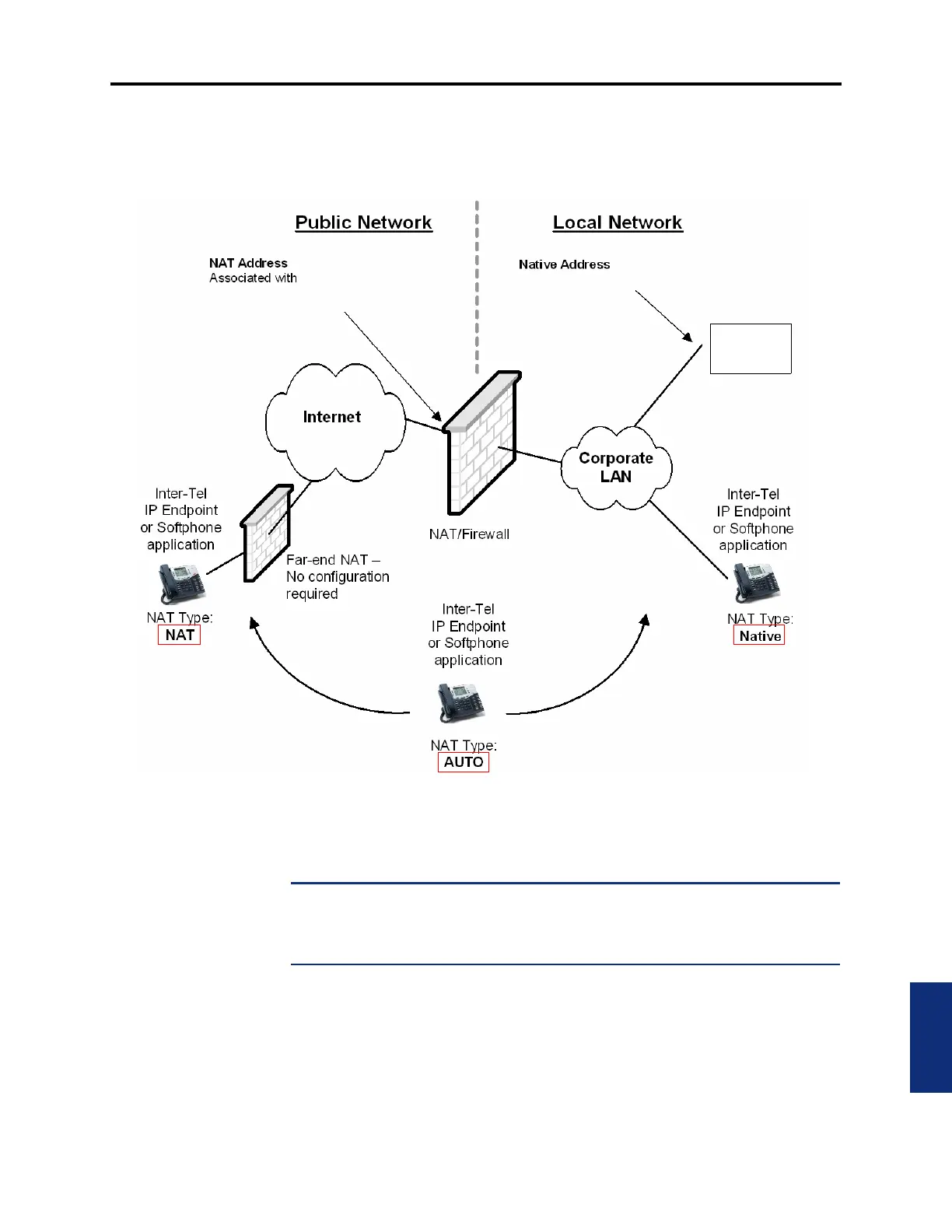
10.4 Figure F-1 depicts the configurations of endpoints programmed for the three NAT
Types in DB Programming.
Figure F-1. Endpoint Configurations for Native, NAT, and Auto NAT Types
10.5 To set up Near-End NAT Traversal for IP Endpoints on an Axxess system:
1. Configure the firewall/NAT device for a static mapping. This associates a public IP
address with the IPRC native private address.
NOTE: Configure the firewall security settings for the newly mapped IP address(es) as
described in “Port Usage Summary” on page F-20. Depending on how the particular fire-
wall defaults its security, failure to configure the security may result in no-audio condi-
tions or security vulnerabilities.
2.
In the System – Devices and Feature Codes – IP Connections folder, program the NAT
IP Address to be the public address that was associated with the native private address
in step 1 above.
3. In the System – Devices and Feature Codes – Stations folder, create an IP endpoint and
specify the MAC address (or device ID).
(one IP address per IPRC)
(one IP address per IPRC)
the Axxess Native IP Address
Axxess



 To Next Page