Page 5-277
System Features
INTER-TEL
®
AXXESS
®
MANUAL VERSION 11.0 – May 2008
DB Programming
FEATURES
5
52.24 Entry to the DB Programming feature at the Administrator stations can be protected
using a password. A password would prevent unauthorized users from altering the system data-
base.
NOTE: Passwords are very important to system security. Without sufficient password protec-
tion, the system database is vulnerable to unauthorized access.
52.25 Depending on the database changes made by the Administrator, the system may require
a reset after programming. If so, the system will prompt the Administrator for a reset and ask if
it should be done immediately or delayed. Delaying the reset would prevent interruption in ser-
vice. However, if a reset is required, it should be done as soon as possible to permit proper sys-
tem operation.
NOTE: A system reset will drop all calls in progress.
52.26 When entering alphanumeric information, such as a username, reminder message, or
do-not-disturb message, press the button or
USE ALPHA MODE/USE NUMERIC
MODE
menu button to switch back and forth between alphanumeric and numeric mode.
• In Numeric Mode: The keypad buttons are used to enter numbers 0-9, the pound
[hash] (#) button is used for entering a hyphen (-), and the asterisk (*) button is used for
entering a colon (:). For example, 1*00 would enter “1:00” in numeric mode.
• In Alphanumeric Mode: The keypad buttons are used to enter the desired letters, num-
bers, and punctuation. The number of times a button is pressed determines which char-
acter is entered. For example, 533266 would enter “JEAN” in English. When adjoining
characters are located under the same button, press the button to advance to the
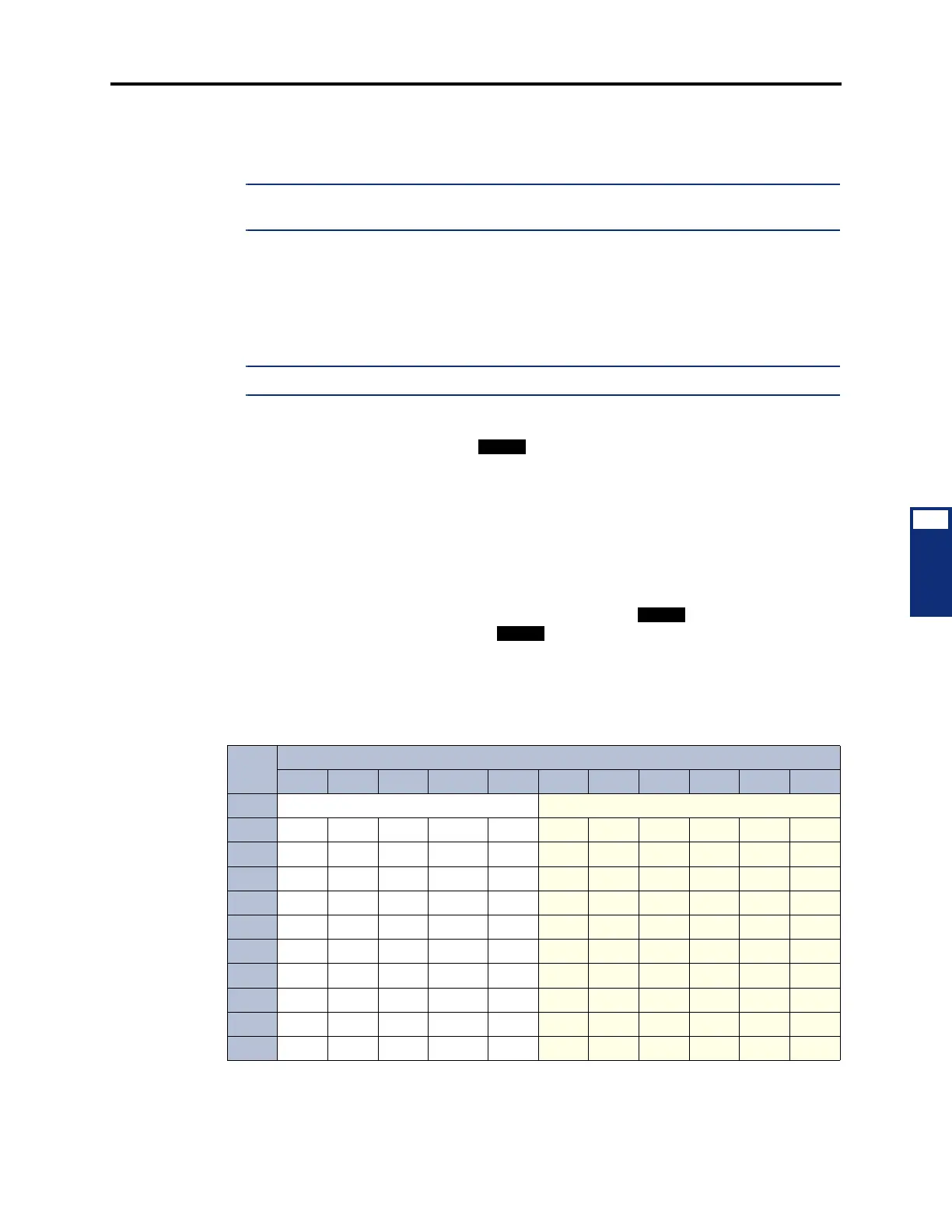
next character. For example, 66 6667776 would enter “NORM.” See the chart
below to program information in alphanumeric mode. (Note that letters correspond to
the letters printed on the keypad buttons.) The Japanese characters will be available
only if the Multilingual Support premium feature is licensed and the Administrator’s
Executive Display, Professional Display, Standard Display, Associate Display, Model
8520, or Model 8560 Phone is set for Japanese.
* The character available depends on the software version.
** The Japanese characters are available only if the Multilingual feature is enabled and Japanese is
installed as the secondary language.
Number of Times Button is Pressed
BTN 1 2 3 4 5 6 7 8 9 10 11
English/Spanish Characters Katakana Characters**
1 -&() 1A I U E O a
2 ABC’ 2KA KI KU KE KO i
3 DEF! 3 SA SHI SU SE SO u
4 GHI * 4 TA CHI TSU TE TO e
5 JKL# or /* 5 NA NI NU NE NO o
6 MNOÑ or #* 6 HA HI FU HE HO tsu
7 PQRS 7MA MI MU ME MO ya
8 TUV? 8YA YU YO . , yu
9 WXYZ 9RA RI RU RE RO yo
0 @:., 0WA WO N pa ba long



 To Next Page