Page 5-17
System Features
INTER-TEL
®
AXXESS
®
MANUAL VERSION 11.0 – May 2008
Station Feature Codes
FEATURES
5
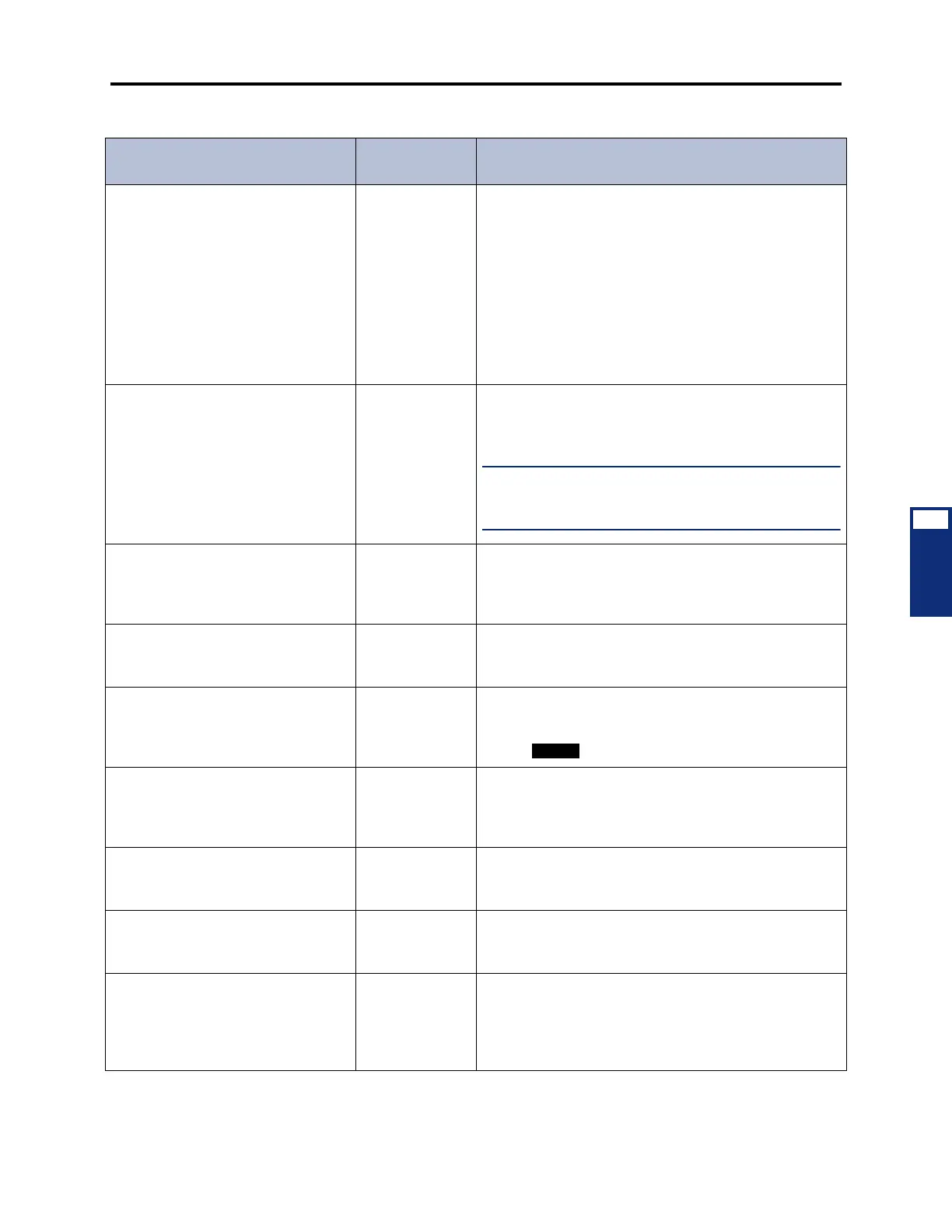
Display Outside Party Name On/Off 379 (Display Phone Only) Toggles the display between the
caller’s name and number while connected to a CO call
that has outside party name information. If there is no
outside party name or the Expanded CO Call Information
On Displays flag is disabled, the user hears a burst of
reorder tone and sees the CANNOT ACCESS FEATURE
display. If the Display Outside Party Name On/Off feature
code is programmed in a user-programmable button with
a lamp, the lamp is lit when the outside party name is
enabled and off when the outside party number is
enabled.
Display Time/Date 300 (Display Phones Only) Temporarily displays the system
date and time, username, and extension number during
a call or when other displays are shown.
NOTE: For SIP (Session Initiation Protocol) endpoints,
this feature code displays the IP address of the endpoint,
not the time/date.
Do-Not-Disturb
Do-Not-Disturb Cancel
Do-Not-Disturb On/Off
370
371
372
Halts all intercom calls, transferred calls, and pages to
the station. The cancel code returns the station to normal
operation. The ON/OFF code can be used to turn do-not-
disturb on or off. (Inter-Tel phones use the DND button.)
Do-Not-Disturb Override 373 (Inter-Tel Phones Only) If enabled in the database,
allows the phone user to break through another station’s
do-not-disturb mode when placing an intercom call.
Enhanced Speakerphone Enable 310 (Digital Phones Only) When entered at a digital phone,
this feature code enables the enhanced speakerphone
as described on page 5-124. (Digital phones can also
use the + Speaker buttons.)
Feature Key Default 395 (Inter-Tel Phones Only) Phones have user-programmable
feature buttons that can be set to enter feature codes.
This code returns the user-programmable buttons to the
database default values.
Group Listen 312 (Inter-Tel Phones Only) Allows a user to transmit a con-
versation over the phone speaker while in handset or
headset mode.
Handsfree On/Off 319 (Inter-Tel Phones Only) Disables/enables the phone’s
handsfree intercom answering. Incoming intercom calls
ring as private calls if handsfree answering is disabled.
Headset Enable
Headset Disable
Headset On/Off
315
316
317
(Inter-Tel Phones Only) Signals the system that a head-
set has been connected to the phone when entering the
enable code. The disable code returns the phone to nor-
mal operation. The on/off feature code can be used to
toggle the feature ON or OFF.
Table 5-2. Station Feature Codes (Continued)
Feature Name
U.S. [Europe]
Code
Definition



 To Next Page