Page 6-89
Programming
INTER-TEL
®
AXXESS
®
MANUAL VERSION 11.0 – May 2008
Networking Wizard
PROGRAMMING
6
16.6 The new node is added to the Target Remote Node screen of the wizard. If you want to
network to this new node, select it from the list and click
Next.
NOTE: Although the new node is available on the wizard’s screen, it will not be added to the
database unless you select it as the target node and complete the networking wizard. If you cre-
ate the first remote node on the system using the networking wizard, DB Studio automatically
shuts down when you click Finish.
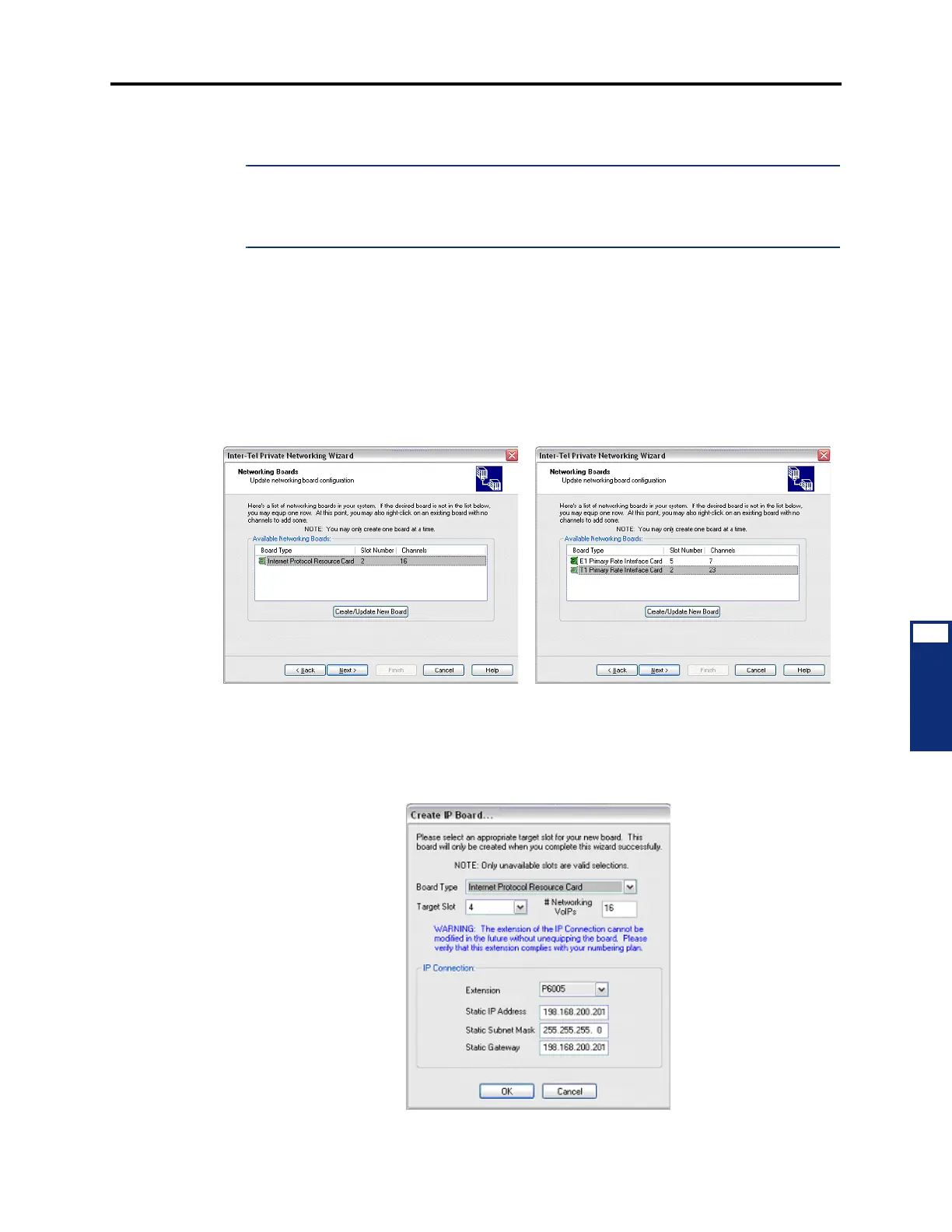
16.7 Selecting/Creating Networking Boards: The next screen of the networking wizard
allows you to select a networking board from the list of boards in the system. If you are config-
uring IPRC networking, a list of available IPRCs appears. If you are configuring T1/E1 net-
working, a list of available T1/E1 PRI Cards appears.
16.8 Select a board from the list and then click
Next. If the system does not have an avail-
able networking board, you can create and configure one by clicking
Create/Update New
Board
.
16.9 To create and configure a new IPRC:
1. Click Create/Update New Board. The Create IP Board dialog box appears as shown
below. The Board Type is pre-populated as Internet Protocol Resource Card, and cannot
be changed.
IPRC Networking
T1/E1 Networking



 To Next Page