Page 6-91
Programming
INTER-TEL
®
AXXESS
®
MANUAL VERSION 11.0 – May 2008
Networking Wizard
PROGRAMMING
6
16.12 The new board is added to the Networking Boards screen of the wizard. If you want to
use this new board, select it from the list and click
Next.
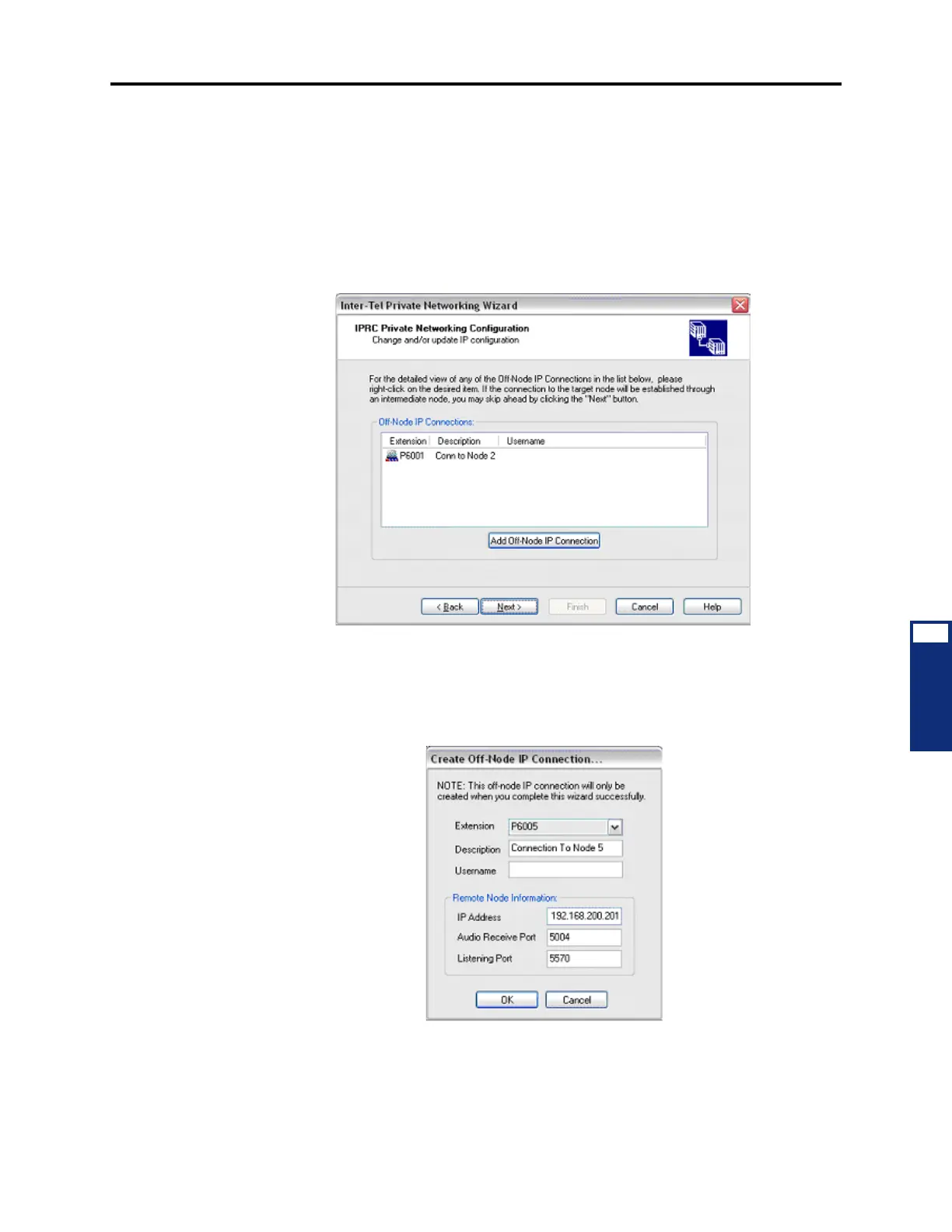
16.13 Updating the IP/PRI Configuration: The fourth screen of the wizard allows you to
configure private networking for the IPRC or the T1/E1 PRI card. This screen differs accord-
ing to the type of networking that you are configuring.
16.14 Configuring IPRC Private Networking: Select an existing Off-Node IP connection
and then click
Next. If there are off-node IP connections, you can create one by clicking Add
Off-Node IP Connection.
16.15 To create an off-node IP connection:
1. Click Add Off-Node IP Connection. The Create Off-Node IP Connection dialog box
opens as shown below.
2. Select an Extension for the connection using the drop-down list box.
3. Enter a Description for the connection.
4. Enter the Username for the connection.



 To Next Page