Page 6-92
Programming
INTER-TEL
®
AXXESS
®
MANUAL VERSION 11.0 – May 2008
Networking Wizard
5. Update the IP Address for the remote node.
6. Update the Audio Receive Port for the remote node, if necessary.
7. Update the Listening Port for the remote node, if necessary.
8. Click OK.
16.16 The new IP connection is added to the IPRC Private Networking Configuration screen
of the wizard.
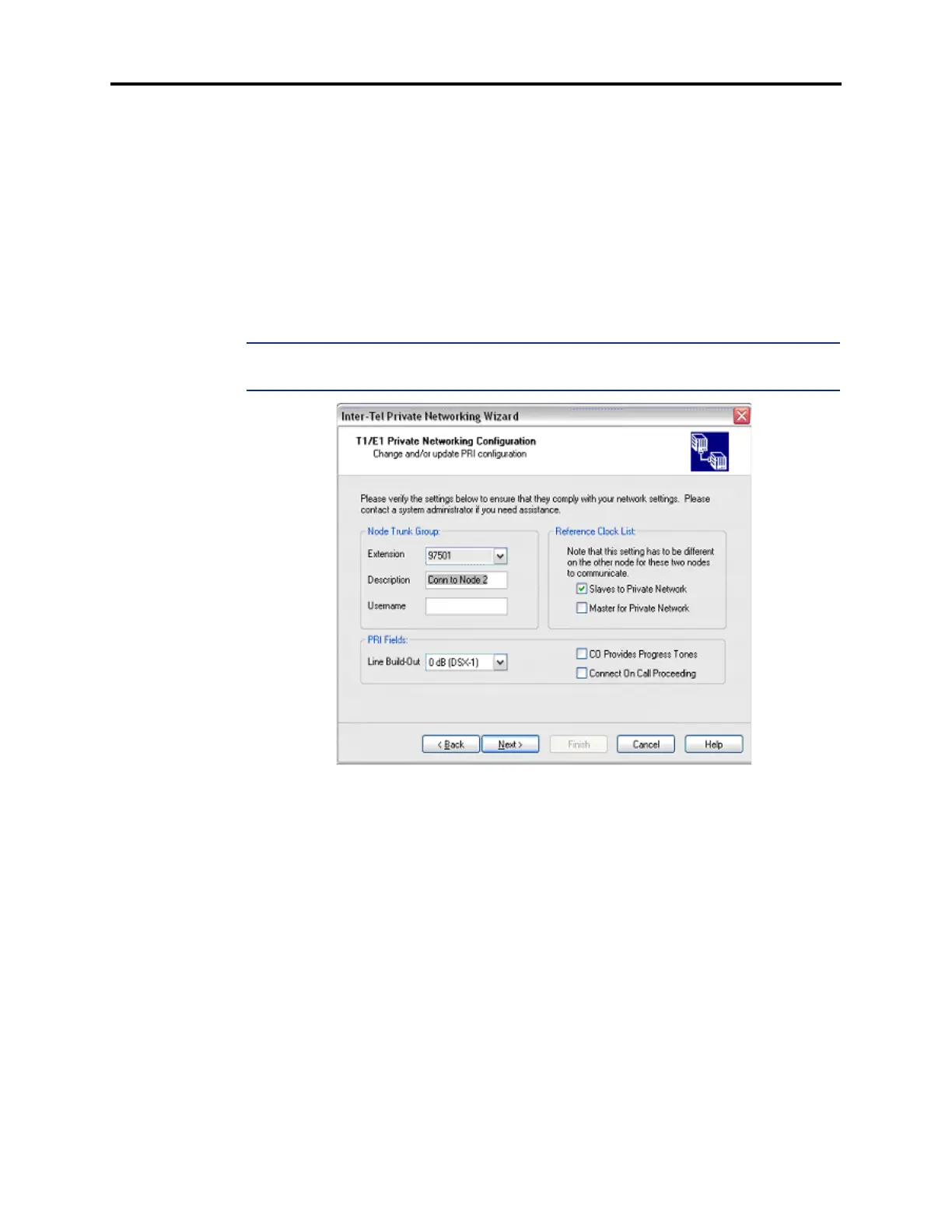
16.17 Configuring T1/E1 Private Networking: If a Node Trunk Group exists for the target
node, its information appears on the fourth screen of the networking wizard as shown below.
You can change or update the PRI configuration by modifying the fields on this screen.
NOTE: A warning appears on this screen if the board you selected is being used in a connec-
tion to another node.
16.18 To update PRI configuration:
1. Select an Extension for the Node Trunk Group using the drop-down list box.
2. Enter a Description for the Node Trunk Group.
3. Enter a Username for the Node Trunk Group.
4. Select a Line Build-Out using the drop-down list box, if necessary.
5. Modify the Reference Clock List, if necessary.
6. Select CO Provides Progress Tones, if desired.
7. Select Connect On Call Proceeding, if desired.
8. Click Next.



 To Next Page