Page 6-250
Programming
INTER-TEL
®
AXXESS
®
MANUAL VERSION 11.0 – May 2008
Trunks
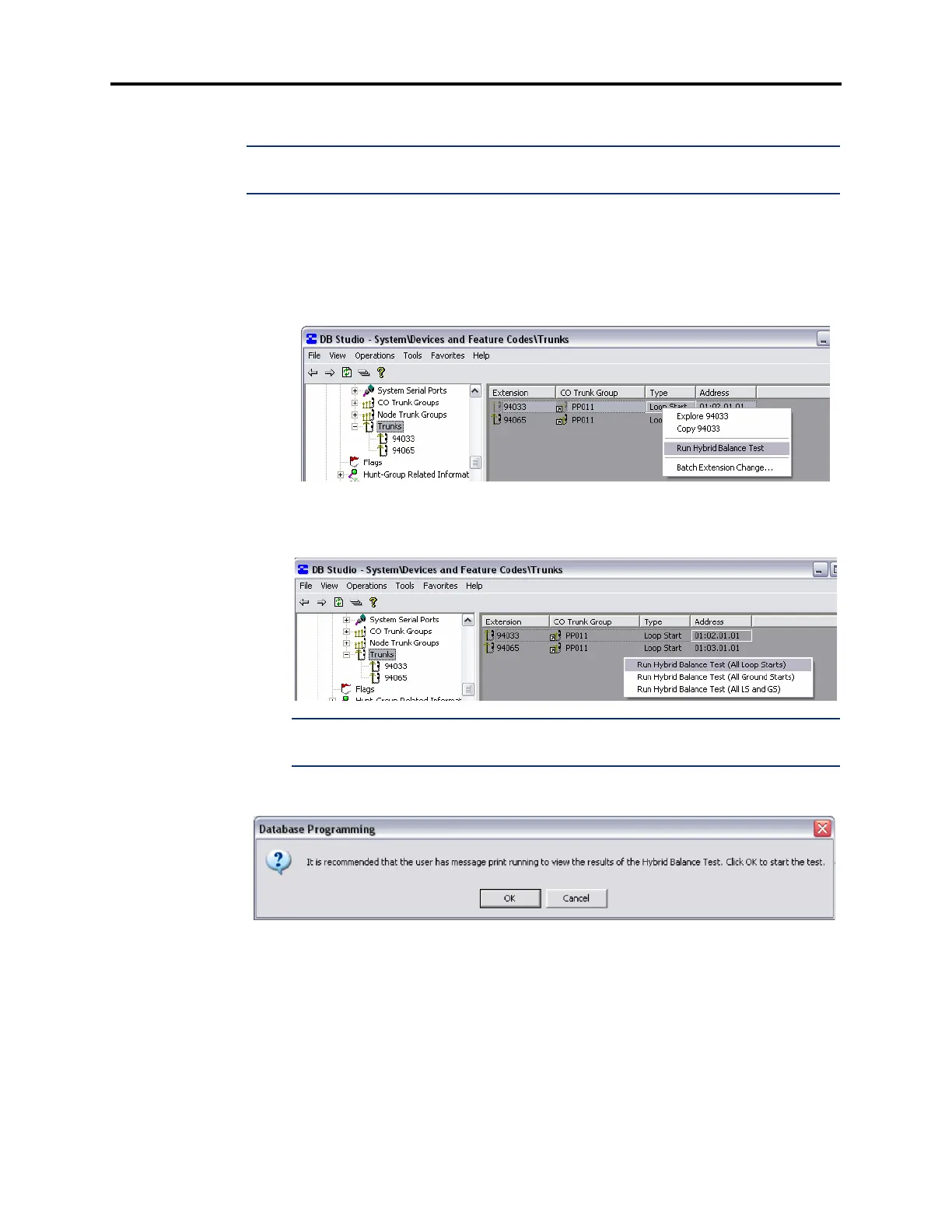
4.356 To run the Hybrid Balance Test:
NOTE: Proceed only if the “Print Expanded Message Print” capability has been enabled
(page 6-248) and the “CO Timeout in seconds” timer is set to 4 (page 6-249).
1.
From the left pane of DB Studio, select System – Devices and Feature Codes – Trunks.
A list of trunks appears in the right pane, identified by Extension, CO Trunk Group,
Type, and Address.
2. For a single trunk, right-click the extension in the Extension, Type, or Address column
of the desired trunk. On the menu, select
Run Hybrid Balance Test.
For all trunks, right-click the background area of the Trunks window, and select
Run
Hybrid Balance Test (All Loop Starts)
, Run Hybrid Balance Test (All Ground Starts),
or
Run Hybrid Balance Test (All LS and GS).
NOTE: While the Hybrid Balance Test runs, the selected trunk(s) are placed in a Busy
condition.
3.
When the following window displays, click OK.



 To Next Page