SubpanelVideoData
(FromSystemMemory)
DefaultPixelData
(DPD)
Threshold
(LPPT)
Partof
VideoData
LineN
Line0
HOLS=0
Panel
SubpanelVideoData
(FromSystemMemory)
DefaultPixelData
(DPD)
Threshold
(LPPT)
PartofDPD
LineN
Line0
HOLS=1
Panel
Registers
www.ti.com
978
SPRUH91D–March 2013–Revised September 2016
Submit Documentation Feedback
Copyright © 2013–2016, Texas Instruments Incorporated
Liquid Crystal Display Controller (LCDC)
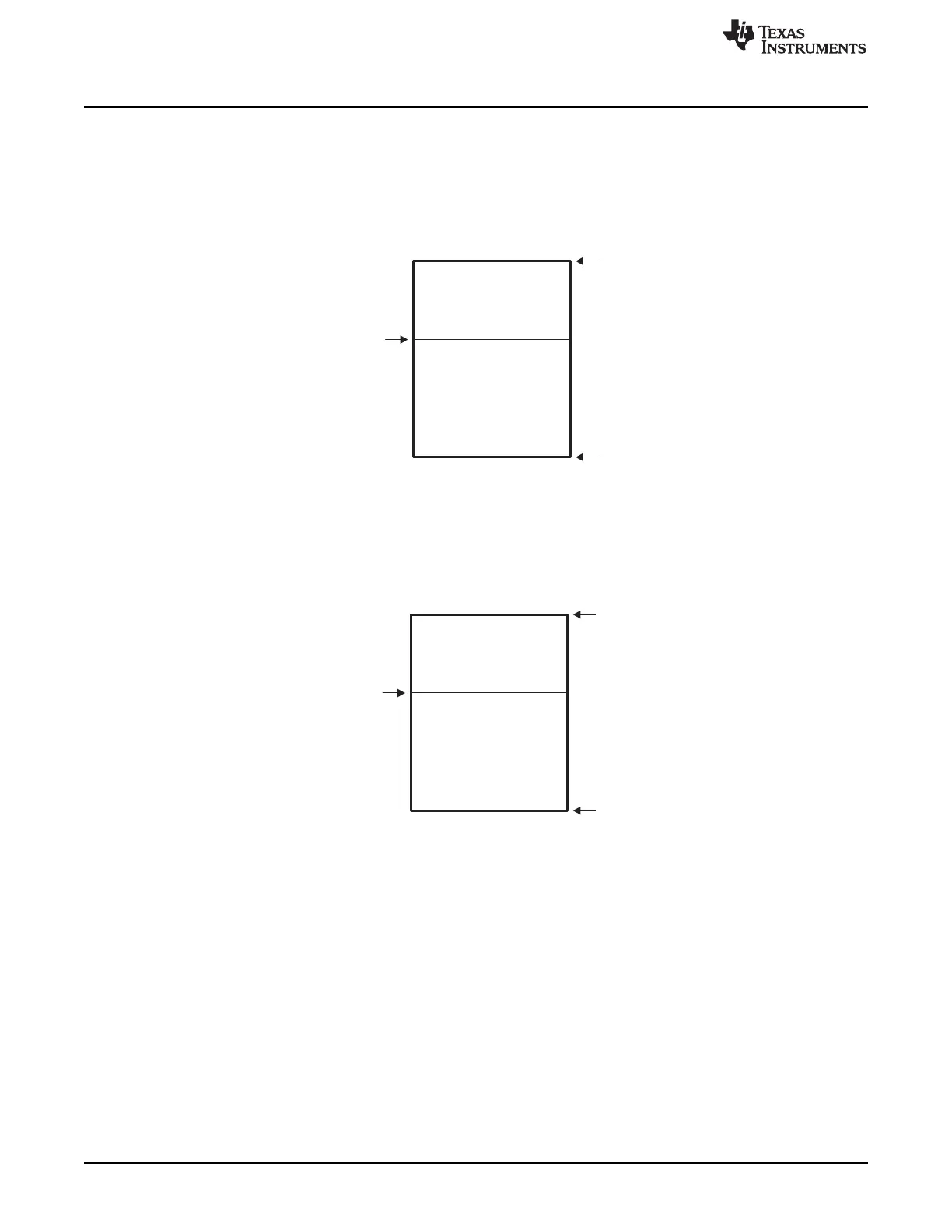
23.3.12.3 High Or Low Signal (HOLS)
The HOLS bit indicates the position of the subpanel compared to the LPPT value. When HOLS = 1, the
image from system memory is displayed above the threshold value. The threshold value is the line
number where the DPD value begins to be displayed. The rest of the screen is filled with DPD value.
Figure 23-39. Subpanel Display: SPEN = 1, HOLS = 1
When HOLS = 0, the beginning of the screen is filled with DPD value until the LPPT excluded. From the
LPPT line number, the rest of the screen (below LPPT) displays the image from system memory.
Figure 23-40. Subpanel Display: SPEN = 1, HOLS = 0
The bottom of the panel is line 0, and top line of the panel is Line N (where N is the number of lines-per-
panel). For example, if you want to display four lines of video data at the bottom of the panel, the correct
settings are HOLS = 0 and LPPT = 3. Here, the amount of video data to be transferred from the
DMA_LCD channel is only four lines.
If the LPPT is above the number of LPP, then:
• When HOLS = 1: panel with default data (whole panel is filled with DPD value).
• When HOLS = 0: normal panel (whole panel is filled with video data from the frame buffer).







 To Next Page