www.ti.com
Registers
955
SPRUH91D–March 2013–Revised September 2016
Submit Documentation Feedback
Copyright © 2013–2016, Texas Instruments Incorporated
Liquid Crystal Display Controller (LCDC)
23.3.4 LCD LIDD Control Register (LIDD_CTRL)
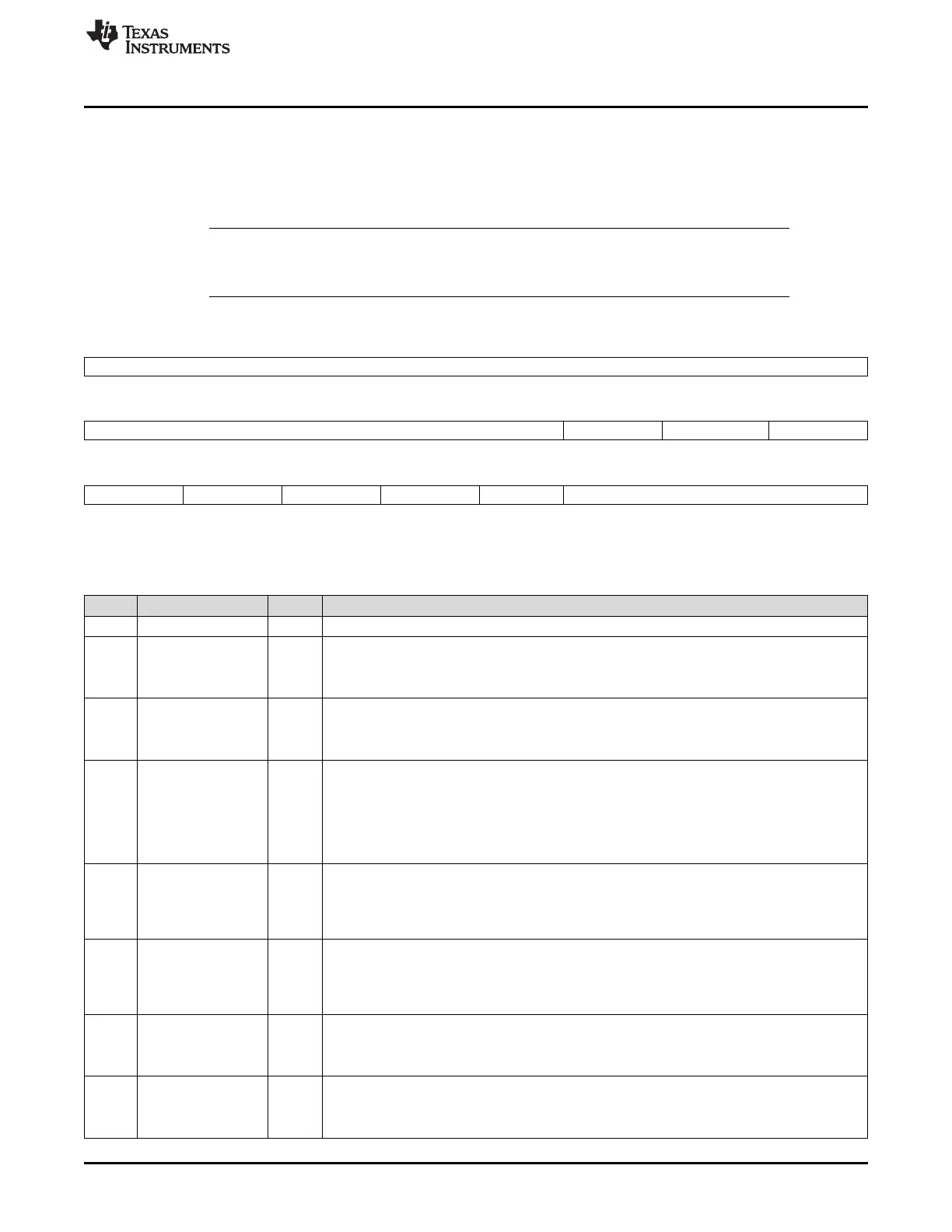
The LCD LIDD control register (LIDD_CTRL) contains the polarity controls for LIDD output signals (to
account for variety in the external LCD display/peripheral signal requirements), and the LIDD type select
bits. These bits are not valid in Raster mode (when LCD control register bit 0 = 1). The LIDD_CTRL is
shown in Figure 23-18 and described in Table 23-14.
NOTE: To activate DMA to drive LIDD interface, all other control bit-fields must be programmed
before setting LIDD_DMA_EN = 1 and must also disable LIDD_DMA_EN bit when changing
the state of any control bit within the LCD controller.
Figure 23-18. LCD LIDD Control Register (LIDD_CTRL)
31 16
Reserved
R-0
15 11 10 9 8
Reserved DONE_INT_EN DMA_CS0_CS1 LIDD_DMA_EN
R-0 R/W-0 R/W-0 R/W-0
7 6 5 4 3 2 0
CS1_E1_POL CS0_E0_POL WS_DIR_POL RS_EN_POL RSPOL LIDD_MODE_SEL
R/W-0 R/W-0 R/W-0 R/W-0 R/W-0 R/W-0
LEGEND: R/W = Read/Write; R = Read only; -n = value after reset
Table 23-14. LCD LIDD Control Register (LIDD_CTRL) Field Descriptions
Bit Field Value Description
31-11 Reserved 0 Reserved
10 DONE_INT_EN LIDD Frame Done Interrupt Enable
0 Disable LIDD Frame Done interrupt
1 Enable LIDD Frame Done interrupt (seen on LCD Status Reg bit 0)
9 DMA_CS0_CS1 CS0/CS1 Select for LIDD DMA writes
0 DMA writes to LIDD CS0
1 DMA writes to LIDD CS1
8 LIDD_DMA_EN LIDD DMA Enable
0 Deactivate DMA control of LIDD interface; DMA control is released upon completion of transfer
of the current frame of data (LIDD Frame Done) after this bit is cleared. The MPU has direct
read/write access to the panel in this mode
1 Activate DMA to drive LIDD interface to support streaming data to "smart" panels. The MPU
cannot access the panel directly in this mode
7 CS1_E1_POL Chip Select 1/Enable 1 (Secondary) Polarity Control
0 Do Not Invert Chip Select 1/Enable 1
1 Invert Chip Select 1/Enable 1 Chip Select 1 is active low by default; Enable 1 is active high by
default
6 CS0_E0_POL Chip Select 0/Enable 0 (Primary) Polarity Control
0 Do Not Invert Chip Select 0/Enable 0
1 Invert Chip Select 0/Enable 0 Chip Select 0 is active low by default; Enable 0 is active high by
default
5 WS_DIR_POL Write Strobe/Direction Polarity Control
0 Do Not Invert Write Strobe/Direction
1 Invert Write Strobe/Direction Write Strobe/Direction is active low/write low by default
4 RS_EN_POL Read Strobe/Enable Polarity Control
0 Do Not Invert Read Strobe/Enable
1 Invert Read Strobe/Enable Read Strobe is active low by default; Enable is active high by default



 To Next Page