View NE Inventory data
264
WebEML User Manual
The configuration report includes Remote Inventory data. The Remote Inventory List
is a read-only screen that lists remote inventory data present in the NE. Remote
inventory data available is as follows:
• Status
• Company Identifier
• Mnemonic
• CLEI Code
• Part Number
• Software Part Number
• Factory Identifier
• Serial Number
• Date Identifier
• Date
• Customer Field
34.3 Procedures
This section provides the following procedures:
• To download provisioning data using JUSM
• To save NE Inventory data
• To print NE Inventory data
• To download provisioning data using Web Server
To download provisioning data using JUSM
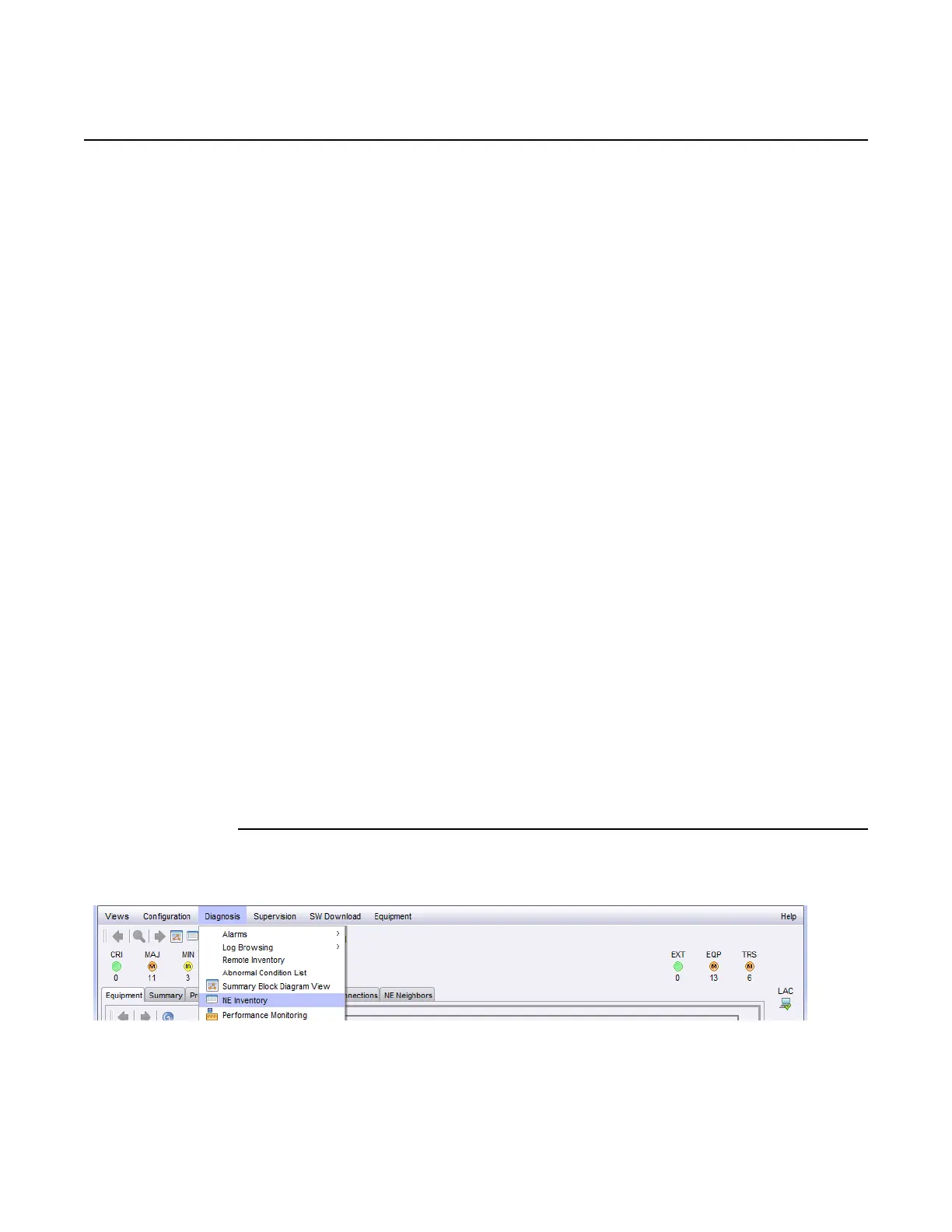
1. From the main menu bar, select Diagnosis > NE Inventory. See Figure 150.
Figure 150 NE Inventory main menu bar path
The NE Inventory window opens. See Figure 151.
Release 7.0.0 3DB 19286 ACAA Issue 01



 To Next Page