Embedded SRAM (eSRAM) Controllers
UG0331 User Guide Revision 15.0 197
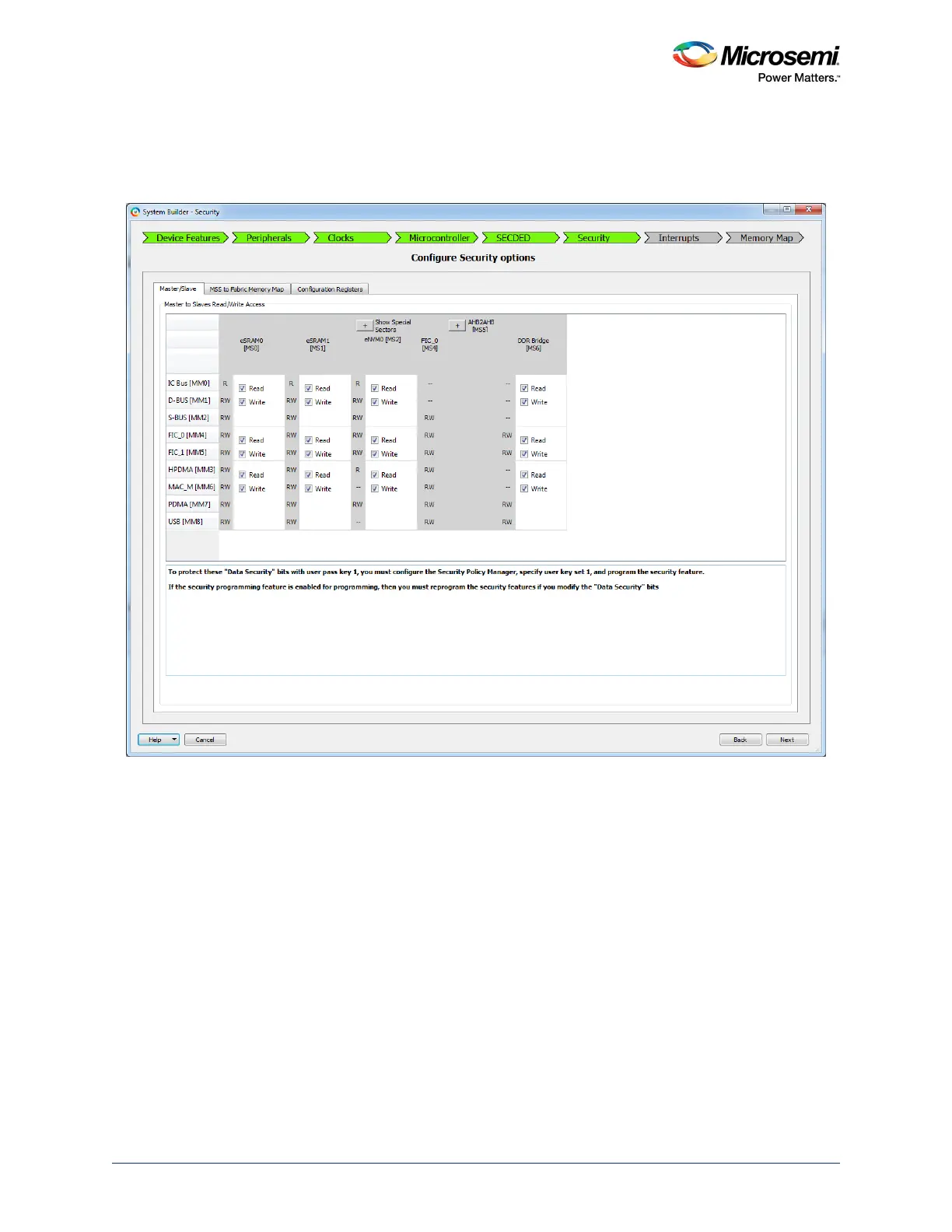
3. Navigate to the Security tab to select the read and write access permissions of eSRAM for different
masters as shown in the following figure. The read and write permission for different masters are
available for data and design security enabled devices like M2S050TS only. For more information on
configuring the security options, refer to SmartFusion2 MSS Security Configuration.
Figure 100 • System Builder - Security Tab
4. Navigate to the Memory Map tab giving the required data in the rest of the System Builder tabs
and click Finish to proceed with creating the MSS Subsystem.
5. Do required Pin connections and Save the project. Generate the SmartDesign in Libero by clicking
Generate Component.
6. Double-click Run PROGRAM Action in the Libero Design Flow window to program the
SmartFusion2 device.
Note: Refer to the Accessing eNVM and eSRAM from the FPGA Fabric Logic Application Note (to be
released) for information on how to access the eSRAM using FPGA fabric logic.





 To Next Page