CAN Controller
UG0331 User Guide Revision 15.0 443
12.3.1 Peripheral Signals Assignment Table
The CAN configurator window is divided into two main sections:
• The Configuration window displays all the Assignment Options.
• The Connectivity Preview window shows a graphical view based on the configurations and
selections for the highlighted signal row.
There are no hardware configuration options for the CAN peripheral.
The following table summarizes the valid connections for different configurations that are available in the
CAN configurator dialog.
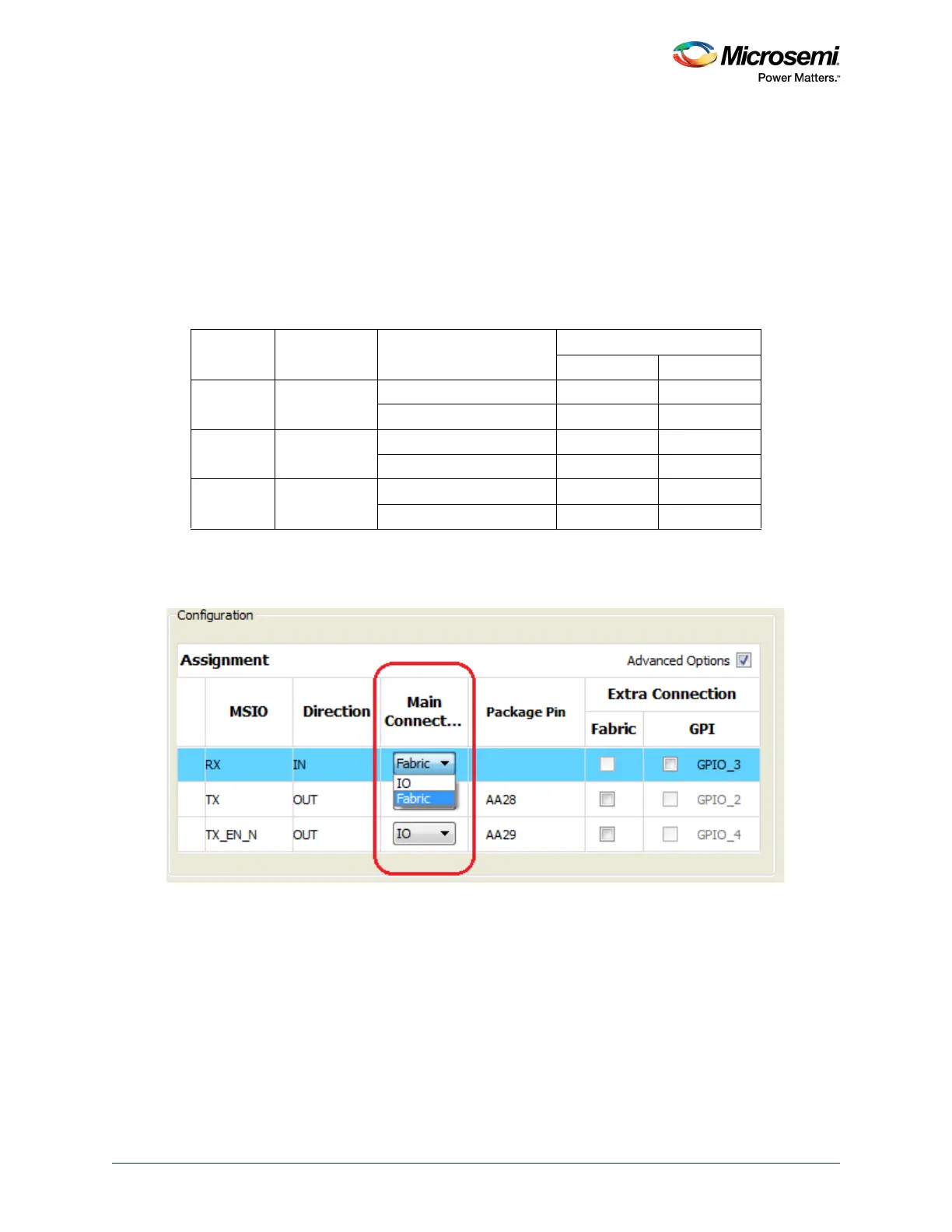
Each port is connected to the allocated CAN MSIO or to the fabric through the Main Connection
drop-down menu, as shown in the following figure.
Figure 171 • Main Connection Options - Either MSIO or Fabric
Table 437 • Summary of Different Valid CAN Connections
CAN Port Direction Main Connection
Extra Connection
Fabric GPIO
RX IN CAN MSIO Yes Yes
Fabric N/A N/A
TX OUT CAN MSIO Yes N/A
Fabric N/A N/A
TX_EN_N OUT CAN MSIO Yes N/A
Fabric N/A N/A




 To Next Page