APB Configuration Interface
UG0331 User Guide Revision 15.0 790
25.2.2 FIC_2 Use Models
This section explains the use models and provides directions for using FIC_2 in an application. The
design is created using the System Builder flow.
25.2.2.1 Use Model 1: Configuring MSS DDR
•Select Use System Builder while creating a new project from the Design Templates and Creators
panel in Libero SoC.
• Follow the steps in the System builder - Device Features GUI with default settings and generate
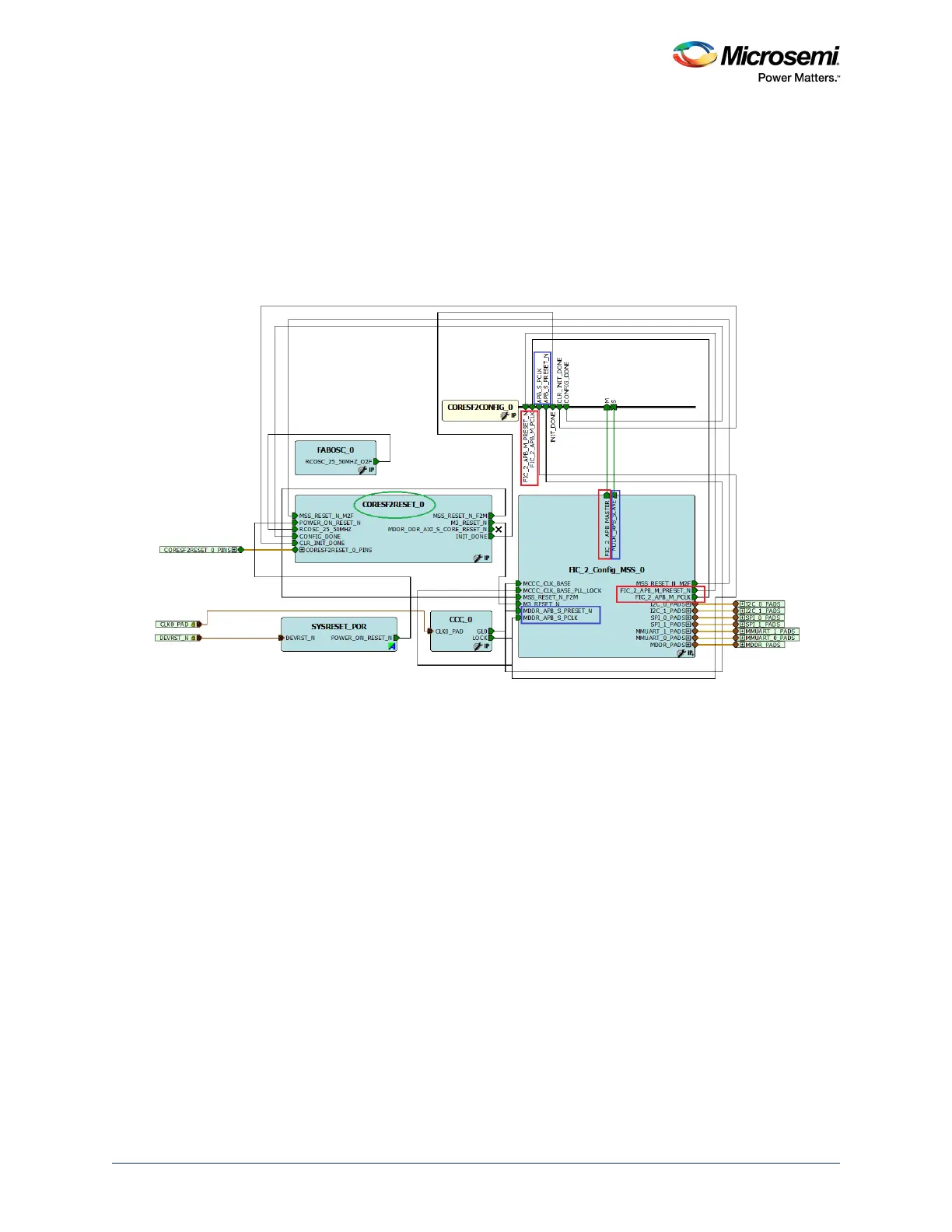
the design. The following figure shows the generated design when opened in SmartDesign.
Figure 362 • MSS DDR Design with APB Configuration Interface
FIC_2 APB master signals are shown in the boxes outlined in red, while MSS DDR APB slave signal are
shown in the boxes outlined in blue. These signals are connected toCoreSF2Config. In addition to APB
configuration signals, CoreSF2Config has a few other signals (CONFIG_DONE, CLR_INIT_DONE, and
INIT_DONE) that are connected to CoreSF2Reset. CoreSF2Reset handles sequencing of reset signals
in SmartFusion2 devices. It is particularly concerned with resets related to peripheral blocks (MDDR,
FDDR, and SERDESIF blocks). CoreSF2Reset soft IP is available in the Libero SoC IP catalog. Refer to
the CoreSF2Reset Handbook for port lists, port descriptions, and design flow.




 To Next Page