APB Configuration Interface
UG0331 User Guide Revision 15.0 791
25.2.2.2 Use Model 2: Configuring SERDES
•Select Use System Builder while creating a new project from the Design Templates and Creators
panel in Libero SoC.
•Select SERDESIF_0 in the System builder - Device Features GUI. Follow the rest of the steps with
default settings and generate the design. The following figure shows the top-level components of the
generated design.
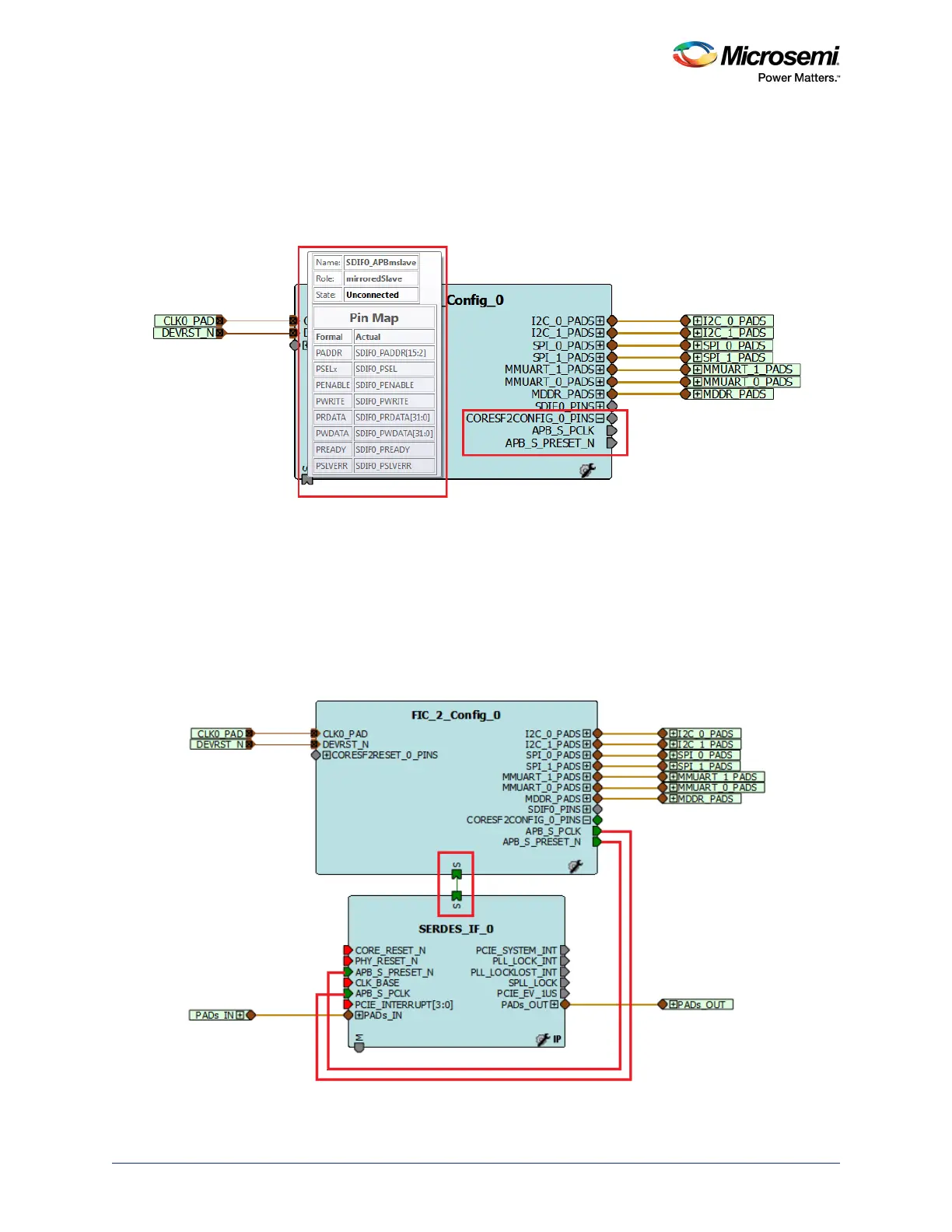
Figure 363 • Top-Level Components with APB Configuration Interface Signals
The signals in the boxes outlined in red show the CoreSF2Config mirrored APB slave port that should be
connected to the APB slave port of the SERDES block to be configured. If you open this component in
SmartDesign, the canvas shows a hierarchical view of the design components (for example,
CoreSF2Configand CoreSF2Reset) with APB configuration interfaces, as shown in Figure 362,
page 790.
• Instantiate the High Speed Serial Interface (SERDES_IF) macro in SmartDesign and connect the
CoreSF2Config mirrored APB slave port with APB slave port of the SERDES_IF block, as shown in
the following figure.
Figure 364 • Interfacing of CoreSF2Config Mirrored APB Slave with SERDES_IF Block




 To Next Page