Reset Controller
UG0331 User Guide Revision 15.0 668
3. Follow the rest of the steps with default settings and generate the design.
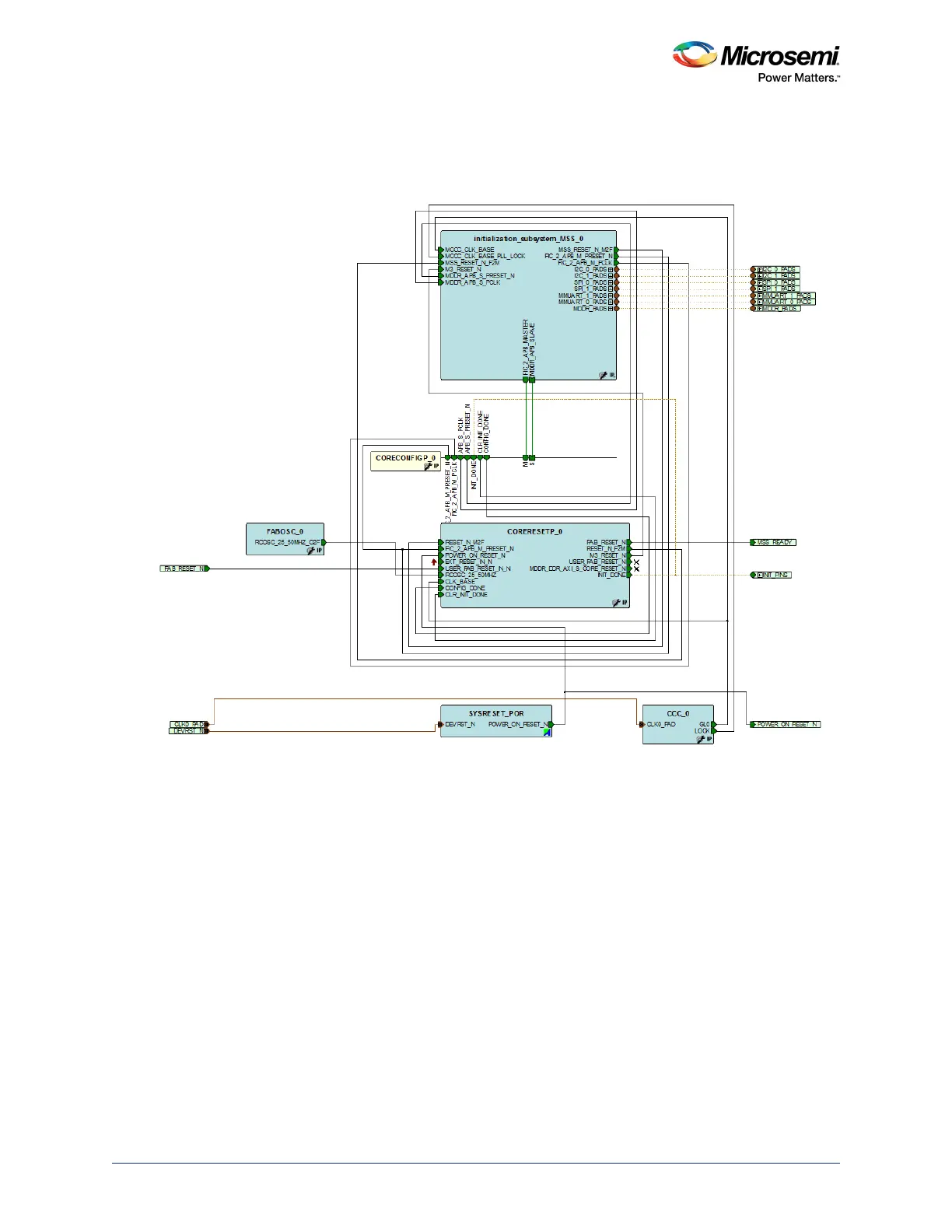
The following figure shows the generated design when opened in SmartDesign.
The actual SmartDesign created by System Builder is typically not visible unless you open the gen-
erated output as a SmartDesign. Refer to the System Builder User Guide for more details.
Figure 307 • Initialization Sub-system with CoreResetP Soft IP
21.4.2.3 Use Model 3: Creating Initialization Sub-system for FIC Sub-systems
Use the following steps for creating Initialization Sub-system using the System Builder. CoreResetP,
SYSRESET and Oscillator are Instantiated and connections are made automatically.
1. Select Use System Builder while creating a new project from the Design Templates and Creators
panel in Libero SoC.
2. System builder - Device Features GUI is pop up. Click Next.
3. Drag Fabric AMBA Slave core from Fabric Slave Cores panel into MSS FIC_0 – MSS Master
Subsystem.
4. Follow the rest of the steps with default settings and generate the design.
The following figure shows the generated design when opened in SmartDesign.
The actual SmartDesign created by System Builder is typically not visible unless you open the generated
output as a SmartDesign. Refer to the System Builder User Guide for more details.




 To Next Page