Universal Serial Bus OTG Controller
UG0331 User Guide Revision 15.0 303
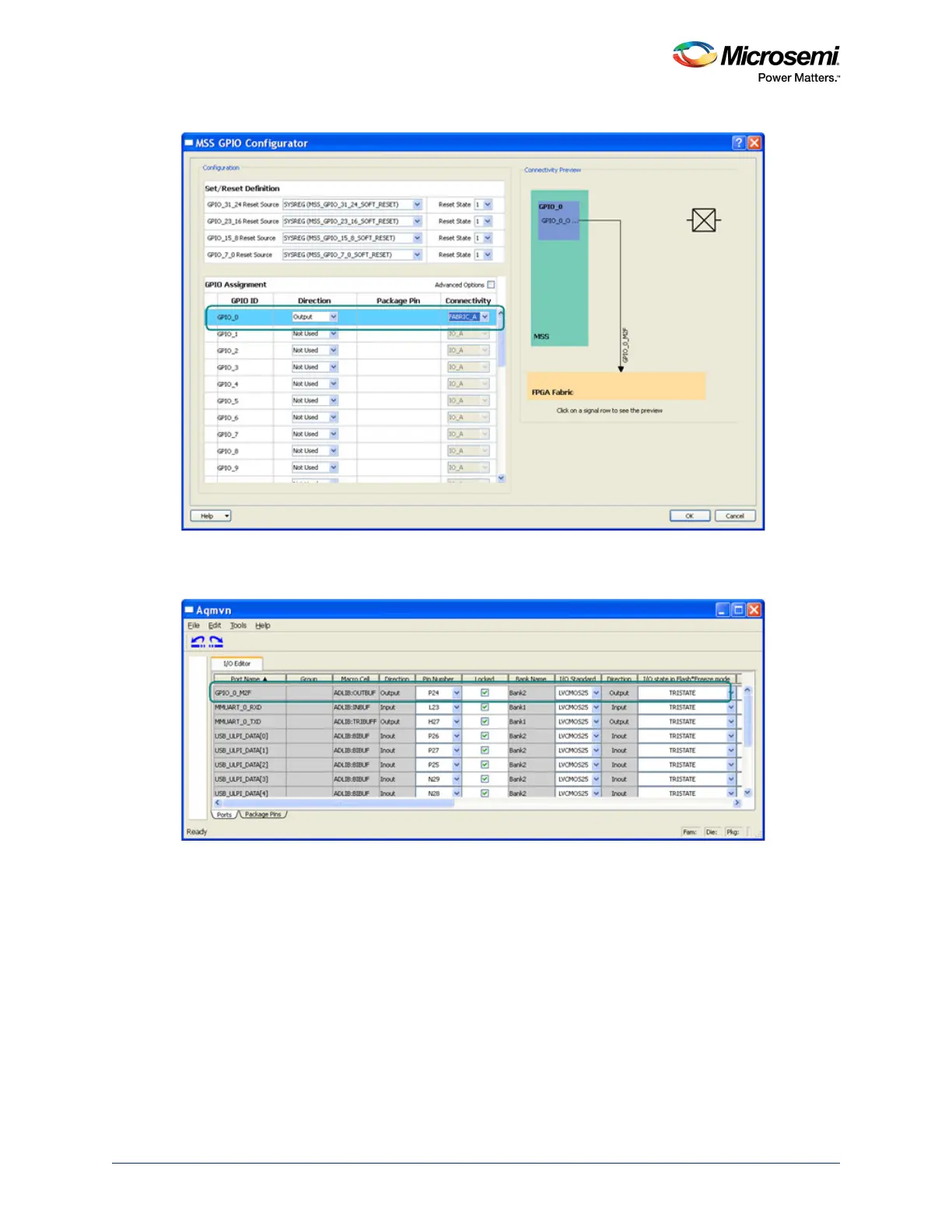
Figure 149 • MSS GPIO Configurator with GPIO Settings for External USB PHY Reset
Figure 150 • I/O Editor Configurator with Settings for External USB PHY Reset Pin Mapping
All the above mentioned selections in the Libero SoC design software flow are mandatory for the
applications using the USB OTG controller in SmartFusion2. Other configurations as per the complete
application requirements, need to be made as well. For more details on the USB configurations using the
Libero SoC design software, refer to the Libero SoC User Guide in the USB configurations section.
10.3.2 Software: Firmware, USB Class Specific Code, and Application
Code
The embedded software flow for the USB applications vary based on the USB OTG controller role as:
Host/Device. The following sections describe the embedded software flow for both the USB Device mode
and the USB Host mode.
USB Device mode: As per the device mode functionality, Microsemi recommends that the USB Protocol
descriptors are required to be created in the low level drivers. These descriptors are sent to the USB host
which the SmartFusion2 is connected to at the time of the USB protocol enumeration processes.




 To Next Page