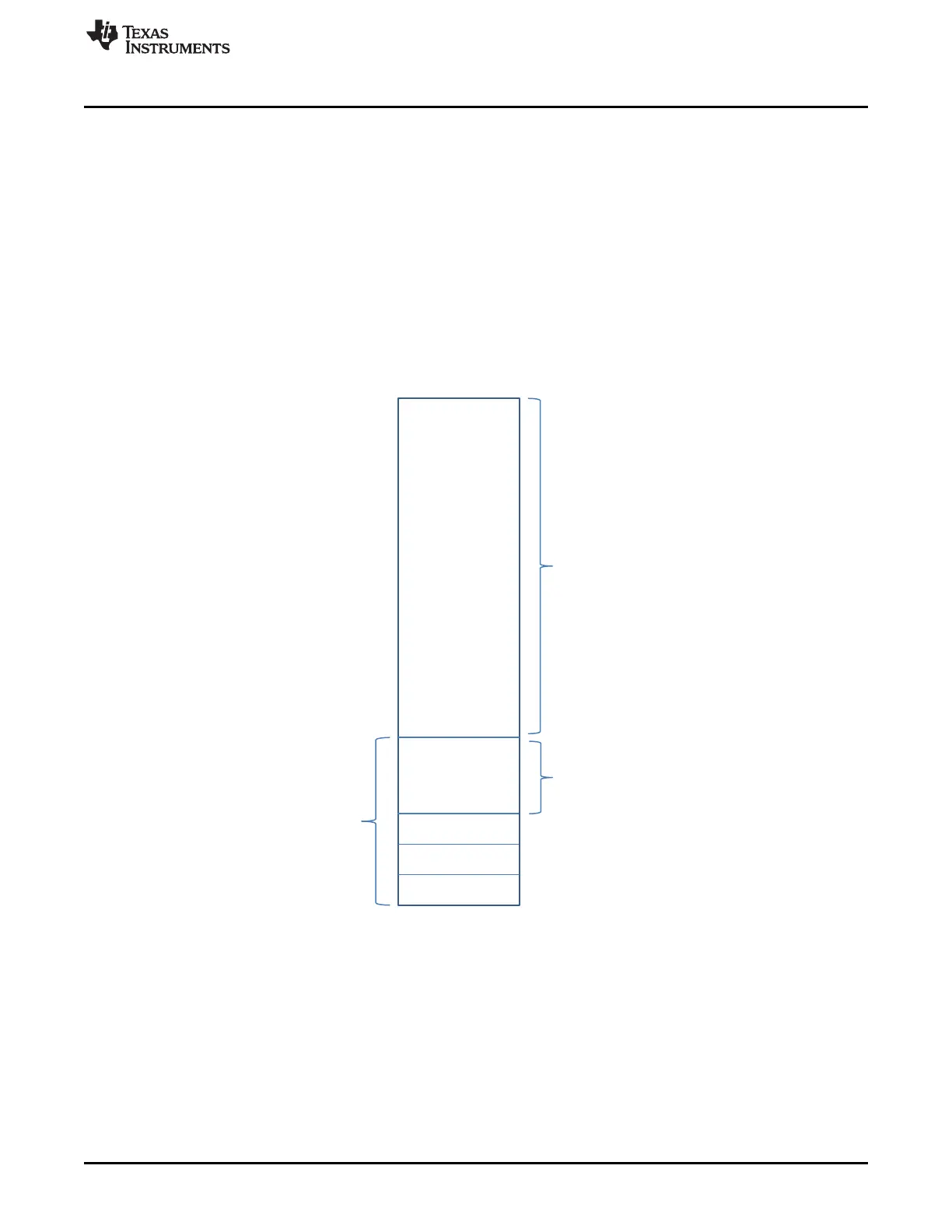
0x5AA5A55A
Image Size
0xEFA3247D
1022 KB User
Application Image
Reserved
2 KB
header
0x0100_0000
0x0100_0800
0x0110_0000
www.ti.com
Debugging Flash User Application Using JTAG
783
SWRU543–January 2019
Submit Documentation Feedback
Copyright © 2019, Texas Instruments Incorporated
On-Chip Parallel Flash
21.10 Debugging Flash User Application Using JTAG
A debug image can be downloaded directly onto on-chip flash using tools such as flash-loaders over
JTAG, usually available with compiler IDEs. These tools generally use the JTAG interface of the
microcontroller to program the on-chip flash. On the CC3235SF, this mode of operation, where an external
debugger can access the JTAG of the core, is supported only when the serial flash is formatted in
development mode.
A debug image should follow a format different from the production image. Such an image should be
prepended with a debug header, as shown in Figure 21-14, which indicates to the bootloader that the
following image is a debug image, should skip the integrity check phase of booting, and should not
attempt an erase of the image.
Unlike a production image, a debug image is written to the 0x0100_0000 address. Figure 21-14 shows the
structure of an image capable of being debugged.
Figure 21-14. Flash Debug Image Layout









 To Next Page